用户模块
我们当前开发的项目属于社交类型项目,所以关于用户的信息和功能直接贯穿了整个项目。所以此处实现用户模块功能,我们先把用户基本信息构建起来,并通过基本信息实现用户注册登录相关功能,后面遇到业务再继续扩展。
服务端实现API接口
先删除原来编写在apps/home蓝图下的测试视图home.views和测试模型代码home.models,当然数据库中的测试数据和表结构也要删除。
创建并注册用户蓝图以及路由信息。
application/settings/dev.py,代码:
from typing import List

"""蓝图列表"""
INSTALL_BLUEPRINT: List = [
    "application.apps.home",
    "application.apps.users",
]
application.urls,代码:
from typing import List
from application import path

urlpatterns: List = [
    path("/home", "home.urls"),
    path("/users", "users.urls"),
]
提交版本
git add .
git commit -m "delete home any codes and create users's module"
git push
git checkout -b feature/users
用户相关模型
application/utils/models.py,代码:
from application import db
from datetime import datetime


class BaseModel(db.Model):
    """公共模型"""
    __abstract__ = True # 抽象模型
    id = db.Column(db.Integer, primary_key=True, comment="主键ID")
    name = db.Column(db.String(255), default="", comment="名称/标题")
    orders = db.Column(db.Integer, default=0, comment="排序")
    status = db.Column(db.Boolean, default=True, comment="状态(是否显示,是否激活)")
    created_time = db.Column(db.DateTime, default=datetime.now, comment="创建时间")
    updated_time = db.Column(db.DateTime, default=datetime.now, onupdate=datetime.now, comment="更新时间")
    deleted_time = db.Column(db.DateTime, default=None, comment="删除时间")

    def __repr__(self):
        return "<%s: %s>" % (self.__class__.__name__, self.name)
application.apps.users.models,代码:
from application.utils.models import BaseModel, db
from werkzeug.security import generate_password_hash, check_password_hash


class User(BaseModel):
    """用户基本信息表"""
    __tablename__ = "ym_user"
    name = db.Column(db.String(255), index=True, comment="用户账户")
    nickname = db.Column(db.String(255), comment="用户昵称")
    _password = db.Column(db.String(255), comment="登录密码")
    age = db.Column(db.SmallInteger, comment="年龄")
    money = db.Column(db.Numeric(7, 2), default=0.0, comment="账户余额")
    ip_address = db.Column(db.String(255), default="", index=True, comment="登录IP")
    intro = db.Column(db.String(500), default="", comment="个性签名")
    avatar = db.Column(db.String(255), default="", comment="头像url地址")
    sex = db.Column(db.SmallInteger, default=0, comment="性别")  # 0表示未设置,保密, 1表示男,2表示女
    email = db.Column(db.String(32), index=True, default="", nullable=False, comment="邮箱地址")
    mobile = db.Column(db.String(32), index=True, nullable=False, comment="手机号码")
    unique_id = db.Column(db.String(255), index=True, default="", comment="客户端唯一标记符")
    province = db.Column(db.String(255), default="", comment="省份")
    city = db.Column(db.String(255), default="", comment="城市")
    area = db.Column(db.String(255), default="", comment="地区")
    info = db.relationship("UserProfile", uselist=False, backref="user", primaryjoin="User.id==UserProfile.user_id",
                           foreign_keys="UserProfile.user_id")

    @property
    def password(self):  # user.password
        return self._password

    @password.setter
    def password(self, rawpwd):  # user.password = '123456'
        """密码加密"""
        self._password = generate_password_hash(rawpwd)

    def check_password(self, rawpwd):
        """验证密码"""
        return check_password_hash(self.password, rawpwd)


class UserProfile(BaseModel):
    """用户详情信息表"""
    __tablename__ = "ym_user_profile"
    user_id = db.Column(db.Integer, index=True, comment="用户ID")
    education = db.Column(db.Integer, comment="学历教育")
    middle_school = db.Column(db.String(255), default="", comment="初中/中专")
    high_school = db.Column(db.String(255), default="", comment="高中/高职")
    college_school = db.Column(db.String(255), default="", comment="大学/大专")
    profession_cate = db.Column(db.String(255), default="", comment="职业类型")
    profession_info = db.Column(db.String(255), default="", comment="职业名称")
    position = db.Column(db.SmallInteger, default=0, comment="职位/职称")
    emotion_status = db.Column(db.SmallInteger, default=0, comment="情感状态")
    birthday = db.Column(db.DateTime, default="", comment="生日")
    hometown_province = db.Column(db.String(255), default="", comment="家乡省份")
    hometown_city = db.Column(db.String(255), default="", comment="家乡城市")
    hometown_area = db.Column(db.String(255), default="", comment="家乡地区")
    hometown_address = db.Column(db.String(255), default="", comment="家乡地址")
    living_province = db.Column(db.String(255), default="", comment="现居住省份")
    living_city = db.Column(db.String(255), default="", comment="现居住城市")
    living_area = db.Column(db.String(255), default="", comment="现居住地区")
    living_address = db.Column(db.String(255), default="", comment="现居住地址")


"""
 外界开发中,不过是SQLAlachemy或者django的ORM,大部分的公司都会放弃使用外键约束来关联查询数据库表。
 因为外键约束,在数据库操作过程中,需要消耗额外的维护成本来管理这个外键关系。因此在大数据的查询中,一般都会设置成逻辑外键[虚拟外键]。数据库本身维护的外键一般我们称之为 "物理外键".
"""
删除原来数据表,让flask重新运行项目即可创建上面模型对应的数据表了,初始化主程序中已经自动建表,application.__init__:
提交版本
注册功能实现
注册功能基本实现
手机号码唯一验证接口
在开发中,针对客户端提交的数据进行验证或提供模型数据转换格式成字典给客户端。可以使用第三方序列化模块Marshmallow来进行。
application/apps/users/views.py,代码:
from application import db, message, status
from .marshmallow import MobileSchema, ValidationError
from typing import Union, Dict
def mobile(mobile: str) -> Dict[str, Union[str, int]]:
"""
验证手机号码是否已经注册
:param mobile: 手机号码
:return:
"""
ms:MobileSchema = MobileSchema()
try:
ms.load({"mobile": mobile})
ret:Dict[str, Union[str, int]] = {"errno": status.CODE_OK, "errmsg": message.ok}
except ValidationError as e:
ret:Dict[str, Union[str, int]] = {"errno": status.CODE_VALIDATE_ERROR, "errmsg": e.messages["mobile"][0]}
return ret
application.apps.users.marshmallow,代码:
from marshmallow import Schema, fields, validate, validates, ValidationError
from application import message
from .models import User
from typing import Dict,Any
class MobileSchema(Schema):
mobile: fields.String = fields.String(required=True,
validate=validate.Regexp("^1[3-9]\d{9}$", error=message.mobile_format_error))
@validates("mobile")
def validates_mobile(self, data: Dict[str, Any]) -> Dict[str, Any]:
user: User = User.query.filter(User.mobile == data).first()
if user:
raise ValidationError(message=message.mobile_is_use)
return data
状态文件和服务端提示信息文件,
application.utils.status代码:
application.utils.message.代码:
user.urls,代码:
from application import path
from . import views
from typing import List
urlpatterns: List = [
]
apipatterns: List = [
path("mobile", views.mobile),
]
设置当前message,status引入到主程序入口,方便其他模块调用.
application/__init__.py,代码:
# 先解析器内置,后框架官方,然后第三方模块,接着是自己封装的模块。
import os
from flask import Flask
from flask_sqlalchemy import SQLAlchemy
from flask_redis import FlaskRedis
from flask_session import Session
from flask_jsonrpc import JSONRPC
from flask_marshmallow import Marshmallow
from application.utils.config import init_config
from application.utils.logger import Log
from application.utils.commands import Command
from application.utils.blueprint import register_blueprint, path, include
from application.utils import message, status
# SQLAlchemy初始化
db = SQLAlchemy()
# redis初始化
redis_cache = FlaskRedis(config_prefix="REDIS")
redis_check = FlaskRedis(config_prefix="CHECK")
redis_session = FlaskRedis(config_prefix="SESSION")
# session存储配置初始化
session_store = Session()
# 自定义日志初始化
logger = Log()
# 自定义终端命令初始化
command = Command()
# jsonrpc初始化
jsonrpc = JSONRPC()
ma = Marshmallow()
def init_app(config_path):
"""用于创建app实例对象并完成初始化过程的工厂函数"""
app = Flask(__name__)
# 当前项目根目录
app.BASE_DIR = os.path.dirname(os.path.dirname(os.path.abspath(__file__)))
# 加载配置
init_config(app, config_path)
# print(app.config)
# SQLAlchemy加载配置
db.init_app(app)
ma.init_app(app)
# redis加载配置
redis_cache.init_app(app)
redis_check.init_app(app)
redis_session.init_app(app)
# session保存数据到redis时启用的链接对象
app.config["SESSION_REDIS"] = redis_session
# session存储配置类加载配置
session_store.init_app(app)
# 日志加载配置
log = logger.init_app(app)
app.log = log
# 自定义终端命令初始化
command.init_app(app)
# jsonrpc注册到项目中
# 开启rpc接口的web调试界面:/api/browse
jsonrpc.browse_url = app.config.get("API_BROWSE_URL", "/api/browse")
jsonrpc.enable_web_browsable_api = app.config.get("DEBUG", False)
jsonrpc.init_app(app)
# 自动注册蓝图
register_blueprint(app, jsonrpc)
# db创建数据表
with app.app_context():
    db.create_all()
return app
客户端进行手机号验证
<!DOCTYPE html>
<html>
<head>
<title>注册</title>
<meta name="viewport" content="width=device-width,minimum-scale=1.0,maximum-scale=1.0,user-scalable=no">
<meta charset="utf-8">
<link rel="stylesheet" href="../css/main.css">
<script src="../script/vue.js"></script>
<script src="../script/axios.js"></script>
<script src="../script/main.js"></script>
</head>
<body>
<div class="app" id="app">
<img class="music" :class="music_play?'music2':''" @click="music_play=!music_play" src="../image/player.png">
<div class="bg">
<img src="../image/bg0.jpg">
</div>
<div class="form">
<div class="form-title">
<img src="../image/register.png">
<img class="back" @click="open_login" src="../image/back.png">
</div>
<div class="form-data">
<div class="form-data-bg">
<img src="../image/bg1.png">
</div>
<div class="form-item">
<label class="text">手机</label>
<input type="text" v-model="mobile" @change="check_mobile" placeholder="请输入手机号">
</div>
<div class="form-item">
<label class="text">验证码</label>
<input type="text" class="code" name="code" placeholder="请输入验证码">
<img class="refresh" src="../image/refresh.png">
</div>
<div class="form-item">
<label class="text">密码</label>
<input type="password" name="password" placeholder="请输入密码">
</div>
<div class="form-item">
<label class="text">确认密码</label>
<input type="password" name="password2" placeholder="请再次输入密码">
</div>
<div class="form-item">
<input type="checkbox" class="agree" name="agree" checked>
<label><span class="agree_text">同意磨方《用户协议》和《隐私协议》</span></label>
</div>
<div class="form-item">
<img class="commit" @click="game.play_music('../mp3/btn1.mp3')" src="../image/commit.png"/>
</div>
</div>
</div>
</div>
<script>
apiready = function(){
Vue.prototype.game = new Game("../mp3/bg1.mp3");
new Vue({
el:"#app",
data(){
return {
music_play: true,
mobile: "", // 手机号
}
},
watch:{
music_play(){
if(this.music_play){
this.game.play_music("../mp3/bg1.mp3");
}else{
this.game.stop_music();
}
}
},
methods:{
open_login(){
this.game.goFrame("login","./login.html");
},
check_mobile(){
// 验证手机号码
this.axios.post("",{
"jsonrpc": "2.0",
"id": 1,
"method": "Users.mobile",
"params": {"mobile": this.mobile}
}).then(response=>{
if(response.data.result.errno != 1000){
api.alert({
title: "警告",
msg: response.data.result.errmsg,
});
}
}).catch(error=>{
this.game.print(error.response.data.error);
});
},
}
})
}
</script>
</body>
</html>
main.js中对axios进行初始化
class Game{
constructor(bg_music){
// 构造函数
this.init();
this.play_music(bg_music);
}
init(){
// 初始化
console.log("系统初始化");
this.config = this.init_config();
this.rem();
this.init_axios();
}
init_config(){
return {
"server_api": "http://172.18.96.65:5000/api",
}
}
init_axios(){
if(window.axios && window.Vue){
// 初始化axios
console.log("初始化axios");
axios.defaults.baseURL = this.config.server_api // 服务端api接口网关地址
axios.defaults.timeout = 2500; // 请求超时时间
axios.defaults.withCredentials = false; // 跨域请求资源的情况下,忽略cookie的发送
Vue.prototype.axios = axios;
}
}
print(data, type=false){
// 打印数据
if(type){
api.alert({msg:JSON.stringify(data)});
}
console.log("打印开始: >>>>> ");
console.log(JSON.stringify(data));
console.log("打印结束: <<<<< ");
}
rem(){
if(window.innerWidth<1200){
this.UIWidth = document.documentElement.clientWidth;
this.UIHeight = document.documentElement.clientHeight;
document.documentElement.style.fontSize = (0.01*this.UIWidth*3)+"px";
document.querySelector("#app").style.height=this.UIHeight+"px"
}
window.onresize = ()=>{
if(window.innerWidth<1200){
this.UIWidth = document.documentElement.clientWidth;
this.UIHeight = document.documentElement.clientHeight;
document.documentElement.style.fontSize = (0.01*this.UIWidth*3)+"px";
}
}
}
stop_music(){
this.print("停止")
document.body.removeChild(this.audio);
}
play_music(src){
this.audio = document.createElement("audio");
this.source = document.createElement("source");
this.source.type = "audio/mp3";
this.audio.autoplay = "autoplay";
this.source.src=src;
this.audio.appendChild(this.source);
document.body.appendChild(this.audio);
var t = setInterval(()=>{
if(this.audio.readyState > 0){
if(this.audio.ended){
clearInterval(t);
document.body.removeChild(this.audio);
}
}
},100);
}
goWin(name,url,pageParam){
// 打开窗口
api.openWin({
name: name, // 自定义窗口名称
bounces: false, // 窗口是否上下拉动
reload: true, // 如果页面已经在之前被打开了,是否要重新加载当前窗口中的页面
url: url, // 窗口创建时展示的html页面的本地路径[相对于当前代码所在文件的路径]
animation:{ // 打开新建窗口时的过渡动画效果
type: "push", //动画类型(详见动画类型常量)
subType: "from_right", //动画子类型(详见动画子类型常量)
duration:300 //动画过渡时间,默认300毫秒
},
pageParam: pageParam // 传递给下一个窗口使用的参数.将来可以在新窗口中通过 api.pageParam.name 获取
});
}
outWin(name){
// 关闭窗口
api.closeWin(name);
}
goFrame(name,url,pageParam){
// 打开帧页面
api.openFrame({
name: name,
url: url,
rect: {
x: 0,
y: 0,
w: 'auto',
h: 'auto'
},
useWKWebView:true,
historyGestureEnabled:true,
bounces:false,
animation:{
type:"push",
subType:"from_right",
duration:300
},
pageParam: pageParam
});
}
outFrame(name){
// 关闭帧页面
api.closeFrame({
name: name,
});
}
}
保存用户注册信息接口
创建Marshmallow构造器[暂时不涉及到手机验证码功能]
users.marshmallow,代码:
from marshmallow_sqlalchemy import SQLAlchemyAutoSchema, auto_field
from marshmallow import post_load, pre_load, validates_schema
from application import db
class UserSchema(SQLAlchemyAutoSchema):
mobile = auto_field(required=True, load_only=True)
password = fields.String(required=True, load_only=True)
password2 = fields.String(required=True, load_only=True)
sms_code = fields.String(required=True, load_only=True)
class Meta:
model = User
include_fk = True # 启用外键关系
include_relationships = True # 模型关系外部属性
fields = ["id", "name", "mobile", "password", "password2", "sms_code"] # 如果要全换全部字段,就不要声明fields或exclude字段即可
sql_session = db.session
@post_load
def save_object(self, data, **kwargs):
data.pop("password2")
data.pop("sms_code")
data["name"] = data["mobile"]
instance = User(**data)
db.session.add(instance)
db.session.commit()
return instance
@validates_schema
def validate(self, data, **kwargs):
# 校验密码和确认密码
if data["password"] != data["password2"]:
raise ValidationError(message=message.password_not_match, field_name="password")
# todo 校验短信验证码
return data
users.views,视图代码:
from typing import Any
from .marshmallow import UserSchema
from .models import User
def register(mobile: str, password: str, password2: str, sms_code: str) -> Dict[str, Any]:
"""
用户信息注册
:param mobile: 手机号
:param password: 登录密码
:param password2: 确认密码
:param sms_code: 短信验证码
:return:
"""
try:
ms: MobileSchema = MobileSchema()
ms.load({"mobile": mobile})
us: UserSchema = UserSchema()
user: User = us.load({
"mobile":mobile,
"password":password,
"password2":password2,
"sms_code": sms_code
})
ret: Dict[str, Any] = {"errno": status.CODE_OK,"errmsg":us.dump(user)}
except ValidationError as e:
ret: Dict[str, Any] = {"errno": status.CODE_VALIDATE_ERROR,"errmsg":e.messages}
return ret
users.urls,代码:
from application import path
from . import views
from typing import List
urlpatterns: List = [
]
apipatterns: List = [
path("mobile", views.mobile),
path("register", views.register),
]
utils.message,代码:
ok: str = "ok"
mobile_format_error: str = "手机号格式有误!"
mobile_is_use: str = "手机号已经被注册使用!"
password_not_match: str = "密码和确认密码不匹配!"
客户端发送用户进行注册
html/register.html,代码:
<!DOCTYPE html>
<html>
<head>
<title>注册</title>
<meta name="viewport" content="width=device-width,minimum-scale=1.0,maximum-scale=1.0,user-scalable=no">
<meta charset="utf-8">
<link rel="stylesheet" href="../css/main.css">
<script src="../script/vue.js"></script>
<script src="../script/axios.js"></script>
<script src="../script/main.js"></script>
</head>
<body>
<div class="app" id="app">
<img class="music" :class="music_play?'music2':''" @click="music_play=!music_play" src="../image/player.png">
<div class="bg">
<img src="../image/bg0.jpg">
</div>
<div class="form">
<div class="form-title">
<img src="../image/register.png">
<img class="back" @click="open_login" src="../image/back.png">
</div>
<div class="form-data">
<div class="form-data-bg">
<img src="../image/bg1.png">
</div>
<div class="form-item">
<label class="text">手机</label>
<input type="text" v-model="mobile" @change="check_mobile" placeholder="请输入手机号">
</div>
<div class="form-item">
<label class="text">验证码</label>
<input type="text" class="code" v-model="sms_code" placeholder="请输入验证码">
<img class="refresh" src="../image/refresh.png">
</div>
<div class="form-item">
<label class="text">密码</label>
<input type="password" v-model="password" placeholder="请输入密码">
</div>
<div class="form-item">
<label class="text">确认密码</label>
<input type="password" v-model="password2" placeholder="请再次输入密码">
</div>
<div class="form-item">
<label>
<input type="checkbox" class="agree" v-model="agree" checked>
<span class="agree_text">同意魔方APP《用户协议》和《隐私协议》</span>
</label>
</div>
<div class="form-item">
<img class="commit" @click="registerHandle" src="../image/commit.png"/>
</div>
</div>
</div>
</div>
<script>
apiready = function(){
Vue.prototype.game = new Game("../mp3/bg1.mp3");
new Vue({
el:"#app",
data(){
return {
music_play: true,
mobile: "", // 手机号
password: "", // 密码
password2: "", // 确认密码
sms_code:"", // 手机验证码
agree:false, // 是否同意用户协议和隐私协议
}
},
watch:{
music_play(){
if(this.music_play){
this.game.play_music("../mp3/bg1.mp3");
}else{
this.game.stop_music();
}
}
},
methods:{
open_login(){
this.game.goFrame("login","./login.html");
},
check_mobile(){
// 验证手机号码
this.axios.post("",{
"jsonrpc": "2.0",
"id": this.game.uuid(),
"method": "Users.mobile",
"params": {"mobile": this.mobile}
}).then(response=>{
if(response.data.result.errno != 1000){
api.alert({
title: "警告",
msg: response.data.result.errmsg,
});
}
}).catch(error=>{
this.game.print(error.response.data.error);
});
},
registerHandle(){
// 注册处理
this.game.play_music('../mp3/btn1.mp3');
// 验证数据[双向验证]
if (!/1[3-9]\d{9}/.test(this.mobile)){
api.alert({
title: "警告",
msg: "手机号码格式不正确!",
});
return; // 阻止代码继续往下执行
}
if(this.password.length<6 || this.password.length > 16){
api.alert({
title: "警告",
msg: "密码长度必须在6-16个字符之间!",
});
return;
}
if(this.password != this.password2){
api.alert({
title: "警告",
msg: "密码和确认密码不匹配!",
});
return; // 阻止代码继续往下执行
}
if(this.sms_code.length<1){
api.alert({
title: "警告",
msg: "验证码不能为空!",
});
return; // 阻止代码继续往下执行
}
if(this.agree === false){
api.alert({
title: "警告",
msg: "对不起, 必须同意魔方APP的用户协议和隐私协议才能继续注册!",
});
return; // 阻止代码继续往下执行
}
this.axios.post("",{
"jsonrpc": "2.0",
"id": this.game.uuid(),
"method": "Users.register",
"params": {
"mobile": this.mobile,
"sms_code": this.sms_code,
"password": this.password,
"password2": this.password2,
}
}).then(response=>{
this.game.print(response.data.result);
if(response.data.result.errno !== 1000){
api.alert({
title: "错误提示",
msg: response.data.result.errmsg,
});
}else{
// 注册成功!
api.confirm({
title: '提示',
msg: '注册成功',
buttons: ['返回首页', '个人中心']
}, (ret, err)=>{
if(ret.buttonIndex == 1){
// 跳转到首页
this.game.goFrame("index", "./index.html");
}else{
// 跳转到个人中心
this.game.goWin("user","./user.html");
}
// 关闭当前页面返回首页
this.game.goFrame("index", "./index.html");
});
}
}).catch(error=>{
this.game.print(error.response.data.error);
});
},
}
})
}
</script>
</body>
</html>
main.js,代码;
class Game{
constructor(bg_music){
// 构造函数
this.init();
this.play_music(bg_music);
}
init(){
// 初始化
console.log("系统初始化");
this.config = this.init_config();
this.rem();
this.init_axios();
}
init_config(){
return {
"server_api": "http://172.18.96.65:5000/api",
}
}
init_axios(){
if(window.axios && window.Vue){
// 初始化axios
console.log("初始化axios");
axios.defaults.baseURL = this.config.server_api // 服务端api接口网关地址
axios.defaults.timeout = 2500; // 请求超时时间
axios.defaults.withCredentials = false; // 跨域请求资源的情况下,忽略cookie的发送
Vue.prototype.axios = axios;
}
}
print(data, type=false){
// 打印数据
if(type){
api.alert({msg:JSON.stringify(data)});
}
console.log("打印开始: >>>>> ");
console.log(JSON.stringify(data));
console.log("打印结束: <<<<< ");
}
uuid(){
// UUID
return 'xxxxxxxx-xxxx-4xxx-yxxx-xxxxxxxxxxxx'.replace(/[xy]/g, function(c) {var r = Math.random()*16|0,v=c=='x'?r:r&0x3|0x8;return v.toString(16);})
}
rem(){
if(window.innerWidth<1200){
this.UIWidth = document.documentElement.clientWidth;
this.UIHeight = document.documentElement.clientHeight;
document.documentElement.style.fontSize = (0.01*this.UIWidth*3)+"px";
document.querySelector("#app").style.height=this.UIHeight+"px"
}
window.onresize = ()=>{
if(window.innerWidth<1200){
this.UIWidth = document.documentElement.clientWidth;
this.UIHeight = document.documentElement.clientHeight;
document.documentElement.style.fontSize = (0.01*this.UIWidth*3)+"px";
}
}
}
stop_music(){
this.print("停止")
document.body.removeChild(this.audio);
}
play_music(src){
this.audio = document.createElement("audio");
this.source = document.createElement("source");
this.source.type = "audio/mp3";
this.audio.autoplay = "autoplay";
this.source.src=src;
this.audio.appendChild(this.source);
document.body.appendChild(this.audio);
var t = setInterval(()=>{
if(this.audio.readyState > 0){
if(this.audio.ended){
clearInterval(t);
document.body.removeChild(this.audio);
}
}
},100);
}
goWin(name,url,pageParam){
// 打开窗口
api.openWin({
name: name, // 自定义窗口名称
bounces: false, // 窗口是否上下拉动
reload: true, // 如果页面已经在之前被打开了,是否要重新加载当前窗口中的页面
url: url, // 窗口创建时展示的html页面的本地路径[相对于当前代码所在文件的路径]
animation:{ // 打开新建窗口时的过渡动画效果
type: "push", //动画类型(详见动画类型常量)
subType: "from_right", //动画子类型(详见动画子类型常量)
duration:300 //动画过渡时间,默认300毫秒
},
pageParam: pageParam // 传递给下一个窗口使用的参数.将来可以在新窗口中通过 api.pageParam.name 获取
});
}
outWin(name){
// 关闭窗口
api.closeWin(name);
}
goFrame(name,url,pageParam){
// 打开帧页面
api.openFrame({
name: name,
url: url,
rect: {
x: 0,
y: 0,
w: 'auto',
h: 'auto'
},
useWKWebView:true,
historyGestureEnabled:true,
bounces:false,
animation:{
type:"push",
subType:"from_right",
duration:300
},
pageParam: pageParam
});
}
outFrame(name){
// 关闭帧页面
api.closeFrame({
name: name,
});
}
}
html/user.html,代码:
<!DOCTYPE html>
<html lang="en">
<head>
<meta charset="UTF-8">
<meta http-equiv="X-UA-Compatible" content="IE=edge">
<meta name="viewport" content="width=device-width, initial-scale=1.0">
<title>Document</title>
</head>
<body>
<h1>用户中心</h1>
</body>
</html>
在html/index.html,新增用户中心页面user.html的链接跳转,代码:
<!DOCTYPE html>
<html lang="en">
<head>
<title>首页</title>
<meta charset="UTF-8">
<meta name="viewport" content="width=device-width,minimum-scale=1.0,maximum-scale=1.0,user-scalable=no">
<meta name="format-detection" content="telephone=no,email=no,date=no,address=no">
<link rel="stylesheet" href="../css/main.css">
<script src="../script/vue.js"></script>
<script src="../script/main.js"></script>
</head>
<body>
<div class="app" id="app">
<img class="music" :class="music_play?'music2':''" @click="music_play=!music_play" src="../image/player.png">
<div class="bg">
<img src="../image/bg0.jpg">
</div>
<ul>
<li><img class="module1" src="../image/image1.png"></li>
<li><img class="module2" @click="open_user" src="../image/image2.png"></li>
<li><img class="module3" src="../image/image3.png"></li>
<li><img class="module4" @click="open_login" src="../image/image4.png"></li>
</ul>
</div>
<script>
apiready = function(){
Vue.prototype.game = new Game("../mp3/bg1.mp3");
new Vue({
el:"#app",
data(){
return {
music_play:true, // 默认播放背景音乐
}
},
watch:{
music_play(){
if(this.music_play){
this.game.play_music("../mp3/bg1.mp3");
}else{
this.game.stop_music();
}
}
},
methods:{
open_login(){
this.game.goFrame("login","./login.html");
},
open_user(){
this.game.goWin("user","./user.html");
}
}
})
}
</script>
</body>
</html>
使用云通讯发送短信
官方文档:https://www.yuntongxun.com/member/main
在登录后的平台上面获取一下信息:
ACCOUNT SID:8a216da863f8e6c20164139687e80c1b
AUTH TOKEN : 6dd01b2b60104b3dbc88b2b74158bac6
AppID(默认):8a216da863f8e6c20164139688400c21
Rest URL(短信服务器): app.cloopen.com:8883
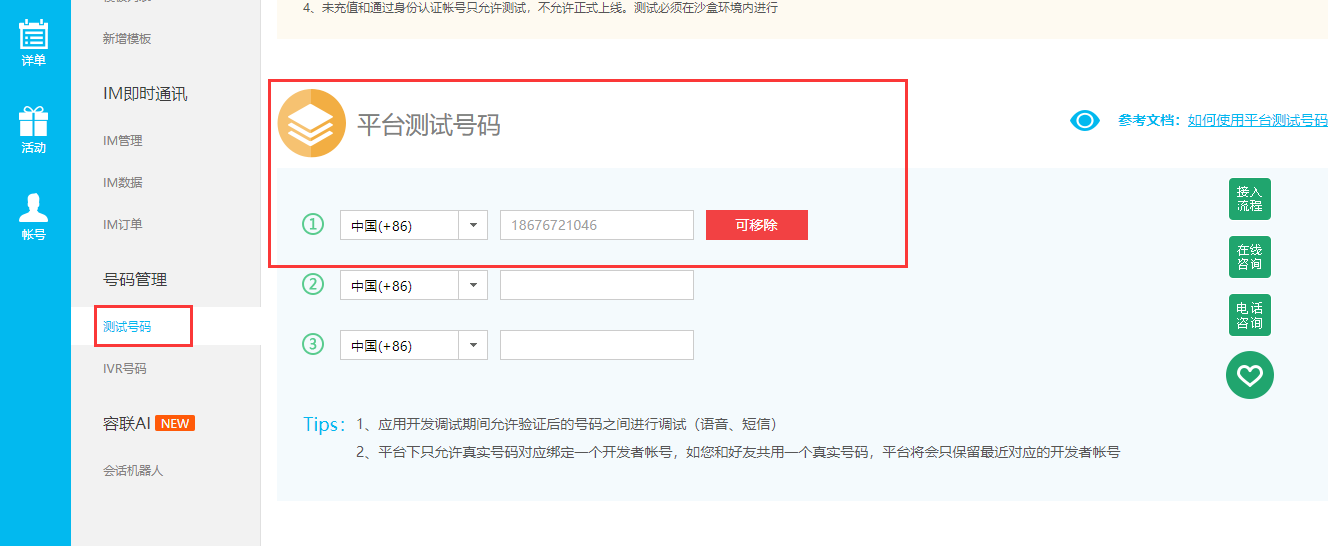
在开发过程中,为了节约发送短信的成本,可以把自己的或者同事的手机加入到测试号码中.
安装sdk
服务端实现发送短信验证码的api接口
application.settings.dev,配置文件中填写短信接口相关配置,代码:
# 短信相关配置
SMS_ACCOUNT_ID = "8a216da863f8e6c20164139687e80c1b" # 接口主账号
SMS_ACCOUNT_TOKEN = "6dd01b2b60104b3dbc88b2b74158bac6" # 认证token令牌
SMS_APP_ID = "8a216da863f8e6c20164139688400c21" # 应用ID
SMS_TEMPLATE_ID = 1 # 短信模板ID
SMS_EXPIRE_TIME = 60 * 5 # 短信有效时间,单位:秒/s
SMS_INTERVAL_TIME = 60 # 短信发送冷却时间,单位:秒/s
application.apps.users.views,代码:
import re, random, json
from redis.client import Pipeline
from flask import current_app
from ronglian_sms_sdk import SmsSDK
from application import redis_check as redis
def sms(mobile: str) -> Dict[str, Any]:
"""发送短信验证码"""
# 验证手机
if not re.match("^1[3-9]\d{9}$",mobile):
return {"errno": status.CODE_VALIDATE_ERROR, "errmsg": message.mobile_format_error}
# 短信发送冷却时间
ret: int = redis.ttl("int_%s" % mobile)
if ret > 0:
return {
"errno": status.CODE_INTERVAL_TIME,
"errmsg": message.sms_interval_time,
"data": {
"time": ret,
}
}
# 生成验证码
sms_code: str = "%06d" % random.randint(0,999999)
# 发送短信
sdk: SmsSDK = SmsSDK(
current_app.config.get("SMS_ACCOUNT_ID"),
current_app.config.get("SMS_ACCOUNT_TOKEN"),
current_app.config.get("SMS_APP_ID")
)
ret: str = sdk.sendMessage(
current_app.config.get("SMS_TEMPLATE_ID"),
mobile,
(sms_code, current_app.config.get("SMS_EXPIRE_TIME") // 60)
)
result: Dict[str, Any] = json.loads(ret)
if result["statusCode"] == "000000":
pipe: Pipeline = redis.pipeline()
pipe.multi() # 开启事务
# 保存短信记录到redis中
pipe.setex("sms_%s" % mobile,current_app.config.get("SMS_EXPIRE_TIME"),sms_code)
# 进行冷却倒计时
pipe.setex("int_%s" % mobile,current_app.config.get("SMS_INTERVAL_TIME"),"_")
pipe.execute() # 提交事务
# 返回结果
ret: Dict[str, Any] = {"errno":status.CODE_OK, "errmsg": message.ok}
else:
ret: Dict[str, Any] = {"errno": status.CODE_SMS_ERROR, "errmsg": message.sms_send_error}
return ret
users.urls,代码:
from application import path
from . import views
from typing import List
urlpatterns: List = [
]
apipatterns: List = [
path("mobile", views.mobile),
path("register", views.register),
path("sms", views.sms),
]
message,代码:
ok: str = "ok"
mobile_format_error: str = "手机号格式有误!"
mobile_is_use: str = "手机号已经被注册使用!"
password_not_match: str = "密码和确认密码不匹配!"
sms_interval_time: str = "短信发送过于频繁!"
sms_send_error: str = "短信发送有误!"
status,代码:
CODE_OK: int = 1000  # 接口操作成功
CODE_VALIDATE_ERROR: int = 1001  # 验证有误!
CODE_INTERVAL_TIME: int = 1002 # 接口操作过于频繁
CODE_SMS_ERROR: int = 1003 # 短接发送有误
客户端实现点击发送短信
<!DOCTYPE html>
<html>
<head>
<title>注册</title>
<meta name="viewport" content="width=device-width,minimum-scale=1.0,maximum-scale=1.0,user-scalable=no">
<meta charset="utf-8">
<link rel="stylesheet" href="../css/main.css">
<script src="../script/vue.js"></script>
<script src="../script/axios.js"></script>
<script src="../script/main.js"></script>
</head>
<body>
<div class="app" id="app">
<img class="music" :class="music_play?'music2':''" @click="music_play=!music_play" src="../image/player.png">
<div class="bg">
<img src="../image/bg0.jpg">
</div>
<div class="form">
<div class="form-title">
<img src="../image/register.png">
<img class="back" @click="open_login" src="../image/back.png">
</div>
<div class="form-data">
<div class="form-data-bg">
<img src="../image/bg1.png">
</div>
<div class="form-item">
<label class="text">手机</label>
<input type="text" v-model="mobile" @change="check_mobile" placeholder="请输入手机号">
</div>
<div class="form-item">
<label class="text">验证码</label>
<input type="text" class="code" v-model="sms_code" placeholder="请输入验证码">
<img class="refresh" @click="send" src="../image/refresh.png">
</div>
<div class="form-item">
<label class="text">密码</label>
<input type="password" v-model="password" placeholder="请输入密码">
</div>
<div class="form-item">
<label class="text">确认密码</label>
<input type="password" v-model="password2" placeholder="请再次输入密码">
</div>
<div class="form-item">
<label>
<input type="checkbox" class="agree" v-model="agree" checked>
<span class="agree_text">同意魔方APP《用户协议》和《隐私协议》</span>
</label>
</div>
<div class="form-item">
<img class="commit" @click="registerHandle" src="../image/commit.png"/>
</div>
</div>
</div>
</div>
<script>
apiready = function(){
Vue.prototype.game = new Game("../mp3/bg1.mp3");
new Vue({
el:"#app",
data(){
return {
music_play: true,
mobile: "", // 手机号
password: "", // 密码
password2: "", // 确认密码
sms_code:"", // 手机验证码
agree:false, // 是否同意用户协议和隐私协议
is_send: false, // 短信发送的冷却状态,false表示没有冷却,true表示进入冷却状态
send_interval: 60, // 短信发送冷却时间
timer: null, // 定时器的标识符
}
},
watch:{
music_play(){
if(this.music_play){
this.game.play_music("../mp3/bg1.mp3");
}else{
this.game.stop_music();
}
}
},
methods:{
open_login(){
this.game.goFrame("login","./login.html");
},
check_mobile(){
// 验证手机号码
this.axios.post("",{
"jsonrpc": "2.0",
"id": this.game.uuid(),
"method": "Users.mobile",
"params": {"mobile": this.mobile}
}).then(response=>{
if(response.data.result.errno != 1000){
api.alert({
title: "警告",
msg: response.data.result.errmsg,
});
}
}).catch(error=>{
this.game.print(error.response.data.error);
});
},
registerHandle(){
// 注册处理
this.game.play_music('../mp3/btn1.mp3');
// 验证数据[双向验证]
if (!/1[3-9]\d{9}/.test(this.mobile)){
api.alert({
title: "警告",
msg: "手机号码格式不正确!",
});
return; // 阻止代码继续往下执行
}
if(this.password.length<6 || this.password.length > 16){
api.alert({
title: "警告",
msg: "密码长度必须在6-16个字符之间!",
});
return;
}
if(this.password != this.password2){
api.alert({
title: "警告",
msg: "密码和确认密码不匹配!",
});
return; // 阻止代码继续往下执行
}
if(this.sms_code.length<1){
api.alert({
title: "警告",
msg: "验证码不能为空!",
});
return; // 阻止代码继续往下执行
}
if(this.agree === false){
api.alert({
title: "警告",
msg: "对不起, 必须同意魔方APP的用户协议和隐私协议才能继续注册!",
});
return; // 阻止代码继续往下执行
}
this.axios.post("",{
"jsonrpc": "2.0",
"id": this.game.uuid(),
"method": "Users.register",
"params": {
"mobile": this.mobile,
"sms_code": this.sms_code,
"password": this.password,
"password2": this.password2,
}
}).then(response=>{
this.game.print(response.data.result);
if(response.data.result.errno !== 1000){
api.alert({
title: "错误提示",
msg: response.data.result.errmsg,
});
}else{
// 注册成功!
api.confirm({
title: '提示',
msg: '注册成功',
buttons: ['返回首页', '个人中心']
}, (ret, err)=>{
if(ret.buttonIndex == 1){
// 跳转到首页
this.game.goFrame("index", "./index.html");
}else{
// 跳转到个人中心
this.game.goWin("user","./user.html");
}
// 关闭当前页面返回首页
this.game.goFrame("index", "./index.html");
});
}
}).catch(error=>{
this.game.print(error.response.data.error);
});
},
send(){
// 点击发送短信
if (!/1[3-9]\d{9}/.test(this.mobile)){
api.alert({
title: "警告",
msg: "手机号码格式不正确!",
});
return; // 阻止代码继续往下执行
}
if(this.is_send){
api.alert({
title: "警告",
msg: `短信发送冷却中,请${this.send_interval}秒之后重新点击发送!`,
});
return; // 阻止代码继续往下执行
}
this.axios.post("",{
"jsonrpc": "2.0",
"id": this.game.uuid(),
"method": "Users.sms",
"params": {
"mobile": this.mobile,
}
}).then(response=>{
if(response.data.result.errno !== 1000){
api.alert({
title: "警告",
msg: response.data.result.errmsg,
});
if(response.data.result.errno === 1002){
this.send_interval = response.data.result.data.time;
this.is_send=true;
var timer = setInterval(()=>{
this.send_interval--;
if(this.send_interval<1){
clearInterval(timer);
this.is_send=false; // 退出冷却状态
}
}, 1000);
}
}else{
this.is_send=true; // 进入冷却状态
this.send_interval = 60;
var timer = setInterval(()=>{
this.send_interval--;
if(this.send_interval<1){
clearInterval(timer);
this.is_send=false; // 退出冷却状态
}
}, 1000);
}
}).catch(error=>{
this.game.print(error.response.data.error);
});
},
}
})
}
</script>
</body>
</html>