day09 数据库
数据库分为两部分:
- 开发角度【今日内容】
- 必备技能(录播 + 其他)
- 优化
- 运维&DBA 角度( Linux命令 )
1.必备技能
1.1 数据库设计
接到项目:
- 需求分析,项目公有多少个功能模块。
- 根据需求去设计表结构(存储数据)理解Excel。
- 项目开发。40%
应该独立自主的去设计项目。
私活来了:让你开发一个薪资管理平台。
- 部门表
- 用户表
- 级别表
- 薪资记录表
本质上设计平台时,其实就是运用 单表、一对多、多对多关系 + 业务需求。
接下来,创建库 & 创建表。
再接下来,写代码开发程序了。
在设计表结构时,如果每次都写SQL去执行,太费劲(修改)。
- 工具:PowerDesigner、Navicat等。
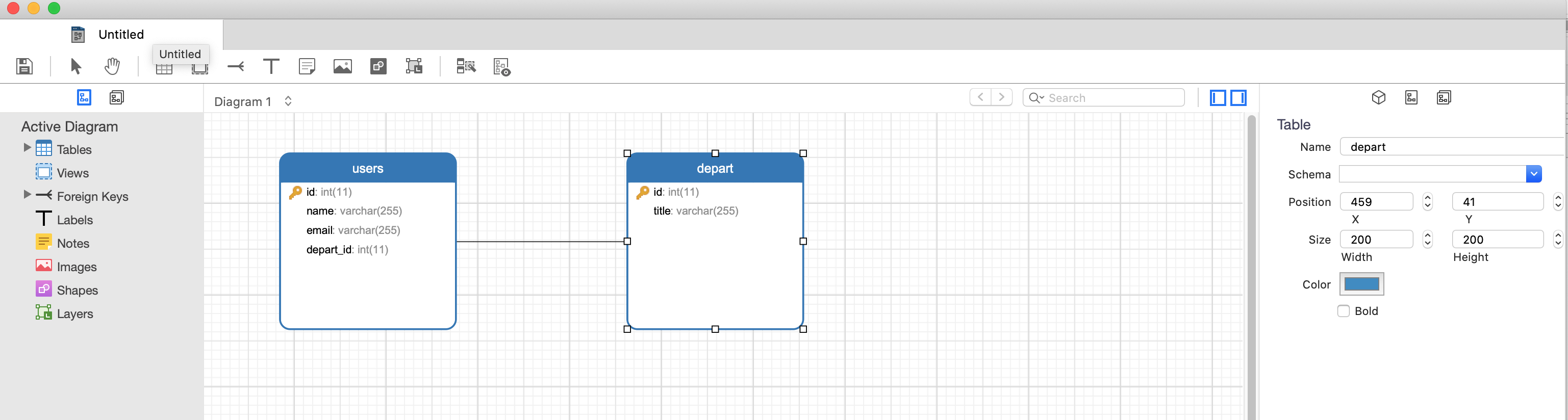
ALTER TABLE `users` DROP FOREIGN KEY `fk_users`;

DROP TABLE `users`;
DROP TABLE `depart`;

CREATE TABLE `users` (
    `id` int(11) NOT NULL,
    `name` varchar(255) NOT NULL,
    `email` varchar(255) NULL,
    `depart_id` int(11) NULL,
    PRIMARY KEY (`id`)
);
CREATE TABLE `depart` (
    `id` int(11) NOT NULL,
    `title` varchar(255) NULL,
    PRIMARY KEY (`id`)
);

ALTER TABLE `users` ADD CONSTRAINT `fk_users` FOREIGN KEY (`depart_id`) REFERENCES `depart` (`id`);
- 基于ORM操作
import time
import datetime
from django.db import models

class Role(models.Model):
    """ 角色,管理员可以做权限管理并分配角色"""
    title = models.CharField(verbose_name="名称", max_length=32)


class RolePermission(models.Model):
    """ 角色&权限关系表 """
    role = models.ForeignKey(verbose_name="角色", to="Role", on_delete=models.CASCADE)
    code = models.CharField(verbose_name="权限名称", max_length=32)


class AdminUser(models.Model):
    """ 平台用户管理 """
    mobile_phone = models.CharField(verbose_name="手机号", max_length=32, db_index=True)
    password = models.CharField(verbose_name="密码", max_length=64)
    real_name = models.CharField(verbose_name="真实姓名", max_length=32)
    role = models.ForeignKey(verbose_name="角色", to="Role", on_delete=models.SET_NULL, null=True, blank=True)


class HandlerLog(models.Model):
    """ 操作日志,基于自定义信号去实现记录日志。"""
    admin = models.ForeignKey(verbose_name="用户", to='AdminUser', on_delete=models.CASCADE)
    content = models.CharField(verbose_name="日志内容", max_length=255)
    create_datetime = models.DateTimeField(verbose_name="操作时间", auto_now_add=True)
1.2 常见SQL语句
常见的增删改查。
1.3 SQL注入
乌云平台,白帽子。
import pymysql

# 输入用户名和密码
user = input("请输入用户名:")
pwd = input("请输入密码:")


conn = pymysql.connect(host='127.0.0.1', port=3306, user='root', passwd='root123', charset="utf8",db='userdb')
cursor = conn.cursor()

# 基于字符串格式化来 拼接SQL语句
sql = "select * from users where name='{}' and password='{}'".format(user, pwd)
cursor.execute(sql)

result = cursor.fetchone()
print(result)

cursor.close()
conn.close()
如果用户在输入user时,输入了: ' or 1=1 -- ,这样即使用户输入的密码不存在,也会可以通过验证。
为什么呢?
因为在SQL拼接时,拼接后的结果是:
注意:在MySQL中 -- 表示注释。
那么,在Python开发中 如何来避免SQL注入呢?
切记,SQL语句不要在使用python的字符串格式化,而是使用pymysql的execute方法。
import pymysql

# 输入用户名和密码
user = input("请输入用户名:")
pwd = input("请输入密码:")

conn = pymysql.connect(host='127.0.0.1', port=3306, user='root', passwd='root123', charset="utf8", db='userdb')

cursor = conn.cursor()

# cursor.execute("select * from users where name=%s and password=%s", [user, pwd])
# 或
cursor.execute("select * from users where name=%(name)s and password=%(pwd)s", {"name": user, 'pwd': pwd})

result = cursor.fetchone()
print(result)

cursor.close()
conn.close()
1.4 事务
什么是事务,为什么用事务?
在SQL语句角度去体现事务:
在Python代码角度去实现事务:
import pymysql

conn = pymysql.connect(host='127.0.0.1', port=3306, user='root', passwd='root123', charset="utf8", db='userdb')
cursor = conn.cursor()

# 开启事务
conn.begin()

try:
    # SQL
    cursor.execute("update tran set age=1 where id=1")
    int('asdf')
    cursor.execute("update tran set age=2 where id=2")

except Exception as e:
    # 回滚
    print("回滚")
    conn.rollback()
else:
    # 提交
    print("提交")
    conn.commit()

cursor.close()
conn.close()
前提:支持事务 innodb。
1.5 锁
MySQL中自带锁。
锁的范围:
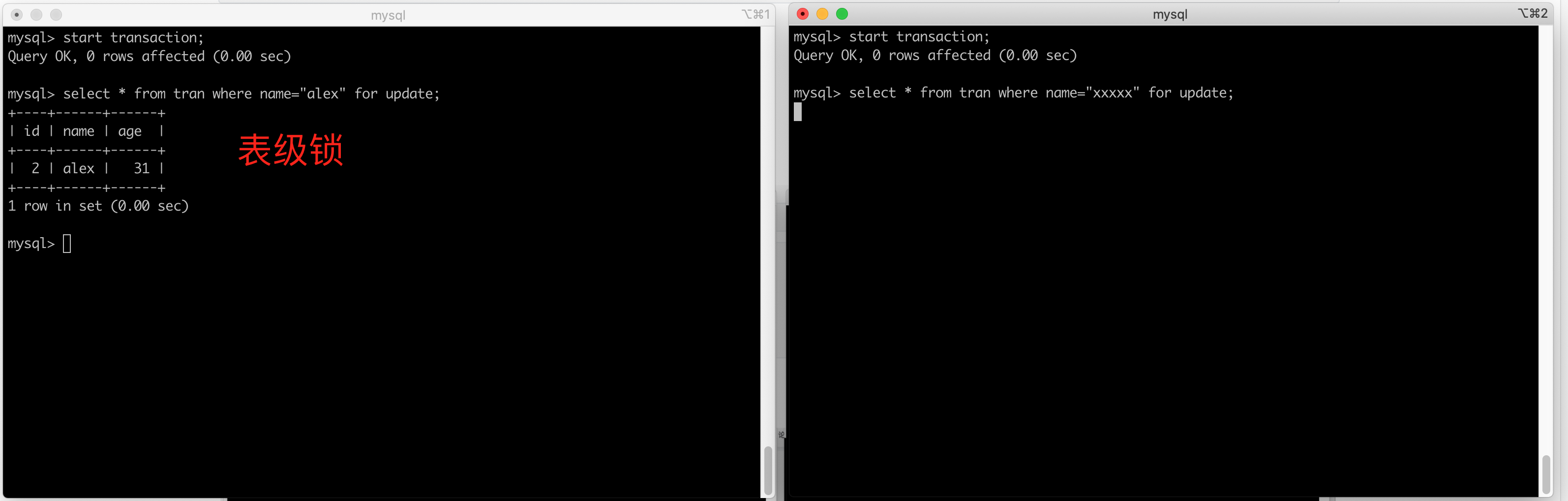
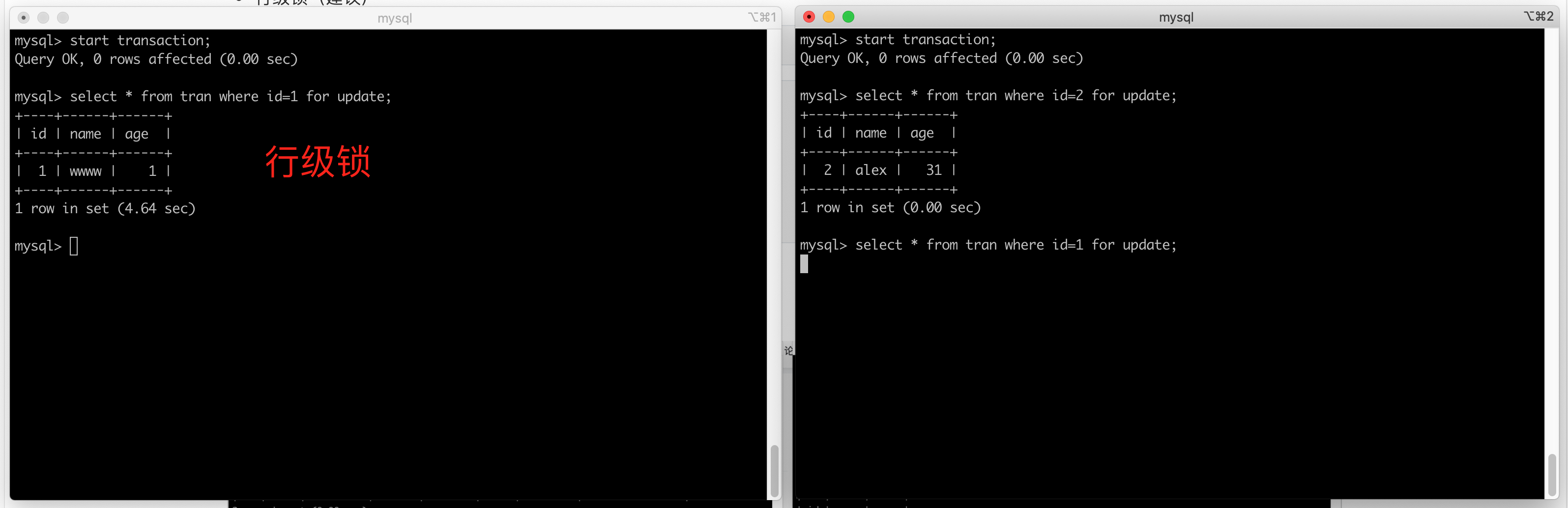
- 表级锁
- 行级锁(建议)
create table d1(
    id int not null auto_increment primary key,
    name varchar(64) not null
)engine=innodb default charset=utf8;
锁的类型:
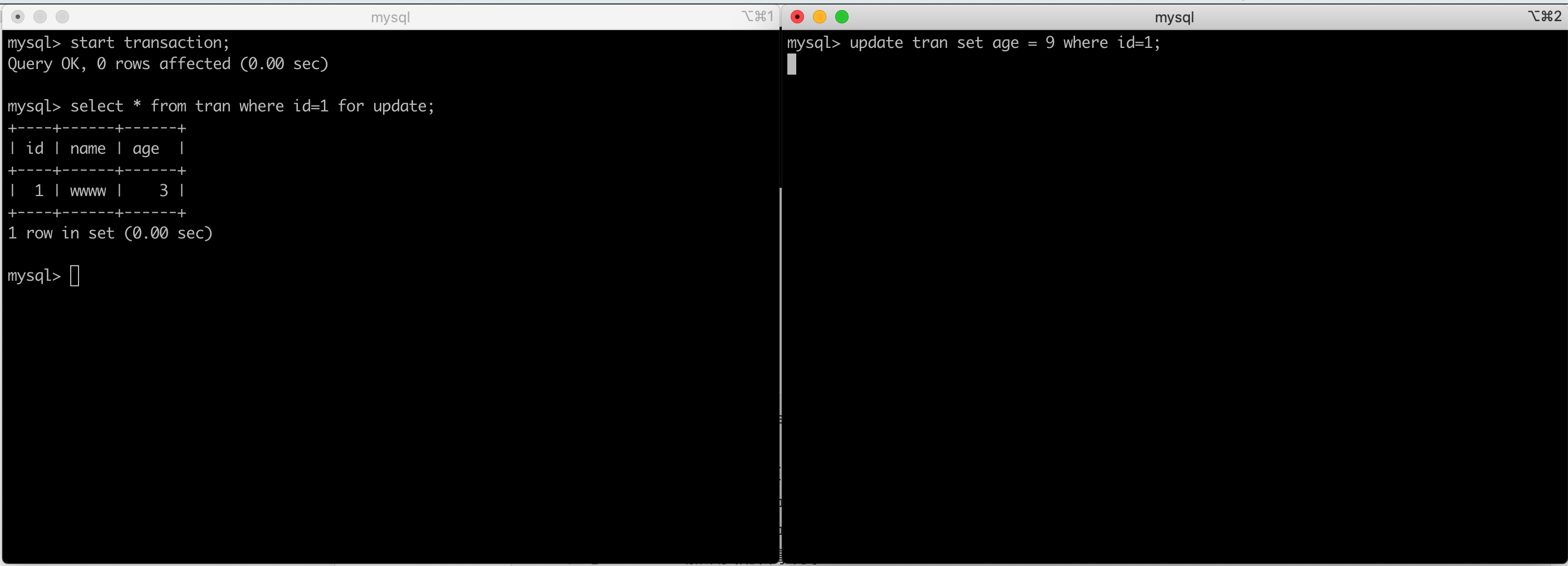
- 排他锁,有一个“人”加锁,其他人再来读写(阻塞)。
- 共享锁,有一个“人”加锁,其他人再来可以读,但是不能写(删除、修改、增加)
1.5.1 排它锁
- 应用排它锁
start transaction;
select * from d1 where id=1  for update;          -- 行
select * from d1 where name="xxx"  for update;        -- 表
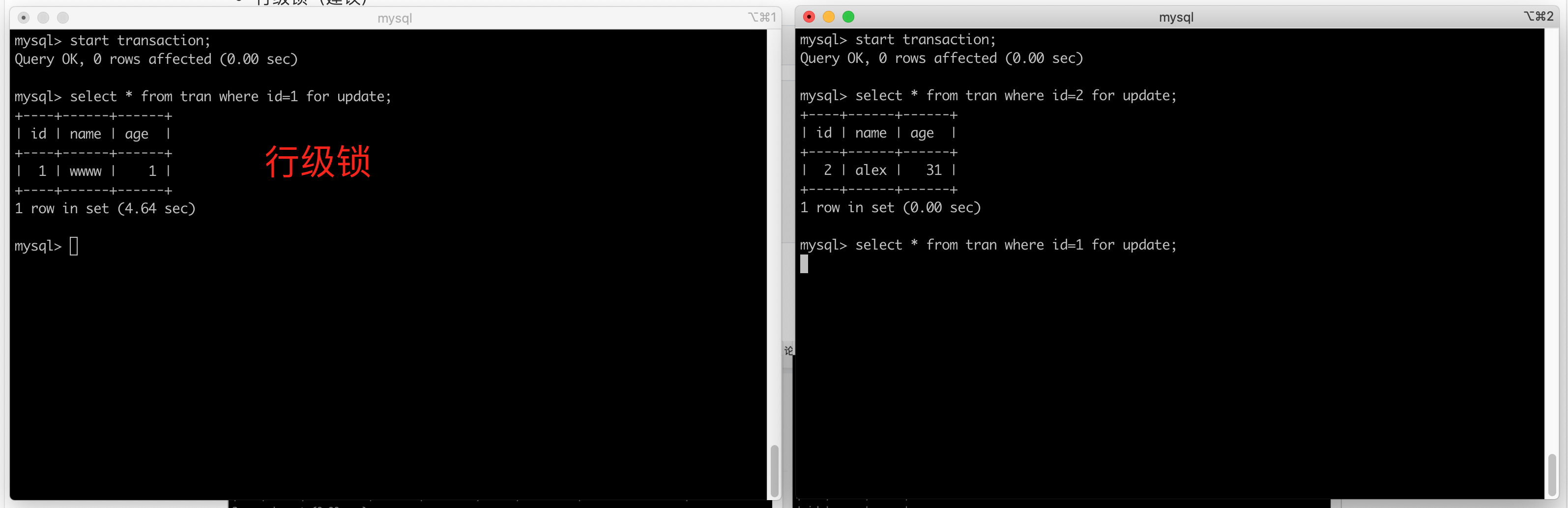
假如:总共100件商品,每次购买数量 -1 。
A: 访问页面显示100件。
B: 访问页面显示100件。

此时如果A/B同时下单:
  begin;
  update goods set count=count-1 where id=3;
  commit;

到了最后一个时刻,商品剩余1件。
C: 访问页面显示1件。
D: 访问页面显示1件。

此时C/D同时下单(错误)
  begin;
  update goods set count=count-1 where id=3;
  commit;

这种情况怎么办?
  begin;
  select * from goods where id=3 for update;
  if 个数>0:
      update goods set count=count-1 where id=3;
  else:
      已售罄
  commit;
如何基于Python实现呢?
create table goods(
  id int not null auto_increment primary key,
    count int
)engine=innodb default charset=utf8;


insert into goods(count) values(10),(15),(8);
import threading
import pymysql


def task():
    conn = pymysql.connect(host='127.0.0.1', port=3306, user='root', passwd='root123', charset="utf8", db='userdb')
    cursor = conn.cursor(pymysql.cursors.DictCursor)

    conn.begin()

    # {"count":1}
    cursor.execute("select count from goods where id=3 for update")
    result = cursor.fetchone()
    count = result['count']
    if count > 0:
        cursor.execute("update goods set count=count-1 where id=3")
    else:
        print("已售罄")

    conn.commit()

    cursor.close()
    conn.close()


def run():
    for i in range(5):
        t = threading.Thread(target=task)
        t.start()


if __name__ == '__main__':
    run()
1.5.2 共享锁
加锁之后,其他人可以读,但不能写(默认自动加锁)。
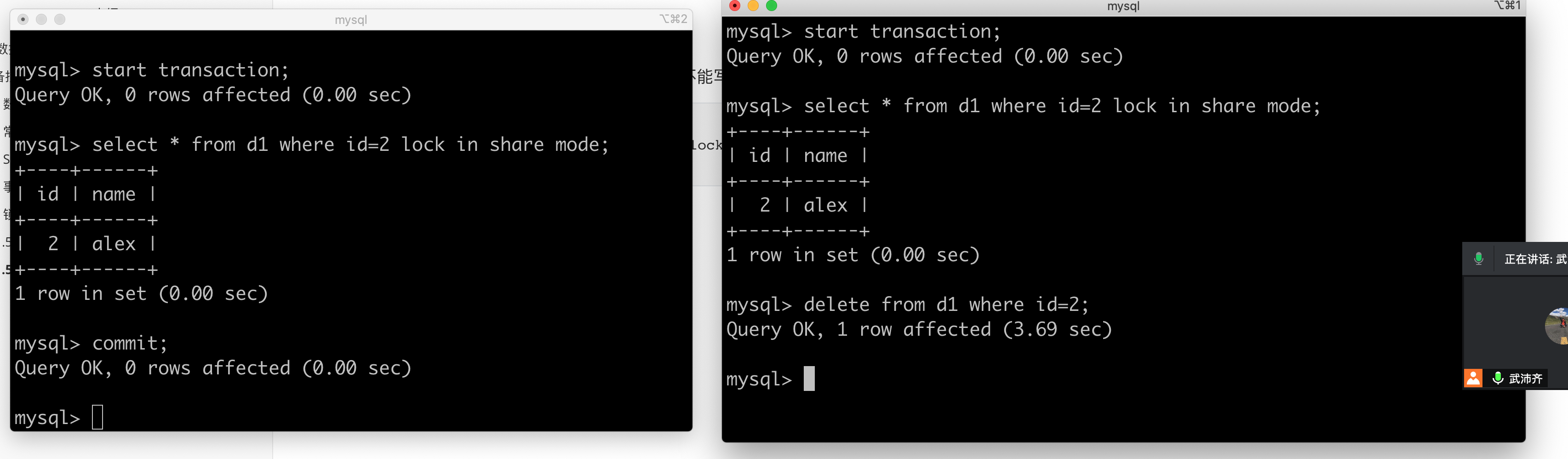
应用场景:假设现在有 A / B 两张表,使用select 查询B表,如果存在(条件成立),在A表中插入一条数据。
是否可以用他来实现商城购物数量-1的情况:
A: 访问页面显示100件。
B: 访问页面显示100件。

此时如果A/B同时下单:
    begin;
    update goods set count=count-1 where id=3;
    commit;

到了最后一个时刻,商品剩余1件。
C: 访问页面显示1件。
D: 访问页面显示1件。

此时C/D同时下单(错误)
    begin;
    update goods set count=count-1 where id=3;
    commit;

这种情况怎么办?
    begin;
    select * from goods where id=3 lock in share mode;
    if 个数>0:
        update goods set count=count-1 where id=3;
    else:
        已售罄
    commit;
以后写项目时,用到排他锁。
A用户:
B用户:
C用户:
1.6 数据库连接池
- 写脚本
10个线程去连接数据库。
有多少个任务就创建多个线程,让线程去连接数据。 1000

连接池 = [连接1,连接2,连接3....连接100]     # 例如:最大100个,初始2;
任务操作数据库,去连接池申请连接 ....  ,不用放回连接池。
- 写网站 or 系统
网站的用户可能会很多,支持多线程    ->    数据库。


连接池 = [连接1,连接2,连接3....连接100]     # 例如:最大100个,初始2;
任务操作数据库,去连接池申请连接 ....  ,不用放回连接池。
安装一个第三方模块:
提供了两种模式的数据库连接池:
- 池,最多100个。(建议)
import pymysql
from dbutils.pooled_db import PooledDB

# 程序启动后,只执行一次(项目中只有数据库连接池)
MYSQL_DB_POOL = PooledDB(
    creator=pymysql,  # 使用链接数据库的模块
    maxconnections=100,  # 连接池允许的最大连接数,0和None表示不限制连接数
    mincached=2,   # 初始化时,链接池中至少创建的空闲的链接,0表示不创建
    maxcached=3,  # 链接池中最多闲置的链接,0和None不限制
    blocking=True,  # 连接池中如果没有可用连接后,是否阻塞等待。True,等待;False,不等待然后报错
    setsession=[],  # 开始会话前执行的命令列表。如:["set datestyle to ...", "set time zone ..."]
    ping=0,
    # ping MySQL服务端,检查是否服务可用。# 如:0 = None = never, 1 = default = whenever it is requested, 2 = when a cursor is created, 4 = when a query is executed, 7 = always

    host='127.0.0.1',
    port=3306,
    user='root',
    password='root123',
    database='userdb',
    charset='utf8'
)


def run():
    while True:
        # 去连接池获取一个连接
        conn = MYSQL_DB_POOL.connection()


        cursor = conn.cursor()
        cursor.execute('select * from tran')
        result = cursor.fetchall()
        print(result)


        cursor.close()

        # 将连接交换给连接池
        conn.close()


if __name__ == '__main__':
    run()
- 为每个线程提供数据库连接(Threading.Local),只有线程终止了,连接才关闭。
import threading
import pymysql
from dbutils.pooled_db import PooledDB
from dbutils.persistent_db import PersistentDB

MYSQL_DB_POOL = PersistentDB(
    creator=pymysql,  # 使用链接数据库的模块
    closeable=False,
    # 如果为False时, conn.close() 实际上被忽略,供下次使用,再线程关闭时,才会自动关闭链接。如果为True时, conn.close()则关闭链接,那么再次调用pool.connection时就会报错,因为已经真的关闭了连接(pool.steady_connection()可以获取一个新的链接)
    threadlocal=None,  # 本线程独享值得对象,用于保存链接对象,如果链接对象被重置

    setsession=[],  # 开始会话前执行的命令列表。如:["set datestyle to ...", "set time zone ..."]
    ping=0,
    # ping MySQL服务端,检查是否服务可用。# 如:0 = None = never, 1 = default = whenever it is requested, 2 = when a cursor is created, 4 = when a query is executed, 7 = always
    host='127.0.0.1',
    port=3306,
    user='root',
    password='root123',
    database='userdb',
    charset='utf8'
)


def task():
    # 去连接池获取一个连接
    conn = MYSQL_DB_POOL.connection(shareable=False)
    cursor = conn.cursor()
    cursor.execute('select sleep(2)')
    result = cursor.fetchall()
    print(result)

    cursor.close()
    # 将连接交换给连接池
    conn.close()


def run():
    for i in range(10):
        t = threading.Thread(target=task)
        t.start()


if __name__ == '__main__':
    run()
1.7 数据库帮助类
到目前为止,掌握:pymysql、dbutils数据库连接池。
最开始的想法(思路):
def login():
    conn = pymysql.connect(host='127.0.0.1', port=3306, user='root', passwd='root123', charset="utf8", db='userdb')
    cursor = conn.cursor(pymysql.cursors.DictCursor)

    cursor.execute("select * from user where username=xx and password=123")
    result = cursor.fetchone()

    cursor.close()
    conn.close()

def resgister():
    conn = pymysql.connect(host='127.0.0.1', port=3306, user='root', passwd='root123', charset="utf8", db='userdb')
    cursor = conn.cursor(pymysql.cursors.DictCursor)

    cursor.execute("select * from user where username=xx and password=123")
    result = cursor.fetchone()

    cursor.close()
    conn.close()

def order():
    conn = pymysql.connect(host='127.0.0.1', port=3306, user='root', passwd='root123', charset="utf8", db='userdb')
    cursor = conn.cursor(pymysql.cursors.DictCursor)

    cursor.execute("select * from user where username=xx and password=123")
    result = cursor.fetchone()

    cursor.close()
    conn.close()


def run():
    func_dict = {
        "1":login,
        "2":login,
    }
    num = input(">>>")
    func = func_dict(num)
    func()

if __name__ == "__main__":
    run()
优化1:
import pymysql
from dbutils.pooled_db import PooledDB

# 程序启动后,只执行一次(项目中只有数据库连接池)
MYSQL_DB_POOL = PooledDB(
    creator=pymysql,  # 使用链接数据库的模块
    maxconnections=100,  # 连接池允许的最大连接数,0和None表示不限制连接数
    mincached=2,   # 初始化时,链接池中至少创建的空闲的链接,0表示不创建
    maxcached=3,  # 链接池中最多闲置的链接,0和None不限制
    blocking=True,  # 连接池中如果没有可用连接后,是否阻塞等待。True,等待;False,不等待然后报错
    setsession=[],  # 开始会话前执行的命令列表。如:["set datestyle to ...", "set time zone ..."]
    ping=0,
    # ping MySQL服务端,检查是否服务可用。# 如:0 = None = never, 1 = default = whenever it is requested, 2 = when a cursor is created, 4 = when a query is executed, 7 = always

    host='127.0.0.1',
    port=3306,
    user='root',
    password='root123',
    database='userdb',
    charset='utf8'
)


def login():
    # 去连接池获取一个连接
    conn = MYSQL_DB_POOL.connection()
    cursor = conn.cursor()
    cursor.execute('select * from tran')
    result = cursor.fetchall()
    print(result)
    cursor.close()
    # 将连接交换给连接池
    conn.close()

def resgister():
    # 去连接池获取一个连接
    conn = MYSQL_DB_POOL.connection()
    cursor = conn.cursor()
    cursor.execute('select * from tran')
    result = cursor.fetchall()
    print(result)
    cursor.close()
    # 将连接交换给连接池
    conn.close()

def order():
    # 去连接池获取一个连接
    conn = MYSQL_DB_POOL.connection()
    cursor = conn.cursor()
    cursor.execute('select * from tran')
    result = cursor.fetchall()
    print(result)
    cursor.close()
    # 将连接交换给连接池
    conn.close()

def run():
    func_dict = {
        "1":login,
        "2":login,
    }
    num = input(">>>")
    func = func_dict(num)
    func()

if __name__ == "__main__":
    run()
优化2:
import pymysql
from dbutils.pooled_db import PooledDB

# 程序启动后,只执行一次(项目中只有数据库连接池)
MYSQL_DB_POOL = PooledDB(
    creator=pymysql,  # 使用链接数据库的模块
    maxconnections=100,  # 连接池允许的最大连接数,0和None表示不限制连接数
    mincached=2,   # 初始化时,链接池中至少创建的空闲的链接,0表示不创建
    maxcached=3,  # 链接池中最多闲置的链接,0和None不限制
    blocking=True,  # 连接池中如果没有可用连接后,是否阻塞等待。True,等待;False,不等待然后报错
    setsession=[],  # 开始会话前执行的命令列表。如:["set datestyle to ...", "set time zone ..."]
    ping=0,
    # ping MySQL服务端,检查是否服务可用。# 如:0 = None = never, 1 = default = whenever it is requested, 2 = when a cursor is created, 4 = when a query is executed, 7 = always

    host='127.0.0.1',
    port=3306,
    user='root',
    password='root123',
    database='userdb',
    charset='utf8'
)

def open_db():
    conn = MYSQL_DB_POOL.connection()
    cursor = conn.cursor()
    return conn,cursor

def close(*args):
    for item in args:
        item.close()


def login():
    conn,cursor = open_db()

    cursor.execute('select * from tran')
    result = cursor.fetchall()

    close(conn,cursor)

def resgister():
    conn,cursor = open_db()

    cursor.execute('select * from tran')
    result = cursor.fetchall()

    close(conn,cursor)

def order():
    conn,cursor = open_db()

    cursor.execute('select * from tran')
    result = cursor.fetchall()

    close(conn,cursor)

def run():
    func_dict = {
        "1":login,
        "2":login,
    }
    num = input(">>>")
    func = func_dict(num)
    func()

if __name__ == "__main__":
    run()
优化3:
# db.py

# 程序启动后,只执行一次(项目中只有数据库连接池)
MYSQL_DB_POOL = PooledDB(
    creator=pymysql,  # 使用链接数据库的模块
    maxconnections=100,  # 连接池允许的最大连接数,0和None表示不限制连接数
    mincached=2,   # 初始化时,链接池中至少创建的空闲的链接,0表示不创建
    maxcached=3,  # 链接池中最多闲置的链接,0和None不限制
    blocking=True,  # 连接池中如果没有可用连接后,是否阻塞等待。True,等待;False,不等待然后报错
    setsession=[],  # 开始会话前执行的命令列表。如:["set datestyle to ...", "set time zone ..."]
    ping=0,
    # ping MySQL服务端,检查是否服务可用。# 如:0 = None = never, 1 = default = whenever it is requested, 2 = when a cursor is created, 4 = when a query is executed, 7 = always

    host='127.0.0.1',
    port=3306,
    user='root',
    password='root123',
    database='userdb',
    charset='utf8'
)


def open_db():
    conn = MYSQL_DB_POOL.connection()
    cursor = conn.cursor()
    return conn,cursor

def close(*args):
    for item in args:
        item.close()


def fetch_one(sql,*args):
    conn,cursor = open_db()
    cursor.execute(sql,args)
    result = cursor.fetchone()
    close(conn,cursor)

    return result

def fetch_all(sql,*args):
    conn,cursor = open_db()
    cursor.execute(sql,args)
    result = cursor.fetchall()
    close(conn,cursor)
    return result

def execute(sql,*args):
    conn,cursor = open_db()
    cursor.execute(sql,args)
    conn.commit()
    close(conn,cursor)
    return result
import pymysql
import db

def login():
    # 10个线程(每个线程都拥有一个连接)
    result = db.fetch_one("select * from users where name=%s and pwd=%s", "alex","123")
    print(result)

def resgister():
    db.execute("insert into users(name,pwd) values(%s,%s)", "wupeiqi","666")

def order():
    pass


def run():
    func_dict = {
        "1":login,
        "2":resgister,
    }
    num = input(">>>")
    func = func_dict(num)
    # func()

    for i in range(10):
        t = threading.Thread(target=func)
        t.start()


if __name__ == "__main__":
    run()
优化4:
# db.py
import pymysql
from dbutils.pooled_db import PooledDB

class DBHelper(object):
    def __init__(self):

        # 创建数据库连接池(去配置文件读取)
        self.pool = PooledDB(
            creator=pymysql,  # 使用链接数据库的模块
            maxconnections=100,  # 连接池允许的最大连接数,0和None表示不限制连接数
            mincached=2,   # 初始化时,链接池中至少创建的空闲的链接,0表示不创建
            maxcached=3,  # 链接池中最多闲置的链接,0和None不限制
            blocking=True,  # 连接池中如果没有可用连接后,是否阻塞等待。True,等待;False,不等待然后报错
            setsession=[],  # 开始会话前执行的命令列表。如:["set datestyle to ...", "set time zone ..."]
            ping=0,
            host='127.0.0.1',
            port=3306,
            user='root',
            password='root123',
            database='userdb',
            charset='utf8'
        )

    def open_db(self):
        conn = self.pool.connection()
        cursor = conn.cursor()
        return conn,cursor

    def close(self, *args):
        for item in args:
            item.close()

    def fetch_one(self):
        conn,cursor = self.open_db()

        cursor.execute(sql,args)
        result = cursor.fetchone()

        self.close(cursor,conn)

        return result

DB = DBHelper()
import threading
from db import DB

def task():
    DB.fetch_one("select * from xxx where id>%s",1)

for i in range(10):
    t = threading.Thread(target=task)
    t.start()
优化5: 文件操作with上下文管理(考虑共用连接会出问题)。
# db.py
import pymysql
from dbutils.pooled_db import PooledDB


class Connect(object):

    def __init__(self):
        self.conn, self.cursor = DB.open_db()

    def __enter__(self):
        return self

    def __exit__(self, exc_type, exc_val, exc_tb):
        self.cursor.close()
        self.conn.close()

    def fetch_one(self, sql, *args):
        self.cursor.execute(sql, args)
        result = self.cursor.fetchone()
        return result


class DBHelper(object):
    def __init__(self):
        # 创建数据库连接池(去配置文件读取)
        self.pool = PooledDB(
            creator=pymysql,  # 使用链接数据库的模块
            maxconnections=100,  # 连接池允许的最大连接数,0和None表示不限制连接数
            mincached=2,  # 初始化时,链接池中至少创建的空闲的链接,0表示不创建
            maxcached=3,  # 链接池中最多闲置的链接,0和None不限制
            blocking=True,  # 连接池中如果没有可用连接后,是否阻塞等待。True,等待;False,不等待然后报错
            setsession=[],  # 开始会话前执行的命令列表。如:["set datestyle to ...", "set time zone ..."]
            ping=0,
            host='127.0.0.1',
            port=3306,
            user='root',
            password='root123',
            database='userdb',
            charset='utf8'
        )

    def open_db(self):
        conn = self.pool.connection()
        cursor = conn.cursor()
        return conn, cursor

    def close(self, *args):
        for item in args:
            item.close()

    def fetch_one(self, sql, *args):
        conn, cursor = self.open_db()

        cursor.execute(sql, args)
        result = cursor.fetchone()

        self.close(cursor, conn)

        return result


DB = DBHelper()
1.8 ORM框架
ORM,对象关系映射。
- 类 对应 表
- 变量 对应 列
- 对象 对应 数据行
课程中会涉及:
- SQLAchemy框架(独立的第三方组件)
- Django内置的ORM(Django项目绑定)
SQLAlchmy框架的架构:
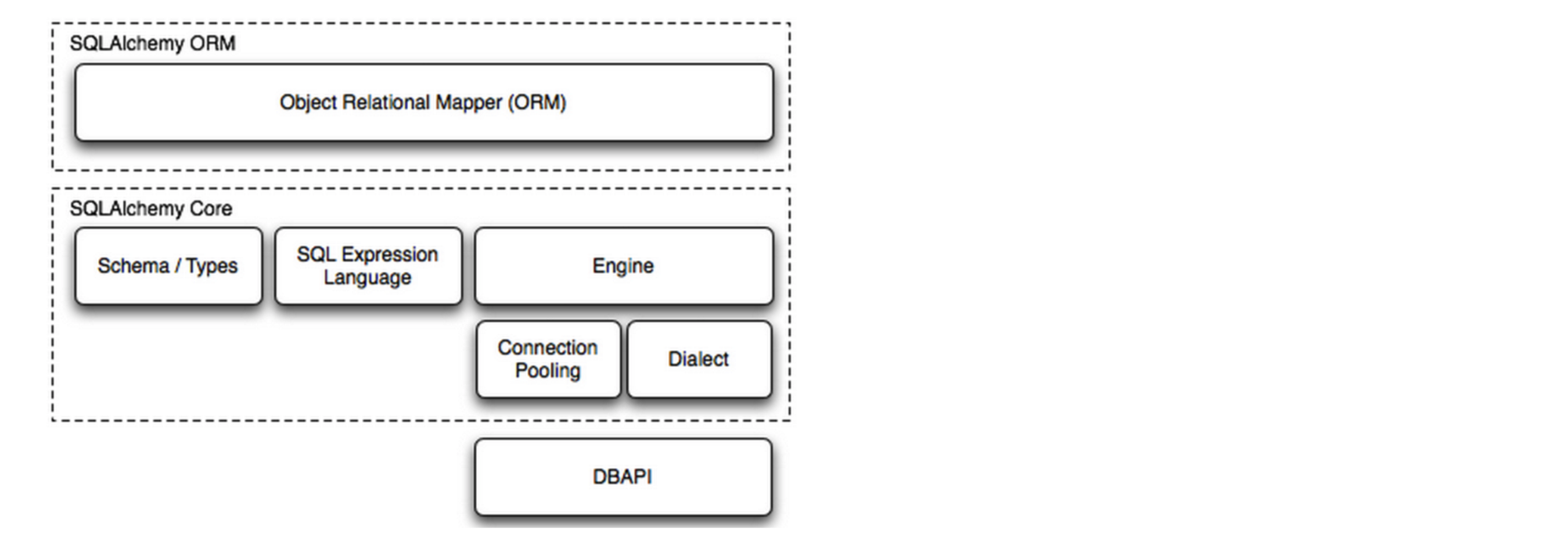
import datetime
from sqlalchemy import create_engine
from sqlalchemy.ext.declarative import declarative_base
from sqlalchemy import Column, Integer, String, Text, ForeignKey, DateTime, UniqueConstraint, Index

# 基类
Base = declarative_base()


class Users(Base):
    __tablename__ = 'users'

    id = Column(Integer, primary_key=True)
    name = Column(String(32), index=True, nullable=False)
    email = Column(String(32), unique=True)
    ctime = Column(DateTime, default=datetime.datetime.now)
    extra = Column(Text, nullable=True)


if __name__ == '__main__':

    # 连接数据库并创建表
    engine = create_engine(
        "mysql+pymysql://root:root123@127.0.0.1:3306/day09?charset=utf8",
        pool_size=5,  # 连接池大小
        pool_timeout=30,  # 池中没有线程最多等待的时间,否则报错
        pool_recycle=-1  # 多久之后对线程池中的线程进行一次连接的回收(重置)
    )
    # 找到继承Base的所有类 & 利用 engine 数据库连接
    #    1. 根据类生成SQL语句
    #    2. 连接并执行SQL
    Base.metadata.create_all(engine)
mysql> use day09
Database changed
mysql> show tables;
Empty set (0.00 sec)

mysql> show tables;
+-----------------+
| Tables_in_day09 |
+-----------------+
| users           |
+-----------------+
1 row in set (0.00 sec)

mysql> desc users;
+-------+-------------+------+-----+---------+----------------+
| Field | Type        | Null | Key | Default | Extra          |
+-------+-------------+------+-----+---------+----------------+
| id    | int(11)     | NO   | PRI | NULL    | auto_increment |
| name  | varchar(32) | NO   | MUL | NULL    |                |
| email | varchar(32) | YES  | UNI | NULL    |                |
| ctime | datetime    | YES  |     | NULL    |                |
| extra | text        | YES  |     | NULL    |                |
+-------+-------------+------+-----+---------+----------------+
5 rows in set (0.00 sec)
2.优化
2.1 表结构设计
-
表的字段,尽量使用固定长度。
-
列的先后顺序,固定长度的字段在前面。
- 能在内存中存储的,尽量不要放在数据库中表关联。
角色表:
id    title
 1   管理员
 2   超级管理员
 3   普通用户

用户表:
id        name    role_id
 1        alex      1
 2        eirc      1
 3        tony      2
 4      kelly   3

 这样设计,以后再查询用户信息时,如果想要看角色中文信息实,需要使用连表查询(效率低)。
数据库中的用户表:
    id        name    role_id
     1        alex      1
     2        eirc      1
     3        tony      2
     4      kelly   3

Python代码中维护:
    ROLE_TYPE = (
        (1,"管理员"),
        (2,"超级管理员"),
        (3,"普通用户"),
    )

适用于有限的数据。
- 允许存在一定的数据冗余
2.2 索引相关
索引(物理表 + 索引结构)
- 约束
- 加速查找
创建了索引之后,一定要去命中索引。
mysql> select * from big limit 5;
  索引  索引       索引              无索引                               无索引
+----+---------+---------------+--------------------------------------+------+
| id | name    | email         | password                             | age  |
+----+---------+---------------+--------------------------------------+------+
|  1 | wu-11-0 | w-11-0@qq.com | 025dfdeb-d803-425d-9834-445758885d1c |    4 |
|  2 | wu-10-0 | w-10-0@qq.com | 362def1c-2b5f-4368-b01f-1ff086feab21 |   10 |
|  3 | wu-11-1 | w-11-1@qq.com | 23b3a40f-ee0c-47b7-b9da-b765d4e3c5a4 |   10 |
|  4 | wu-12-0 | w-12-0@qq.com | adb7e30c-dd51-4f41-b472-5e24c1cb3ec6 |    3 |
|  5 | wu-10-1 | w-10-1@qq.com | d5cc3e3b-0c33-4938-9a25-5890228f6959 |    6 |
+----+---------+---------------+--------------------------------------+------+
5 rows in set (0.00 sec)
- like
    select * from big where name like "%u-11-0";          -- 无法命中

- 使用函数
    select * from big where reverse(name) = "wupeiqi";    -- 无法命中

- or条件,当or条件中存在未建索引的列时。
    select * from big where name = "wupeiqi" or age=19;

    特殊:
        select * from big where name = "wupeiqi" or age=19 and  email="xxxx";

- 数据类型不一致
    select * from big where name = 123;

- 不等于
    select * from big where name != "武沛齐"; -- 未命中
    特别的主键:
        select count(1) from big where id !=1;  -- 命中

- 排序,当根据索引排序时候,选择的映射如果不是索引,则不走索引。
    select * from big order by name asc;

    select name from big order by name asc;

- 组合索引最左前缀,如果组合索引为:(name,password)
    name and password       -- 命中
    name                    -- 命中
    password                -- 未命中
    name or password        -- 未命中
如果你搞不清楚,通过执行计划(预估):
explain + 查询SQL - 用于显示SQL执行信息参数,根据参考信息可以进行SQL优化

mysql> explain select * from tb2;
+----+-------------+-------+------+---------------+------+---------+------+------+-------+
| id | select_type | table | type | possible_keys | key  | key_len | ref  | rows | Extra |
+----+-------------+-------+------+---------------+------+---------+------+------+-------+
|  1 | SIMPLE      | tb2   | ALL  | NULL          | NULL | NULL    | NULL |    2 | NULL  |
+----+-------------+-------+------+---------------+------+---------+------+------+-------+
1 row in set (0.00 sec)
id,查询顺序标识
如:mysql> explain select * from (select nid,name from tb1 where nid < 10) as B;
+----+-------------+------------+-------+---------------+---------+---------+------+------+-------------+
| id | select_type | table      | type  | possible_keys | key     | key_len | ref  | rows | Extra       |
+----+-------------+------------+-------+---------------+---------+---------+------+------+-------------+
|  1 | PRIMARY     | <derived2> | ALL   | NULL          | NULL    | NULL    | NULL |    9 | NULL        |
|  2 | DERIVED     | tb1        | range | PRIMARY       | PRIMARY | 8       | NULL |    9 | Using where |
+----+-------------+------------+-------+---------------+---------+---------+------+------+-------------+
特别的:如果使用union连接气值可能为null


select_type,查询类型
    SIMPLE          简单查询
    PRIMARY         最外层查询
    SUBQUERY        映射为子查询
    DERIVED         子查询
    UNION           联合
    UNION RESULT    使用联合的结果
    ...


table,正在访问的表名


type,查询时的访问方式,性能:all < index < range < index_merge < ref_or_null < ref < eq_ref < system/const
    ALL,全表扫描,对于数据表从头到尾找一遍
        select * from tb1;
        特别的:如果有limit限制,则找到之后就不在继续向下扫描
        select * from tb1 where email = 'seven@live.com'
        select * from tb1 where email = 'seven@live.com' limit 1;
        虽然上述两个语句都会进行全表扫描,第二句使用了limit,则找到一个后就不再继续扫描。

    INDEX,全索引扫描,对索引从头到尾找一遍
        select nid from tb1;

    RANGE,对索引列进行范围查找
        select *  from tb1 where name < 'alex';
        PS:
            between and
            in
            >   >=  <   <=  操作
            注意:!= 和 > 符号


    INDEX_MERGE,合并索引,使用多个单列索引搜索
        select *  from tb1 where name = 'alex' or nid in (11,22,33);

    REF,根据索引查找一个或多个值
        select *  from tb1 where name = 'seven';

    EQ_REF,连接时使用primary key 或 unique类型
        select tb2.nid,tb1.name from tb2 left join tb1 on tb2.nid = tb1.nid;

    CONST,常量
        表最多有一个匹配行,因为仅有一行,在这行的列值可被优化器剩余部分认为是常数,const表很快,因为它们只读取一次。
        select nid from tb1 where nid = 2 ;

    SYSTEM,系统
        表仅有一行(=系统表)。这是const联接类型的一个特例。
        select * from (select nid from tb1 where nid = 1) as A;


possible_keys,可能使用的索引

key,真实使用的

key_len,MySQL中使用索引字节长度

rows,mysql估计为了找到所需的行而要读取的行数 ------ 只是预估值

extra
    该列包含MySQL解决查询的详细信息
    “Using index”
    此值表示mysql将使用覆盖索引,以避免访问表。不要把覆盖索引和index访问类型弄混了。
    “Using where”
    这意味着mysql服务器将在存储引擎检索行后再进行过滤,许多where条件里涉及索引中的列,当(并且如果)它读取索引时,就能被存储引擎检验,因此不是所有带where子句的查询都会显示“Using where”。有时“Using where”的出现就是一个暗示:查询可受益于不同的索引。
    “Using temporary”
    这意味着mysql在对查询结果排序时会使用一个临时表。
    “Using filesort”
    这意味着mysql会对结果使用一个外部索引排序,而不是按索引次序从表里读取行。mysql有两种文件排序算法,这两种排序方式都可以在内存或者磁盘上完成,explain不会告诉你mysql将使用哪一种文件排序,也不会告诉你排序会在内存里还是磁盘上完成。
    “Range checked for each record(index map: N)”
    这个意味着没有好用的索引,新的索引将在联接的每一行上重新估算,N是显示在possible_keys列中索引的位图,并且是冗余的。
最准确的其实就是SQL执行了多长时间。【慢日志】,一般都是DBA来做。
# 开启慢日志 ON / OFF
slow_query_log = ON

# 执行时间 > 0.5s
long_query_time = 0.5

# 慢日志的存储文件路径
slow_query_log_file = /var/log/mysql_slow.log

# 未命中索引的SQL也记录下来
log_queries_not_using_indexes = ON
2.3 查询
分为如下几种情况:
-
避免使用 select *
-
连表操作时字段类型要一致
-
查询特定条数数据时,尽量加limit。
mysql> select * from big where password="362def1c-2b5f-4368-b01f-1ff086feab21";
+----+---------+---------------+--------------------------------------+------+
| id | name    | email         | password                             | age  |
+----+---------+---------------+--------------------------------------+------+
|  2 | wu-10-0 | w-10-0@qq.com | 362def1c-2b5f-4368-b01f-1ff086feab21 |   10 |
+----+---------+---------------+--------------------------------------+------+
1 row in set (0.77 sec)

mysql> select * from big where password="362def1c-2b5f-4368-b01f-1ff086feab21" limit 1;
+----+---------+---------------+--------------------------------------+------+
| id | name    | email         | password                             | age  |
+----+---------+---------------+--------------------------------------+------+
|  2 | wu-10-0 | w-10-0@qq.com | 362def1c-2b5f-4368-b01f-1ff086feab21 |   10 |
+----+---------+---------------+--------------------------------------+------+
1 row in set (0.00 sec)
- 经典的查询时关于分页的问题。
select * from big limit 10 offset 0;
select * from big limit 10 offset 10;
select * from big limit 10 offset 20;
select * from big limit 10 offset 30;
...
select * from big limit 10 offset 2900000;

-- 很多的网站,如果有很多页就会越来越慢。
很多网站为了解决这类问题:下拉刷新、上一页和下一页。

当访问当前页时,将最大ID 和 最小ID记录。
上一页:
下一页:
还可以展示跟多的页码。

这样就需要根据 当前页 & 目标页面 & 最大ID & 最小ID 共同来计算。
-
后面的页码
-
前面的页面
2.4 缓存(redis)
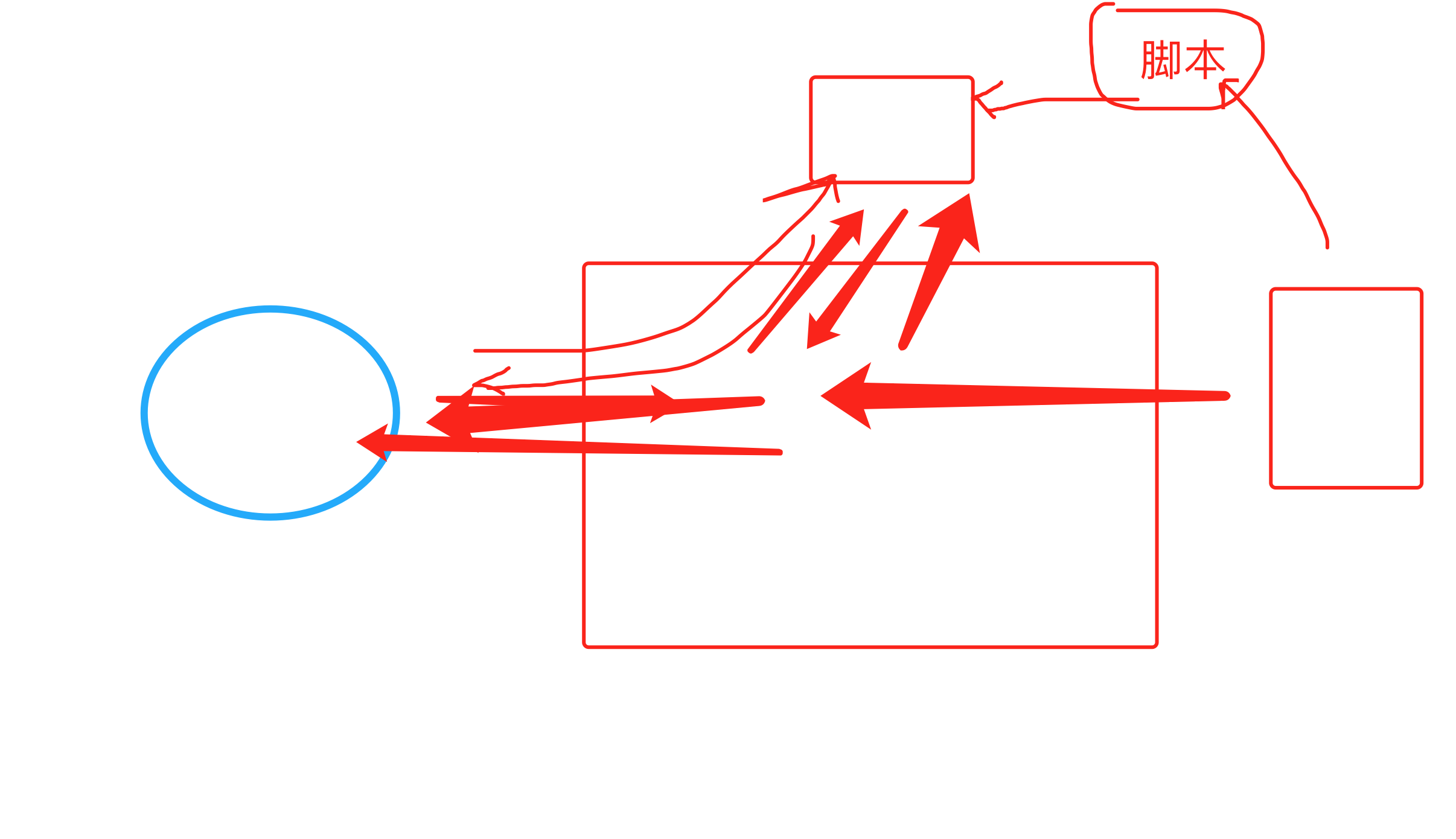
使用缓存来提升页面响应能力,简而言之:
使用缓存的注意事项:
- 缓存穿透,例如:访问ID不存在数据。
- 在代码中进行合法性判断,例如:ID=-1不合法。
- 即使数据库中没有,也可以缓存一下。
  A:id=48, 缓存中没有;数据库也没有;  ->   也在缓存中放一份None。
  B:id=48, 在缓存中获取到了。

- 布隆过滤,维护哈希表 + 通过哈希算法来计算(评估)访问的数据是否存在。(非精准)
  {
      48:...
      47:...
  }
- 缓存击穿,例如:热点数据大量的同时过期。
- 让热点数据不过期 + 定时任务更新数据。
- 加锁处理。
  在redis中加上锁,只让1个请求过去,其他99999等10s。
  让着1个请求去数据库获取数据,写入缓存。
  其他99999再去缓存中获取。
import redis
import time


def get_data():
    # 单进程 & 单线程
    conn = redis.Redis(host='127.0.0.1', port=6379, password='qwe123', encoding='utf-8')

    # 1. 读取数据
    data = conn.get("wupeiqi666")

    # 当数据不存在时,应该去数据库中获取数据
    if not data:

        # 设置锁,其实就是一个标记。 100000w
        #  在redis中设置 wupeiqi666_lock=9999,
        #     - 设置成功:success=True
        #     - 设置失败:success=False
        success = conn.set('wupeiqi666_lock', 9999, nx=True)


        # 设置成功
        if success:
            # 去数据库中读取数据
            data = "数据呀"
            conn.set("wupeiqi666", data)
            conn.delete("wupeiqi666_lock")
        else:
            time.sleep(5)
            get_data()

    return data
- 缓存雪崩,宕机很久数据都过期,再启动起来。
总结
- 必备技能,必须要掌握(开发)。
- 优化 + 概念。
其他(Linux基础命令 & 虚拟机)
- 读写分离(设计理念)
- 集群 (设计理念)
- 高可用 (设计理念)
答疑
程康华
贾智博
下节课需要的linux给哪看:linux下课发链接。
温家华
想要改表结构,表结构同步:
- models 类
makemigrations->配置->SQL语句migrate去数据库同步
正常的的Django开发所有的表结构的变动,都应该在。
特殊的要求:
-
手动在数据库调整
-
本地同步
-
重新根据数据生成models.py,
-
保证models类和数据库同步
-
models类 & 数据库
-
执行命令
-
李翔
现在学到模块6,视频先看了一遍,照着每节课件练习写了一遍,开始写多表增删改查,比如做登录注册,auth和forms清楚怎么去做,但是写的还是很慢,而且要照着之前每节练习再去做,特别是作业把form替换ajax提交,里面涉及修改dom部分,有思路就是写的时候还是要参考之前的练习笔记,憋的难受,写的很慢,主要是练习时间拖了很长 ,这种学习方法正确吗?是不是需要调整下?
django-debug-tools,SQL统计SQL / 在MySQL日志。


q = Entry.objects.filter(headline__startswith="What")
q = q.filter(pub_date__lte=datetime.date.today())
q = q.exclude(body_text__icontains="food")
for item in q:
    pass
for
print(q)    -> 执行SQL
获取内部元素  -> 执行SQL
保留:
pt-online-schema-change