2 1vue基础
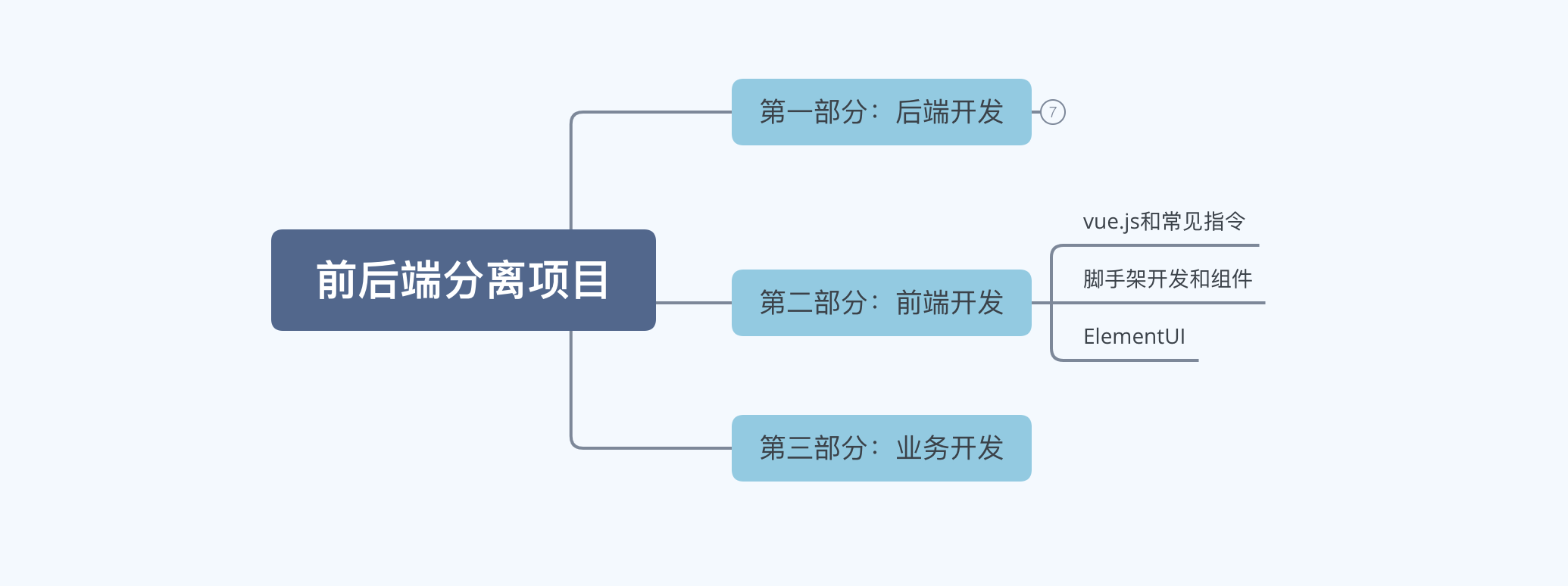
第二部分:前端开发
关于vue.js的版本
- vue2,经典版本,现在绝大部分的企业项目都是用vue2版本开发。
- vue3,新版本,未来的趋势。
1.vue.js 初体验
基于vue.js框架来编写项目需要以下几个步骤:
- 导入vue.js包(CDN)
<!-- 开发环境版本,包含了有帮助的命令行警告 -->
<script src="https://cdn.jsdelivr.net/npm/vue@2/dist/vue.js"></script>

<!-- 生产环境版本,优化了尺寸和速度 -->
<script src="https://cdn.jsdelivr.net/npm/vue@2"></script>

# 当然,也可以将文件下载下来再通过本地导入。
- 应用
<!DOCTYPE html>
<html lang="en">
<head>
    <meta charset="UTF-8">
    <title>Title</title>
    <!-- 1.引入vue.js文件 -->
    <script src="https://cdn.jsdelivr.net/npm/vue@2/dist/vue.js"></script>
</head>
<body>

<!-- 2.指定区域,该区域的内容希望由vue.js来接管。 -->
<div id="app">
    <h1>欢迎学习Vue.js</h1>
    <div>我叫{{name}},微信{{wechat}}</div>

    <input type="button" value="点我" v-on:click="clickMe">
</div>


<script>
  // 3.创建Vue对象,并关联指定HTML区域。
    var app = new Vue({
        el: '#app',
        data: {
            name: '武沛齐',
            wechat: 'wupeiqi888'
        },
        methods: {
            clickMe: function () {
                // 获取值this.name
                // 修改值this.name = "xx"
                this.name = "alex";
                this.wechat = "wupeiqi666";
            }
        }
    })
</script>
</body>
</html>
后期编写前端代码使用IDE:WebStom (与Pycharm是一家子)【2020.1版本破解同Pycharm】
2.vue常见指令
想要使用vue.js来进行开发,就必须学会vue.js中提供的指令,明白每个指令是什么意思,才能更灵活的让他去显示我们想要的效果。
一大波vue指令来了。。。
2.1 插值表达式
一般在显示文本内容的标签中使用。
<!DOCTYPE html>
<html lang="en">
<head>
    <meta charset="UTF-8">
    <title>Title</title>
    <script src="https://cdn.jsdelivr.net/npm/vue@2/dist/vue.js"></script>
</head>
<body>
<div id="app">
    <div>我叫{{name}},我喜欢{{hobby}},邮箱:{{dataInfo.email}}</div>
    <ul>
        <li>{{'李杰'}}</li>
        <li>{{'李杰' + "土鳖"}}</li>
        <li>{{ base + 1 + 1 }}</li>
        <li>{{ 1===1 ?"李杰":"alex"}}</li>
    </ul>
    <ul>
        <li>{{ condition?"李杰":"alex"}}</li>
    </ul>
    <input type="button" value="点我" v-on:click="clickMe">
</div>


<script>
    var app = new Vue({
        el: '#app',
        data: {
            name: '武沛齐',
            hobby: '篮球',
            dataInfo: {
                id: 1,
                email: "xxx.com"
            },
            condition: false,
            base: 1
        },
        methods: {
            clickMe: function () {
                this.name = "苑日天";
                this.condition = true;
                this.dataInfo.email = "wupeiqi@live.com";
                this.base += 100;
            }
        }
    })
</script>
</body>
</html>
2.2 v-bind指令
一般用于对标签中的属性进行操作。
<!DOCTYPE html>
<html lang="en">
<head>
    <meta charset="UTF-8">
    <title>Title</title>
    <script src="https://cdn.jsdelivr.net/npm/vue@2/dist/vue.js"></script>
    <style>
        .ig {
            border: 2px solid red;
        }
    </style>
</head>
<body>
<div id="app">
    <img src='xx.png' class='c1' />

    <img alt="" v-bind:src="imageUrl" v-bind:class="cls">

</div>


<script>
    var app = new Vue({
        el: '#app',
        data: {
            imageUrl: 'https://hcdn2.luffycity.com/media/frontend/public_class/PY1@2x_1566529821.1110113.png',
            cls: "ig",
        }
    })
</script>
</body>
</html>
<!DOCTYPE html>
<html lang="en">
<head>
    <meta charset="UTF-8">
    <title>Title</title>
    <script src="https://cdn.jsdelivr.net/npm/vue@2/dist/vue.js"></script>
    <style>
        .ig {
            border: 2px solid red;
        }

        .info {
            color: red;
        }

        .danger {
            font-size: 10px;
        }
    </style>
</head>
<body>
<div id="app">
    <img src='xx.png' class='c1'/>

    <img alt="" v-bind:src="imageUrl" v-bind:class="cls">

    <h1 v-bind:class="{info:v1,danger:v2}">你好呀111</h1>
    <h1 v-bind:class="clsDict">你好呀</h1>

    <h2 v-bind:class="[a1,a2]"></h2>
    <h2 v-bind:class="[1===1?a1:'y',a2]">111</h2>

    <h3 v-bind:style="{ color:clr,fontSize:size+'px'}">222</h3>
    <h3 style="color: red;font-size: 19px">333</h3>

    <input type="button" value="点我" v-on:click="clickMe">
</div>


<script>
    var app = new Vue({
        el: '#app',
        data: {
            imageUrl: 'https://hcdn2.luffycity.com/media/frontend/public_class/PY1@2x_1566529821.1110113.png',
            cls: "ig",
            v1: true,
            v2: true,
            clsDict: {
                info: false,
                danger: false
            },
            a1: "info",
            a2: "danger",
            clr: "red",
            size: "19",
        },
        methods:{
            clickMe:function () {
                this.v1 = false;
            }
        }
    })
</script>
</body>
</html>
v-bind注意:
- 简写的格式:
:属性名=xxx,例如:
- v-bind属于单向绑定( JS修改->HTML修改 )。
2.3 v-model指令
一般用于在交互的表中中使用,例如:input、select、textarea等。【双向绑定】
<!DOCTYPE html>
<html lang="en">
<head>
    <meta charset="UTF-8">
    <title>Title</title>
    <script src="https://cdn.jsdelivr.net/npm/vue@2/dist/vue.js"></script>
</head>
<body>
<div id="app">
    <div>
        用户名:<input type="text" v-model="user">
    </div>
    <div>
        密码:<input type="password" v-model="pwd">
    </div>
    <input type="button" value="登录" v-on:click="clickMe"/>
    <input type="button" value="重置" v-on:click="resetForm"/>
</div>


<script>
    var app = new Vue({
        el: '#app',
        data: {
            user: "",
            pwd: "",
        },
        methods: {
            clickMe: function () {
                console.log(this.user, this.pwd)
            },
            resetForm: function () {
                this.user = "";
                this.pwd = "";
            }
        }
    })
</script>
</body>
</html>
更多相关标签示例:
<!DOCTYPE html>
<html lang="en">
<head>
    <meta charset="UTF-8">
    <title>Title</title>
    <script src="https://cdn.jsdelivr.net/npm/vue@2/dist/vue.js"></script>
</head>
<body>
<div id="app">
    <div>
        用户名:<input type="text" v-model="user">
    </div>
    <div>
        密码:<input type="password" v-model="pwd">
    </div>
    <div>
        性别:
        <input type="radio" v-model="sex" value="1">男
        <input type="radio" v-model="sex" value="2">女
    </div>
    <div>
        爱好:
        <input type="checkbox" v-model="hobby" value="11">篮球
        <input type="checkbox" v-model="hobby" value="22">足球
        <input type="checkbox" v-model="hobby" value="33">评判求
    </div>
    <div>
        城市:
        <select v-model="city">
            <option value="sh">上海</option>
            <option value="bj">北京</option>
            <option value="sz">深圳</option>
        </select>
    </div>
    <div>
        擅长领域:
        <select v-model="company" multiple>
            <option value="11">技术</option>
            <option value="22">销售</option>
            <option value="33">运营</option>
        </select>
    </div>
    <div>
        其他:<textarea v-model="more"></textarea>
    </div>

    <input type="button" value="注 册" v-on:click="clickMe"/>
</div>


<script>
    var app = new Vue({
        el: '#app',
        data: {
            user: "",
            pwd: "",
            sex: "2",
            hobby: ["22"],
            city: "sz",
            company: ["22", "33"],
            more: '...'
        },
        methods: {
            clickMe: function () {
                console.log(this.user, this.pwd, this.sex, this.hobby, this.city, this.company, this.more);
            },
        }
    })
</script>
</body>
</html>
<!DOCTYPE html>
<html lang="en">
<head>
    <meta charset="UTF-8">
    <title>Title</title>
    <script src="https://cdn.jsdelivr.net/npm/vue@2/dist/vue.js"></script>
</head>
<body>
<div id="app">
    <div>
        用户名:<input type="text" v-model="info.user">
    </div>
    <div>
        密码:<input type="password" v-model="info.pwd">
    </div>
    <div>
        性别:
        <input type="radio" v-model="info.sex" value="1">男
        <input type="radio" v-model="info.sex" value="2">女
    </div>
    <div>
        爱好:
        <input type="checkbox" v-model="info.hobby" value="11">篮球
        <input type="checkbox" v-model="info.hobby" value="22">足球
        <input type="checkbox" v-model="info.hobby" value="33">评判求
    </div>
    <div>
        城市:
        <select v-model="info.city">
            <option value="sh">上海</option>
            <option value="bj">北京</option>
            <option value="sz">深圳</option>
        </select>
    </div>
    <div>
        擅长领域:
        <select v-model="info.company" multiple>
            <option value="11">技术</option>
            <option value="22">销售</option>
            <option value="33">运营</option>
        </select>
    </div>
    <div>
        其他:<textarea v-model="info.more"></textarea>
    </div>

    <input type="button" value="注 册" v-on:click="clickMe"/>
</div>


<script>
    var app = new Vue({
        el: '#app',
        data: {
            info: {
                user: "",
                pwd: "",
                sex: "2",
                hobby: ["22"],
                city: "sz",
                company: ["22", "33"],
                more: '...'
            }
        },
        methods: {
            clickMe: function () {
                console.log(this.info);
            },
        }
    })
</script>
</body>
</html>
2.4 v-for指令
用户数据进行循环并展示。
示例1:
<div id="app">
    <ul>
        <li v-for="item in dataList">{{ item }}</li>
    </ul>
</div>
<script>
    var app = new Vue({
        el: '#app',
        data: {
            dataList: ["郭德纲", "于谦", "三哥"],
        }
    })
</script>
示例2:
<div id="app">
    <ul>
        <li v-for="(item,idx) in dataList">{{idx}} - {{ item }}</li>
    </ul>
</div>
<script>
    var app = new Vue({
        el: '#app',
        data: {
            dataList: ["郭德纲", "于谦", "三哥"],
        }
    })
</script>
示例3:
<div id="app">
    <ul>
        <li v-for="(value,key) in dataDict">{{key}} - {{ value }}</li>
    </ul>
</div>
<script>
    var app = new Vue({
        el: '#app',
        data: {
            dataDict: {
                id: 1,
                age: 18,
                name: "xxx"
            }
        }
    })
</script>
示例4:
<div id="app">
    <ul>
        <li v-for="(item,idx) in cityList">{{item.id}} - {{ item.text }}</li>
    </ul>
</div>
<script>
    var app = new Vue({
        el: '#app',
        data: {
            cityList: [
                {id: 11, text: "上海"},
                {id: 12, text: "北京"},
                {id: 13, text: "深圳"},
            ]
        }
    })
</script>
示例5:
<div id="app">
    <ul>
        <li v-for="(item,idx) in cityList">
            <span v-for="(v,k) in item">{{k}} {{v}}</span>
        </li>
    </ul>
</div>
<script>
    var app = new Vue({
        el: '#app',
        data: {
            cityList: [
                {id: 11, text: "上海"},
                {id: 12, text: "北京"},
                {id: 13, text: "深圳"},
            ]
        }
    })
</script>
2.5 v-on指令
事件相关的指令,例如:
<!DOCTYPE html>
<html lang="en">
<head>
    <meta charset="UTF-8">
    <title>Title</title>
    <script src="https://cdn.jsdelivr.net/npm/vue@2/dist/vue.js"></script>
</head>
<body>
<div id="app">
    <ul>
        <li v-on:click="clickMe">点击</li>
        <li @click="clickMe">点击</li>
        <li v-on:dblclick="doSomething('双击')">双击</li>
        <li v-on:mouseover="doSomething('进入')" v-on:mouseout="doSomething('离开')">进入&离开</li>
    </ul>
</div>

<script>
    var app = new Vue({
        el: '#app',
        data: {},
        methods: {
            clickMe: function () {
                alert("点击了")
            },
            doSomething: function (msg) {
                console.log(msg);
            }
        }
    })
</script>
</body>
</html>
注意:事件可以简写为 <div @click="xx">点击</div>
案例:数据管理
数据的管理包括对数据:展示、动态添加、删除、修改。
- 数据列表展示
<!DOCTYPE html>
<html lang="en">
<head>
    <meta charset="UTF-8">
    <title>Title</title>
    <script src="https://cdn.jsdelivr.net/npm/vue@2/dist/vue.js"></script>
    <style>
        .penal {
            border: 1px solid #dddddd;
            margin: 20px 0 0 0;
            padding: 10px;
            border-bottom: 0;
            background-color: #d9d9d9;
        }

        .table {
            width: 100%;
            border-collapse: collapse;
            border-spacing: 0;
        }

        .table > tbody > tr > td, .table > tbody > tr > th, .table > tfoot > tr > td, .table > tfoot > tr > th, .table > thead > tr > td, .table > thead > tr > th {
            padding: 8px;
            vertical-align: top;
            border: 1px solid #ddd;
            text-align: left;
        }
    </style>
</head>
<body>

<div id="app">
    <h3 class="penal">数据列表</h3>
    <table class="table">
        <thead>
        <tr>
            <td>姓名</td>
            <td>年龄</td>
        </tr>
        </thead>
        <tbody>
        <tr v-for="item in dataList">
            <td>{{item.name}}</td>
            <td>{{item.age}}</td>
        </tr>
        </tbody>
    </table>
</div>
<script>
    var app = new Vue({
        el: '#app',
        data: {
            dataList: [
                {"name": "武沛齐", "age": 19},
                {"name": "alex", "age": 89},
            ]
        }
    })
</script>
</body>
</html>
- 数据添加
<!DOCTYPE html>
<html lang="en">
<head>
    <meta charset="UTF-8">
    <title>Title</title>
    <script src="https://cdn.jsdelivr.net/npm/vue@2/dist/vue.js"></script>
    <style>
        .penal {
            border: 1px solid #dddddd;
            margin: 20px 0 0 0;
            padding: 10px;
            border-bottom: 0;
            background-color: #d9d9d9;
        }

        .table {
            width: 100%;
            border-collapse: collapse;
            border-spacing: 0;
        }

        .table > tbody > tr > td, .table > tbody > tr > th, .table > tfoot > tr > td, .table > tfoot > tr > th, .table > thead > tr > td, .table > thead > tr > th {
            padding: 8px;
            vertical-align: top;
            border: 1px solid #ddd;
            text-align: left;
        }
    </style>
</head>
<body>

<div id="app">
    <h3 class="penal">表单区域</h3>
    <div>
        <div>
            <label>姓名</label>
            <input type="text" v-model="user">
        </div>
        <div>
            <label>年龄</label>
            <input type="text" v-model="age">
            <input type="button" value="新建" @click="addUser">
        </div>
    </div>

    <h3 class="penal">数据列表</h3>
    <table class="table">
        <thead>
        <tr>
            <td>姓名</td>
            <td>年龄</td>
        </tr>
        </thead>
        <tbody>
        <tr v-for="item in dataList">
            <td>{{item.name}}</td>
            <td>{{item.age}}</td>
        </tr>
        </tbody>
    </table>
</div>
<script>
    var app = new Vue({
        el: '#app',
        data: {
            user: "",
            age: "",
            dataList: [
                {name: "武沛齐", age: 19},
                {name: "alex", age: 89},
            ]
        },
        methods: {
            addUser: function () {
                let row = {name: this.user, age: this.age};
                this.dataList.push(row);
                this.user = "";
                this.age = "";
            }
        }
    })
</script>
</body>
</html>
- 删除数据
<!DOCTYPE html>
<html lang="en">
<head>
    <meta charset="UTF-8">
    <title>Title</title>
    <script src="https://cdn.jsdelivr.net/npm/vue@2/dist/vue.js"></script>
    <style>
        .penal {
            border: 1px solid #dddddd;
            margin: 20px 0 0 0;
            padding: 10px;
            border-bottom: 0;
            background-color: #d9d9d9;
        }

        .table {
            width: 100%;
            border-collapse: collapse;
            border-spacing: 0;
        }

        .table > tbody > tr > td, .table > tbody > tr > th, .table > tfoot > tr > td, .table > tfoot > tr > th, .table > thead > tr > td, .table > thead > tr > th {
            padding: 8px;
            vertical-align: top;
            border: 1px solid #ddd;
            text-align: left;
        }
    </style>
</head>
<body>

<div id="app">
    <h3 class="penal">表单区域</h3>
    <div>
        <div>
            <label>姓名</label>
            <input type="text" v-model="user">
        </div>
        <div>
            <label>年龄</label>
            <input type="text" v-model="age">
            <input type="button" value="新建" @click="addUser">
        </div>
    </div>

    <h3 class="penal">数据列表</h3>
    <table class="table">
        <thead>
        <tr>
            <td>姓名</td>
            <td>年龄</td>
            <td>操作</td>
        </tr>
        </thead>
        <tbody>
        <tr v-for="(item,idx) in dataList">
            <td>{{item.name}}</td>
            <td>{{item.age}}</td>
            <td>
                <input type="button" value="删除" @click="deleteRow" :data-idx="idx"/>
            </td>
        </tr>
        </tbody>
    </table>
</div>
<script>
    var app = new Vue({
        el: '#app',
        data: {
            user: "",
            age: "",
            dataList: [
                {name: "武沛齐", age: 19},
                {name: "alex", age: 89},
            ]
        },
        methods: {
            addUser: function () {
                let row = {name: this.user, age: this.age};
                this.dataList.push(row);
                this.user = "";
                this.age = "";
            },
            deleteRow: function (event) {
                // 根据索引删除dataList中的值
                let idx = event.target.dataset.idx;
                this.dataList.splice(idx, 1);
            }
        }
    })
</script>
</body>
</html>
- 编辑修改数据
<!DOCTYPE html>
<html lang="en">
<head>
    <meta charset="UTF-8">
    <title>Title</title>
    <script src="https://cdn.jsdelivr.net/npm/vue@2/dist/vue.js"></script>
    <style>
        .penal {
            border: 1px solid #dddddd;
            margin: 20px 0 0 0;
            padding: 10px;
            border-bottom: 0;
            background-color: #d9d9d9;
        }

        .table {
            width: 100%;
            border-collapse: collapse;
            border-spacing: 0;
        }

        .table > tbody > tr > td, .table > tbody > tr > th, .table > tfoot > tr > td, .table > tfoot > tr > th, .table > thead > tr > td, .table > thead > tr > th {
            padding: 8px;
            vertical-align: top;
            border: 1px solid #ddd;
            text-align: left;
        }
    </style>
</head>
<body>

<div id="app">
    <h3 class="penal">表单区域</h3>
    <div>
        <div>
            <label>姓名</label>
            <input type="text" v-model="user">
        </div>
        <div>
            <label>年龄</label>
            <input type="text" v-model="age">
            <input type="button" :value="title" @click="addUser">
        </div>
    </div>

    <h3 class="penal">数据列表</h3>
    <table class="table">
        <thead>
        <tr>
            <td>姓名</td>
            <td>年龄</td>
            <td>操作</td>
        </tr>
        </thead>
        <tbody>
        <tr v-for="(item,idx) in dataList">
            <td>{{item.name}}</td>
            <td>{{item.age}}</td>
            <td>
                <input type="button" value="删除" @click="deleteRow" :data-idx="idx"/>
                <input type="button" value="编辑" @click="editRow" :data-idx="idx"/>
            </td>
        </tr>
        </tbody>
    </table>
</div>
<script>
    var app = new Vue({
        el: '#app',
        data: {
            editIndex: undefined,
            title: "新建",
            user: "",
            age: "",
            dataList: [
                {name: "武沛齐", age: 19},
                {name: "alex", age: 89},
            ]
        },
        methods: {
            addUser: function () {
                if (this.editIndex) {
                    // 修改
                    this.dataList[this.editIndex].name = this.user;
                    this.dataList[this.editIndex].age = this.age;
                } else {
                    let row = {name: this.user, age: this.age};
                    this.dataList.push(row);
                }
                this.user = "";
                this.age = "";
                this.editIndex = undefined;
                this.title = "新建";
            },
            deleteRow: function (event) {
                // 根据索引删除dataList中的值
                let idx = event.target.dataset.idx;
                this.dataList.splice(idx, 1);
            },
            editRow: function (event) {
                let idx = event.target.dataset.idx;
                // let name = this.dataList[idx].name;
                // let age = this.dataList[idx].age;
                // let {id, name} = {id: 1, name: "武沛齐"};
                // console.log(id, name);
                let {name, age} = this.dataList[idx];
                this.user = name;
                this.age = age;
                this.title = "编辑";
                this.editIndex = idx;
            }
        }
    })
</script>
</body>
</html>
2.6 v-if指令
条件判断。
<!DOCTYPE html>
<html lang="en">
<head>
    <meta charset="UTF-8">
    <title>Title</title>
    <script src="https://cdn.jsdelivr.net/npm/vue@2/dist/vue.js"></script>
</head>
<body>
<div id="app">
    <a v-if="isLogin">{{user}}</a>
    <a v-else>登录</a>
</div>

<script>
    var app = new Vue({
        el: '#app',
        data: {
            isLogin: false,
            user: "武沛齐"
        }
    })
</script>
</body>
</html>
<!DOCTYPE html>
<html lang="en">
<head>
    <meta charset="UTF-8">
    <title>Title</title>
    <script src="https://cdn.jsdelivr.net/npm/vue@2/dist/vue.js"></script>
</head>
<body>
<div id="app">
    <h1 v-if="v1">阿里无人区</h1>


    <h1 v-if="v2">去西藏</h1>
    <h1 v-else>去新疆</h1>


    <div v-if="v3 === '北京'">
        <h1>天安门</h1>
    </div>
    <div v-else-if="v3 === '新疆'">
        <h1>乌鲁木齐</h1>
    </div>
    <div v-else-if="v3 ==='西藏'">
        <h1>拉萨</h1>
    </div>
    <div v-else>
        <h1>大理</h1>
    </div>
</div>

<script>
    var app = new Vue({
        el: '#app',
        data: {
            v1: true,
            v2: true,
            v3: "新疆"
        }
    })
</script>
</body>
</html>
2.7 v-show指令
根据条件显示或隐藏(标签都会渲染到页面)。
<!DOCTYPE html>
<html lang="en">
<head>
    <meta charset="UTF-8">
    <title>Title</title>
    <script src="https://cdn.jsdelivr.net/npm/vue@2/dist/vue.js"></script>
</head>
<body>
<div id="app">
    <h1 v-show="v1">可可西里</h1>
    <h1 v-show="!v1">罗布泊</h1>
</div>

<script>
    var app = new Vue({
        el: '#app',
        data: {
            v1: false,
        }
    })
</script>
</body>
</html>
<!DOCTYPE html>
<html lang="en">
<head>
    <meta charset="UTF-8">
    <title>Title</title>
    <script src="https://cdn.jsdelivr.net/npm/vue@2/dist/vue.js"></script>
    <style>
        label {
            width: 60px;
            display: inline-block;
            text-align: right;
            margin-right: 8px;
        }
    </style>
</head>
<body>
<div id="app">
    <input type="button" value="密码登录" @click="isSms=false"/>
    <input type="button" value="短信登录" @click="isSms=true"/>

    <div v-show="isSms">
        <p>
            <label>手机号</label>
            <input type="text" placeholder="手机号">
        </p>
        <p>
            <label>验证码</label>
            <input type="text" placeholder="验证码">
        </p>
    </div>
    <div v-show="!isSms">
        <p>
            <label>用户名</label>
            <input type="text" placeholder="用户名">
        </p>
        <p>
            <label>密码</label>
            <input type="password" placeholder="密码">
        </p>
    </div>

</div>

<script>
    var app = new Vue({
        el: '#app',
        data: {
            isSms: false,
        }
    })
</script>
</body>
</html>
案例:用户登录
在编写案例之前,现在来学下axios,他是一个HTTP 库,可以发送Http请求。
<script src="https://unpkg.com/axios/dist/axios.min.js"></script>
<script>
    axios({
        method: "post",
        url: 'https://api.luf...ord/login/',
        params: {
            v1:123,
            v2:456
        },
        data: {
            name:"武沛齐",
            pwd:"123"
        },
        headers: {
            "Content-Type": "application/json"
        }
    }).then(function (res) {
        console.log(res.data);
    }).catch(function (error) {
        console.log(error);
    })
</script>
<!DOCTYPE html>
<html lang="en">
<head>
    <meta charset="UTF-8">
    <title>Title</title>
    <script src="https://cdn.jsdelivr.net/npm/vue@2/dist/vue.js"></script>
    <script src="https://unpkg.com/axios/dist/axios.min.js"></script>
    <style>
        label {
            width: 60px;
            display: inline-block;
            text-align: right;
            margin-right: 8px;
        }
    </style>
</head>
<body>
<div id="app">
    <input type="button" value="密码登录" @click="isSms=false"/>
    <input type="button" value="短信登录" @click="isSms=true"/>

    <div v-show="isSms">
        <p>
            <label>手机号</label>
            <input type="text" placeholder="手机号" v-model="sms.mobile">
        </p>
        <p>
            <label>验证码</label>
            <input type="text" placeholder="验证码" v-model="sms.code">
        </p>
    </div>
    <div v-show="!isSms">
        <p>
            <label>用户名</label>
            <input type="text" placeholder="用户名" v-model="info.username">
        </p>
        <p>
            <label>密码</label>
            <input type="password" placeholder="密码" v-model="info.password">
        </p>
    </div>

    <input type="button" value="登 录" @click="loginForm"/>
</div>

<script>
    var app = new Vue({
        el: '#app',
        data: {
            isSms: false,
            info: {
                username: "",
                password: "",
            },
            sms: {
                mobile: "",
                code: ""
            }
        },
        methods: {
            loginForm: function () {
                // 1.获取用户输入的值
                let dataDict = this.isSms ? this.sms : this.info;

                let url;
                if (this.isSms) {
                    url = "https://api.luffycity.com/api/v1/auth/mobile/login/?loginWay=mobile";
                } else {
                    url = "https://api.luffycity.com/api/v1/auth/password/login/?loginWay=password";
                }

                // 2.想某个地址发送网络请求 axios
                // https://api.luffycity.com/api/v1/auth/password/login/?loginWay=password
                // {"username":"alex123","password":"999"}

                // https://api.luffycity.com/api/v1/auth/mobile/login/?loginWay=mobile
                // {"mobile":"18630087660","code":"123123"}
                axios({
                    method: "post",
                    url: url,
                    data: dataDict,
                    headers: {
                        "Content-Type": "application/json"
                    }
                }).then(function (res) {
                    if (res.data.code === -1) {
                        alert(res.data.msg);
                        return;
                    }
                    // 登录成功后跳转
                    window.location.href = "https://www.luffycity.com"
                }).catch(function (error) {
                    alert("请求异常,请重新操作。")
                })
            }
        }
    })
</script>
</body>
</html>
3.组件化开发
在开发过程中,我们可以将页面中 某一部分 的功能编写成一个组件,然后再在页面上进行引用。
- 有利于划分功能模块的开发(HTML、CSS、JavaScript等相关代码都集成到组件中)。
- 有利于重用
3.1 局部组件
<!DOCTYPE html>
<html lang="en">
<head>
    <meta charset="UTF-8">
    <title>Title</title>
    <script src="https://cdn.jsdelivr.net/npm/vue@2/dist/vue.js"></script>
</head>
<body>
<div id="app">
    <h1>=======当前页面=======</h1>
    {{name}}

    <h1>=======引入子组件=======</h1>
    <Demo></Demo>
    <Demo></Demo>
    <Bb></Bb>
    <Bb></Bb>
    <hr/>
    <Bb></Bb>
</div>
<script>
    //创建子组件
    const Demo = {
        data:function() {
            return {
                msg: '哈哈哈哈哈'
            }
        },
        template: `
            <div>
                <h1>{{msg}}</h1>
                <input type="text" v-model="msg"/>
                <input type="button" @click="showMeg" value="点我呀">
            </div>
        `,
        methods: {
            showMeg: function () {
                alert(this.msg);
            }
        }
    }

    //创建子组件
    const Bili = {
        // 组件中的data是一个方法,并返回值(与Vue对象创建不同)
        data:function() {
            return {
                dataList: [
                    {"id": 1, "title": "路飞学城倒闭了"},
                    {"id": 2, "title": "老板和保洁阿姨跑了"},
                ]
            }
        },
        template: `
            <div>
                <h1>数据列表</h1>
                <table border="1">
                    <thead>
                    <tr>
                        <th>ID</th>
                        <th>标题</th>
                    </tr>
                    </thead>
                    <tbody>
                    <tr v-for="item in dataList">
                        <td>{{item.id}}</td>
                        <td>{{item.title}}</td>
                    </tr>
                    </tbody>
                </table>
            </div>
        `
    }

    var app = new Vue({
        el: '#app',
        data: {
            name: "武沛齐",
        },
        components: {
            Demo,
            Bb: Bili
        },
        methods: {}
    })
</script>
</body>
</html>
3.2 全局组件
<!DOCTYPE html>
<html lang="en">
<head>
    <meta charset="UTF-8">
    <title>Title</title>
    <script src="https://cdn.jsdelivr.net/npm/vue@2/dist/vue.js"></script>
</head>
<body>
<div id="app">
    <h1>=======当前页面=======</h1>
    {{name}}

    <h1>=======引入子组件=======</h1>
    <Demo></Demo>
    <Demo></Demo>
    <Bili></Bili>
    <Bili></Bili>
</div>
<script>
    //创建子组件
    Vue.component('Demo', {
        data: function () {
            return {
                msg: '哈哈哈哈哈'
            }
        },
        template: `
            <div>
                <h1>{{msg}}</h1>
                <input type="text" v-model="msg"/>
                <input type="button" @click="showMeg" value="点我呀">
            </div>
        `,
        methods: {
            showMeg: function () {
                alert(this.msg);
            }
        }
    });

    //创建子组件
    Vue.component('Bili', {
        // 组件中的data是一个方法,并返回值(与Vue对象创建不同)
        data: function () {
            return {
                dataList: [
                    {"id": 1, "title": "路飞学城倒闭了"},
                    {"id": 2, "title": "老板和保洁阿姨跑了"},
                ]
            }
        },
        template: `
            <div>
                <h1>数据列表</h1>
                <table border="1">
                    <thead>
                    <tr>
                        <th>ID</th>
                        <th>标题</th>
                    </tr>
                    </thead>
                    <tbody>
                    <tr v-for="item in dataList">
                        <td>{{item.id}}</td>
                        <td>{{item.title}}</td>
                    </tr>
                    </tbody>
                </table>
            </div>
        `
    });

    var app = new Vue({
        el: '#app',
        data: {
            name: "武沛齐",
        },
        methods: {}
    })
</script>
</body>
</html>
4.vue-router组件
vue + vue-router组件 可以实现 SPA(single Page Application),即:单页面应用。
单页面应用,简而言之就是项目只有一个页面。
一个页面如何呈现多种界面的效果呢?
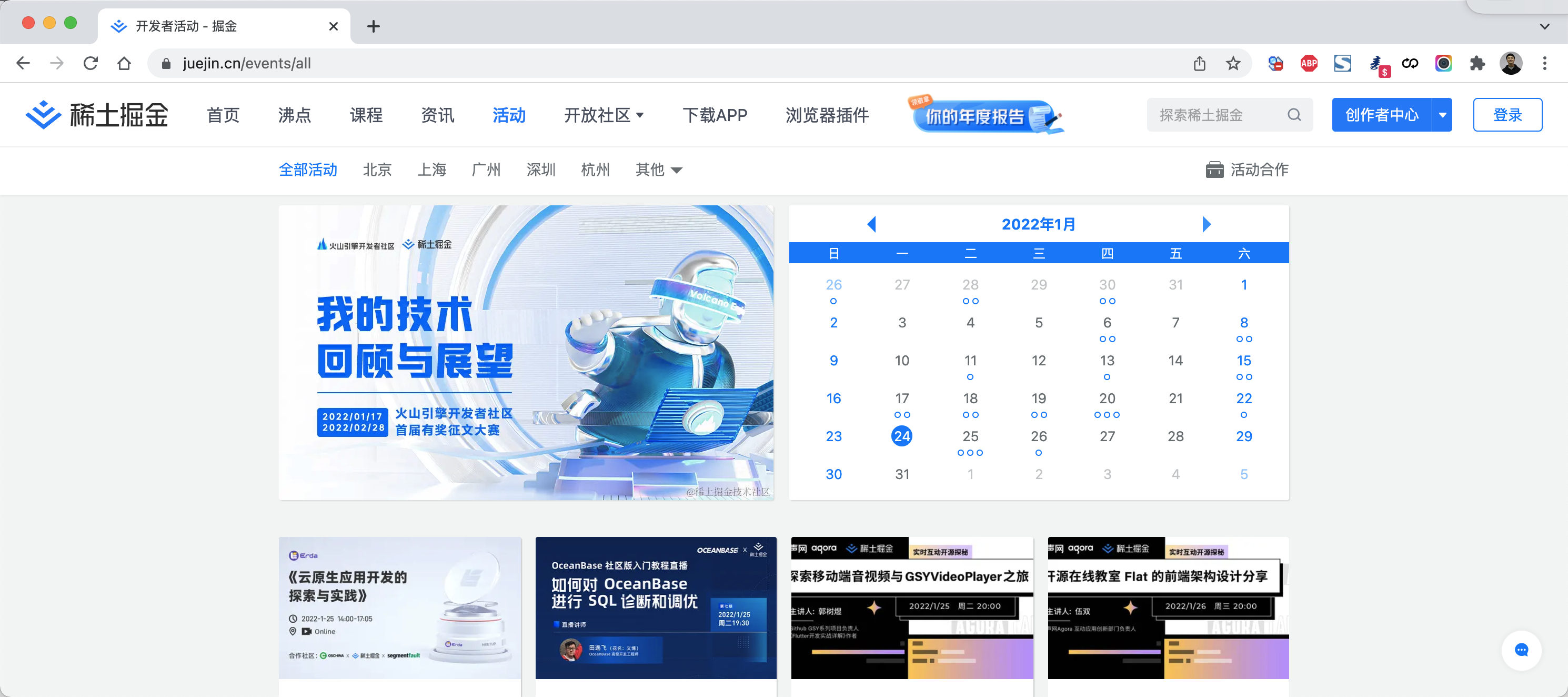
- 基于vue开发多个组件,例如:活动组件、课程组件、咨询组件
- 在页面上 vue-router 用来管理这些组件,用户点击某个按钮,就显示特定的组件(数据基于Ajax获取)。
4.1 下载和引用
官方地址:https://router.vuejs.org/zh/
下载地址:https://unpkg.com/vue-router@4
<!DOCTYPE html>
<html lang="en">
<head>
    <meta charset="UTF-8">
    <title>Title</title>

    <!--  vue-router.js 依赖 vue.js -->
    <script src="vue.js"></script>
    <script src="vue-router.js"></script>

</head>
<body>
    ...
</body>
</html>
注意:后期用脚手架开发时,可以直接使用npm下载和引用。
4.2 快速上手
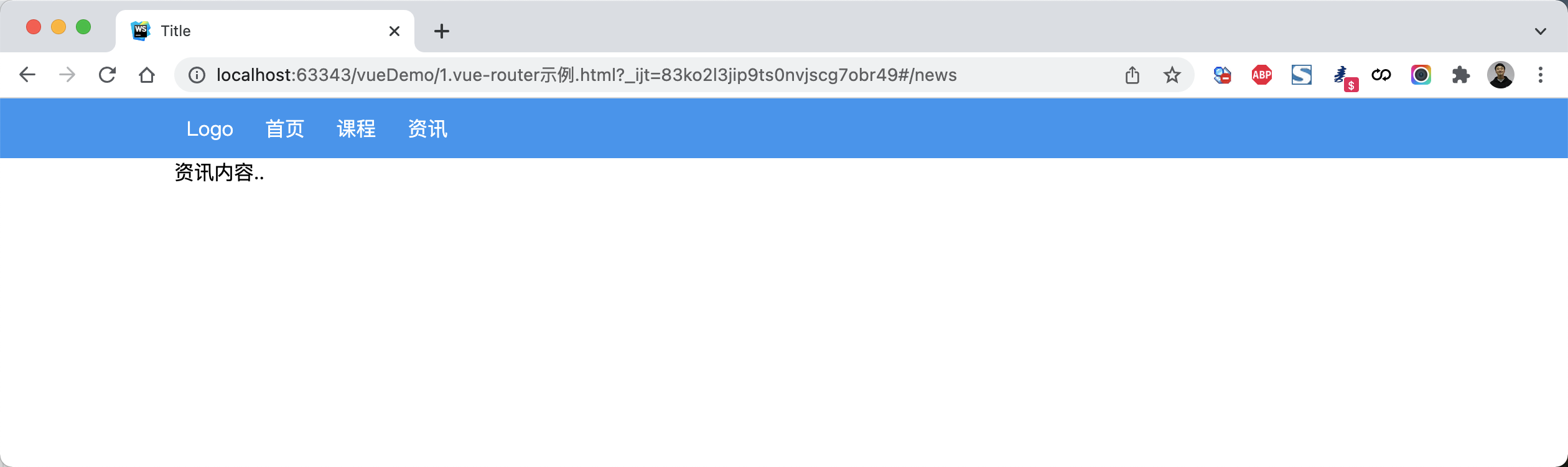
<!DOCTYPE html>
<html lang="en">
<head>
    <meta charset="UTF-8">
    <title>Title</title>
    <style>
        body {
            margin: 0;
        }

        .container {
            width: 980px;
            margin: 0 auto;
        }

        .menu {
            height: 48px;
            background-color: #499ef3;
            line-height: 48px;

        }

        .menu a {
            color: white;
            text-decoration: none;
            padding: 0 10px;
        }
    </style>

    <script src="vue.js"></script>
    <script src="vue-router.js"></script>
</head>
<body>
<div id="app">
    <div class="menu">
        <div class="container">
            <router-link to="/">Logo</router-link>
            <router-link to="/home">首页</router-link>
            <router-link to="/course">课程</router-link>
            <router-link to="/news">资讯</router-link>
        </div>
    </div>
    <div class="container">
        <router-view></router-view>
    </div>

</div>

<script>

    const Home = {template: '<div>首页内容...</div>'}
    const Course = {template: '<div>课程内容..</div>'}
    const News = {template: '<div>资讯内容..</div>'}

    const router = new VueRouter({
        routes: [
            {
                path: '/',
                component: Home
            },
            {
                path: '/home',
                component: Home
            },
            {path: '/course', component: Course},
            {path: '/news', component: News}
        ],
    })

    var app = new Vue({
        el: '#app',
        data: {
            name: "武沛齐",
        },
        methods: {},
        router: router
    })
</script>
</body>
</html>
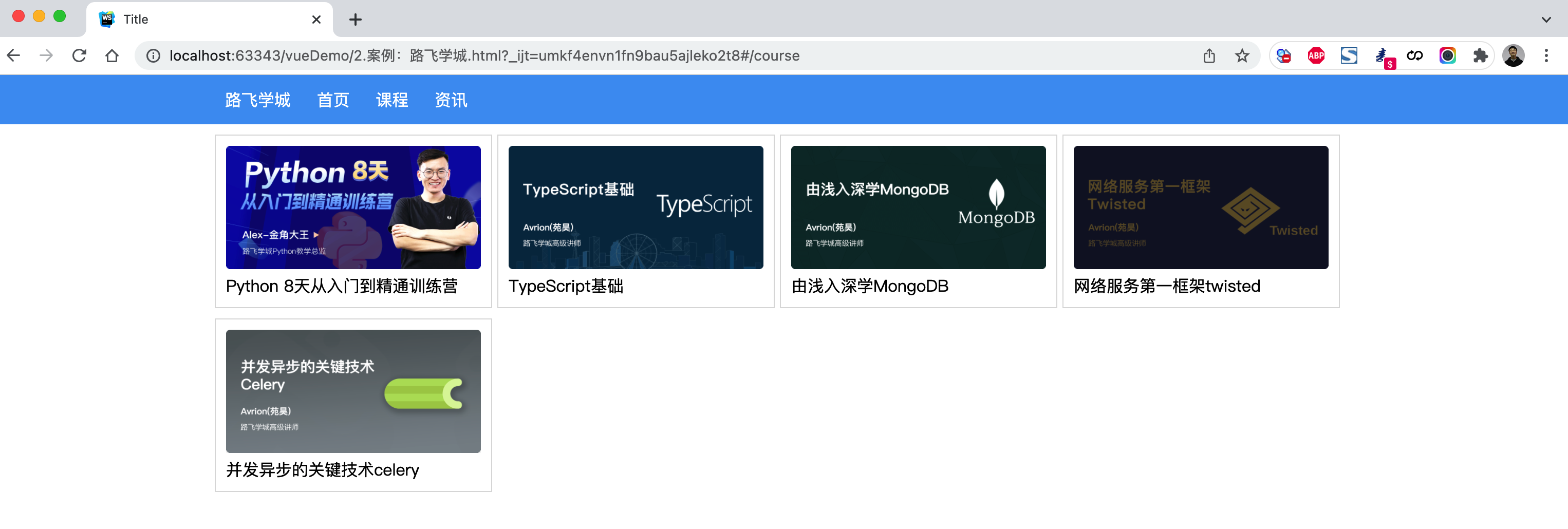
案例:路飞学城(第1版)
<!DOCTYPE html>
<html lang="en">
<head>
    <meta charset="UTF-8">
    <title>Title</title>
    <style>
        body {
            margin: 0;
        }

        .container {
            width: 1100px;
            margin: 0 auto;
        }

        .menu {
            height: 48px;
            background-color: #499ef3;
            line-height: 48px;

        }

        .menu a {
            color: white;
            text-decoration: none;
            padding: 0 10px;
        }

        .course-list {
            display: flex;
            flex-wrap: wrap;
            justify-content: flex-start;
        }

        .course-list .item {
            width: 248px;
            padding: 10px;
            border: 1px solid #dddddd;
            margin-right: 5px;
            margin-top: 10px;
        }

        .course-list .item img {
            width: 100%;
            height: 120px;
        }
    </style>

    <script src="vue.js"></script>
    <script src="vue-router.js"></script>
    <script src="axios.min.js"></script>
</head>
<body>
<div id="app">
    <div class="menu">
        <div class="container">
            <router-link to="/">路飞学城</router-link>
            <router-link to="/home">首页</router-link>
            <router-link to="/course">课程</router-link>
            <router-link to="/news">资讯</router-link>
        </div>
    </div>
    <div class="container">
        <router-view></router-view>
    </div>

</div>

<script>

    const Home = {
        data: function () {
            return {
                title: "欢迎使用路飞学城"
            }
        },
        template: `<h2>{{title}}</h2>`
    }
    const Course = {
        data: function () {
            return {
                courseList: []
            }
        },
        created: function () {
            /* 组件创建完成之后自动触发【此时组件的对象已创建,但还未将页面先关的DOM创建并显示在页面上】
                 - 可以去操作组件对象,例如:this.courseList = [11,22,33]
                 - 不可以去操作DOM,例如:document.getElementById (未创建)
             */
            axios({
                method: "get",
                url: 'https://api.luffycity.com/api/v1/course/actual/?limit=5&offset=0',
                headers: {
                    "Content-Type": "application/json"
                }
            }).then((res) => {
                this.courseList = res.data.data.result;
            })

        },
        mounted: function () {
            /* DOM对象已在页面上生成,此时就可以 */
        },
        template: `
            <div class="course-list">
                <div class="item" v-for="item in courseList">
                    <img :src="item.cover" alt="">
                    <a>{{item.name}}</a>
                </div>
            </div>`
    }
    const News = {
        data: function () {
            return {
                dataList: []
            }
        },
        created: function () {
            /* 组件创建完成之后自动触发【此时组件的对象已创建,但还未将页面先关的DOM创建并显示在页面上】
                 - 可以去操作组件对象,例如:this.courseList = [11,22,33]
                 - 不可以去操作DOM,例如:document.getElementById (未创建)
             */
            axios({
                method: "get",
                url: 'https://api.luffycity.com/api/v1/course/actual/?limit=5&offset=10',
                headers: {
                    "Content-Type": "application/json"
                }
            }).then((res) => {
                this.dataList = res.data.data.result;
            })

        },
        template: `<ul><li v-for="item in dataList">{{item.name}}</li></ul>`
    }

    const router = new VueRouter({
        routes: [
            {path: '/', component: Home},
            {path: '/home', component: Home},
            {path: '/course', component: Course},
            {path: '/news', component: News}
        ],
        //mode: 'history'
    })

    var app = new Vue({
        el: '#app',
        data: {},
        methods: {},
        router: router
    })
</script>
</body>
</html>
4.3 路由和传值
当某个组件可以根据某些参数值的不同,展示不同效果时,需要用到动态路由。
例如:访问网站看到课程列表,点击某个课程,就可以跳转到课程详细页面(根据课程ID不同展示不同数据)。
如何来设置动态路由呢?
- 定义路由
const router = new VueRouter({
    routes: [
        { path: '/', component: Home},
        { path: '/course', component: Course, name: "Course"}
        { path: '/detail/:id', component: Detail, name: "Detail"}
    ],
})
- HTML展示
<div>
    <router-link to="/">首页</router-link>
    <router-link to="/course">课程</router-link>
    <router-link to="/detail/123">课程</router-link>

    <router-link :to="{path:'/course'}">课程</router-link>
    <router-link :to="{path:'/course?size=19&page=2'}">课程</router-link>
    <router-link :to="{path:'/course', query:{size:19,page:2}">课程</router-link>

    <router-link :to="{name:'Course'}">课程</router-link>
    <router-link :to="{name:'Course', query:{size:19,page:2} }">课程</router-link>

    <router-link :to="{path:'/detail/22',query:{size:123}}">Linux</router-link>
    <router-link :to="{name:'Detail',params:{id:3}, query:{size:29}}">网络安全</router-link>
</div>

<h1>内容区域</h1>
<router-view></router-view>
- 组件获取URL传值和GET参数
 const Detail = {
     data: function () {
         return {
             title: "详细页面",
             paramDict: null,
             queryDict: null,

         }
     },
     created: function () {
         this.paramDict = this.$route.params;
         this.queryDict = this.$route.query;
         // 发送axios请求
     },
     template: `<div><h2>{{title}}</h2><div>当前请求的数据 {{paramDict}}  {{queryDict}}</div></div>`
 }
案例:路飞学城(第2版)
点击课程,查看课程详细页面。
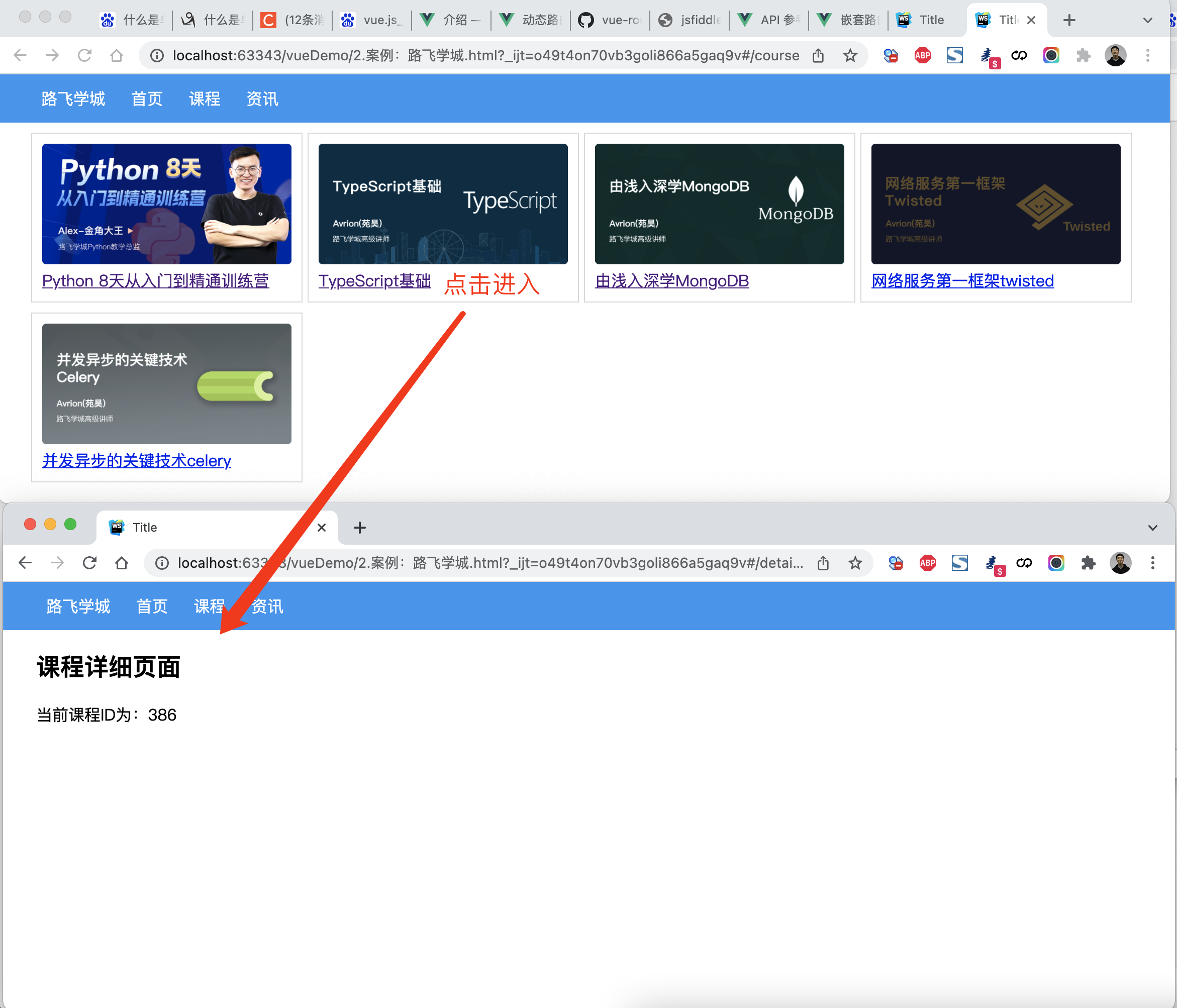
<!DOCTYPE html>
<html lang="en">
<head>
    <meta charset="UTF-8">
    <title>Title</title>
    <style>
        body {
            margin: 0;
        }

        .container {
            width: 1100px;
            margin: 0 auto;
        }

        .menu {
            height: 48px;
            background-color: #499ef3;
            line-height: 48px;

        }

        .menu a {
            color: white;
            text-decoration: none;
            padding: 0 10px;
        }

        .course-list {
            display: flex;
            flex-wrap: wrap;
            justify-content: flex-start;
        }

        .course-list .item {
            width: 248px;
            padding: 10px;
            border: 1px solid #dddddd;
            margin-right: 5px;
            margin-top: 10px;
        }

        .course-list .item img {
            width: 100%;
            height: 120px;
        }
    </style>

    <script src="vue.js"></script>
    <script src="vue-router.js"></script>
    <script src="axios.min.js"></script>
</head>
<body>
<div id="app">
    <div class="menu">
        <div class="container">
            <router-link to="/">路飞学城</router-link>
            <router-link to="/home">首页</router-link>
            <router-link to="/course">课程</router-link>
            <router-link to="/news">资讯</router-link>
        </div>
    </div>
    <div class="container">
        <router-view></router-view>
    </div>

</div>

<script>

    const Home = {
        data: function () {
            return {
                title: "欢迎使用路飞学城"
            }
        },
        template: `<h2>{{title}}</h2>`
    }
    const Course = {
        data: function () {
            return {
                courseList: []
            }
        },
        created: function () {
            /* 组件创建完成之后自动触发【此时组件的对象已创建,但还未将页面先关的DOM创建并显示在页面上】
                 - 可以去操作组件对象,例如:this.courseList = [11,22,33]
                 - 不可以去操作DOM,例如:document.getElementById (未创建)
             */
            axios({
                method: "get",
                url: 'https://api.luffycity.com/api/v1/course/actual/?limit=5&offset=0',
                headers: {
                    "Content-Type": "application/json"
                }
            }).then((res) => {
                this.courseList = res.data.data.result;
            })

        },
        mounted: function () {
            /* DOM对象已在页面上生成,此时就可以 */
        },
        template: `
            <div class="course-list">

                <div class="item" v-for="item in courseList">
                    <router-link :to="{name:'Detail',params:{id:item.id}}">
                        <img :src="item.cover" alt="">
                        <a>{{item.name}}</a>
                     </router-link>
                </div>

            </div>`
    }
    const News = {
        data: function () {
            return {
                dataList: []
            }
        },
        created: function () {
            /* 组件创建完成之后自动触发【此时组件的对象已创建,但还未将页面先关的DOM创建并显示在页面上】
                 - 可以去操作组件对象,例如:this.courseList = [11,22,33]
                 - 不可以去操作DOM,例如:document.getElementById (未创建)
             */
            axios({
                method: "get",
                url: 'https://api.luffycity.com/api/v1/course/actual/?limit=5&offset=10',
                headers: {
                    "Content-Type": "application/json"
                }
            }).then((res) => {
                this.dataList = res.data.data.result;
            })

        },
        template: `<ul><li v-for="item in dataList">{{item.name}}</li></ul>`
    }

    const Detail = {
        data: function () {
            return {
                title: "详细页面",
                courseId: null
            }
        },
        created: function () {
            this.courseId = this.$route.params.id;
            // 此处可以根据课程ID,发送ajax请求获取课程详细信息
        },
        template: `<div><h2>课程详细页面</h2><div>当前课程ID为:{{courseId}}</div></div>`
    }

    const router = new VueRouter({
        routes: [
            {path: '/', component: Home},
            {path: '/home', component: Home},
            {path: '/course', component: Course},
            {path: '/news', component: News},
            {path: '/detail/:id', component: Detail, name: 'Detail'}
        ],
        //mode: 'history'
    })

    var app = new Vue({
        el: '#app',
        data: {},
        methods: {},
        router: router
    })
</script>
</body>
</html>
4.5 无法刷新
上述编写案例是没有问题,但如果在开发中会涉及到 同一个路由的跳转(默认不会重新加载页面,数据无法获取)。
例如:在详细页面再出现一个课程推荐,即:在课程详细,点击推荐的课程后跳转到课程详细页面(课程ID不同),此时课程的ID还是原来加载的ID,无法获取推荐课程的ID。
如何解决呢?
在课程详细的组件中设置watch属性即可,watch会监测$route 值,一旦发生变化,就执行相应的函数。
const Detail = {
    data: function () {
        return {
            title: "详细页面",
            courseId: null,

        }
    },
    created: function () {
        this.courseId = this.$route.params.id;
        this.getCourseDetail();
    },
    watch: {
        $route:function(to, from) {
            this.courseId = to.params.id;
            // this.getCourseDetail();
        }
    },
    methods: {
        getCourseDetail: function () {
            // 根据this.courseId获取课程详细信息
        }
    },
    template: `<div><h2>{{title}}</h2><div>当前请求的数据 {{paramDict}}  {{queryDict}}</div></div>`
}
案例:路飞学城(第3版)
在详细页面实现推荐课程
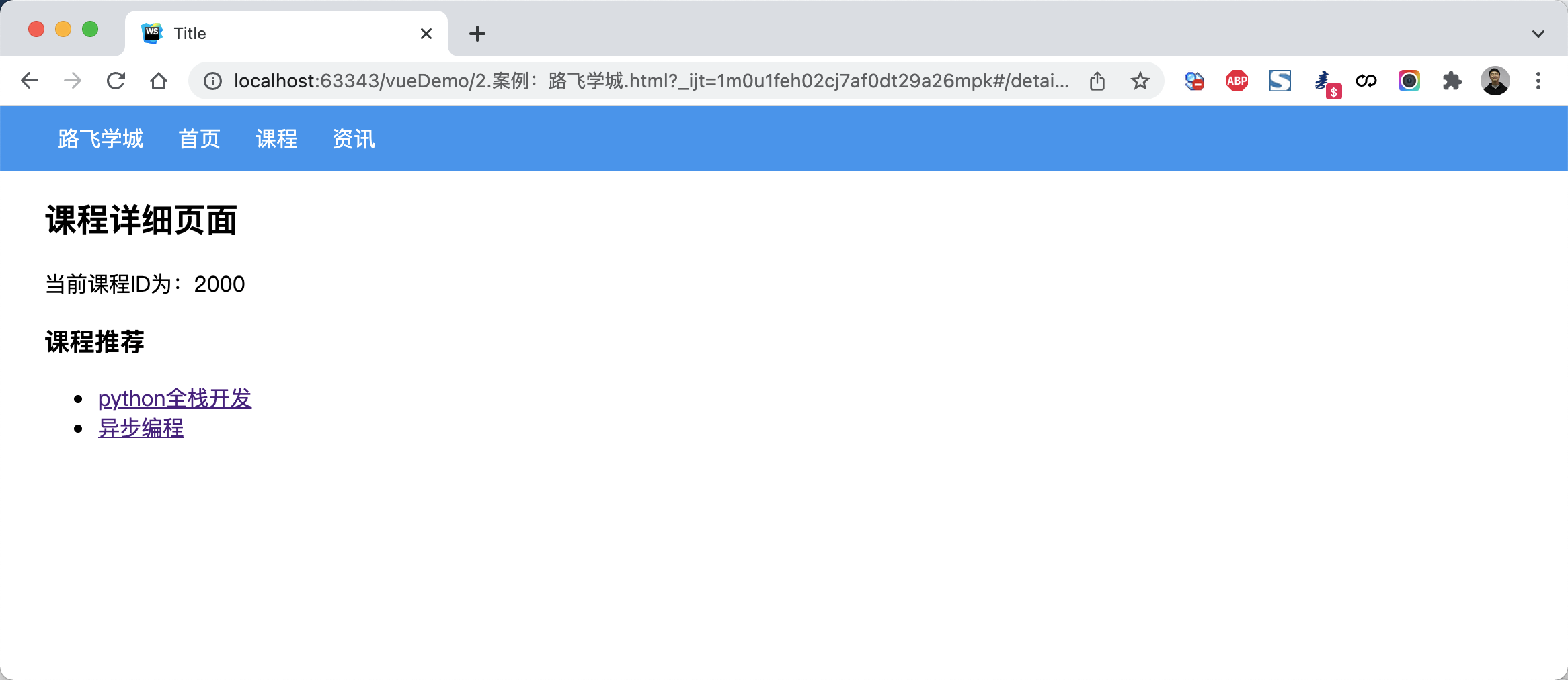
<!DOCTYPE html>
<html lang="en">
<head>
    <meta charset="UTF-8">
    <title>Title</title>
    <style>
        body {
            margin: 0;
        }

        .container {
            width: 1100px;
            margin: 0 auto;
        }

        .menu {
            height: 48px;
            background-color: #499ef3;
            line-height: 48px;

        }

        .menu a {
            color: white;
            text-decoration: none;
            padding: 0 10px;
        }

        .course-list {
            display: flex;
            flex-wrap: wrap;
            justify-content: flex-start;
        }

        .course-list .item {
            width: 248px;
            padding: 10px;
            border: 1px solid #dddddd;
            margin-right: 5px;
            margin-top: 10px;
        }

        .course-list .item img {
            width: 100%;
            height: 120px;
        }
    </style>

    <script src="vue.js"></script>
    <script src="vue-router.js"></script>
    <script src="axios.min.js"></script>
</head>
<body>
<div id="app">
    <div class="menu">
        <div class="container">
            <router-link to="/">路飞学城</router-link>
            <router-link to="/home">首页</router-link>
            <router-link to="/course">课程</router-link>
            <router-link to="/news">资讯</router-link>
        </div>
    </div>
    <div class="container">
        <router-view></router-view>
    </div>

</div>

<script>

    const Home = {
        data: function () {
            return {
                title: "欢迎使用路飞学城"
            }
        },
        template: `<h2>{{title}}</h2>`
    }
    const Course = {
        data: function () {
            return {
                courseList: []
            }
        },
        created: function () {
            /* 组件创建完成之后自动触发【此时组件的对象已创建,但还未将页面先关的DOM创建并显示在页面上】
                 - 可以去操作组件对象,例如:this.courseList = [11,22,33]
                 - 不可以去操作DOM,例如:document.getElementById (未创建)
             */
            axios({
                method: "get",
                url: 'https://api.luffycity.com/api/v1/course/actual/?limit=5&offset=0',
                headers: {
                    "Content-Type": "application/json"
                }
            }).then((res) => {
                this.courseList = res.data.data.result;
            })

        },
        mounted: function () {
            /* DOM对象已在页面上生成,此时就可以 */
        },
        template: `
            <div class="course-list">

                <div class="item" v-for="item in courseList">
                    <router-link :to="{name:'Detail',params:{id:item.id}}">
                        <img :src="item.cover" alt="">
                        <a>{{item.name}}</a>
                     </router-link>
                </div>

            </div>`
    }
    const News = {
        data: function () {
            return {
                dataList: []
            }
        },
        created: function () {
            /* 组件创建完成之后自动触发【此时组件的对象已创建,但还未将页面先关的DOM创建并显示在页面上】
                 - 可以去操作组件对象,例如:this.courseList = [11,22,33]
                 - 不可以去操作DOM,例如:document.getElementById (未创建)
             */
            axios({
                method: "get",
                url: 'https://api.luffycity.com/api/v1/course/actual/?limit=5&offset=10',
                headers: {
                    "Content-Type": "application/json"
                }
            }).then((res) => {
                this.dataList = res.data.data.result;
            })

        },
        template: `<ul><li v-for="item in dataList">{{item.name}}</li></ul>`
    }

    const Detail = {
        data: function () {
            return {
                title: "详细页面",
                courseId: null,
                hotCourseList: [
                    {id: 1000, title: "python全栈开发"},
                    {id: 2000, title: "异步编程"},
                ],
            }
        },
        created: function () {
            this.courseId = this.$route.params.id;
            // 此处可以根据课程ID,发送ajax请求获取课程详细信息
            this.getCourseDetail();
        },
        watch: {
            $route: function (to, from) {
                this.courseId = to.params.id;
                this.getCourseDetail();
            }
        },
        methods: {
            getCourseDetail: function () {
                // 根据this.courseId获取课程详细信息
            }
        },
        template: `
                <div>
                    <h2>课程详细页面</h2>
                    <div>当前课程ID为:{{courseId}}</div>
                    <h3>课程推荐</h3>
                    <ul>
                        <li v-for="item in hotCourseList">
                            <router-link :to="{name:'Detail', params:{id:item.id}}">{{item.title}}</router-link>
                        </li>
                    </ul>
                </div>`
    }

    const router = new VueRouter({
        routes: [
            {path: '/', component: Home},
            {path: '/home', component: Home},
            {path: '/course', component: Course},
            {path: '/news', component: News},
            {path: '/detail:id', component: Detail, name: 'Detail'}
        ],
        //mode: 'history'
    })

    var app = new Vue({
        el: '#app',
        data: {},
        methods: {},
        router: router
    })
</script>
</body>
</html>
4.6 路由嵌套
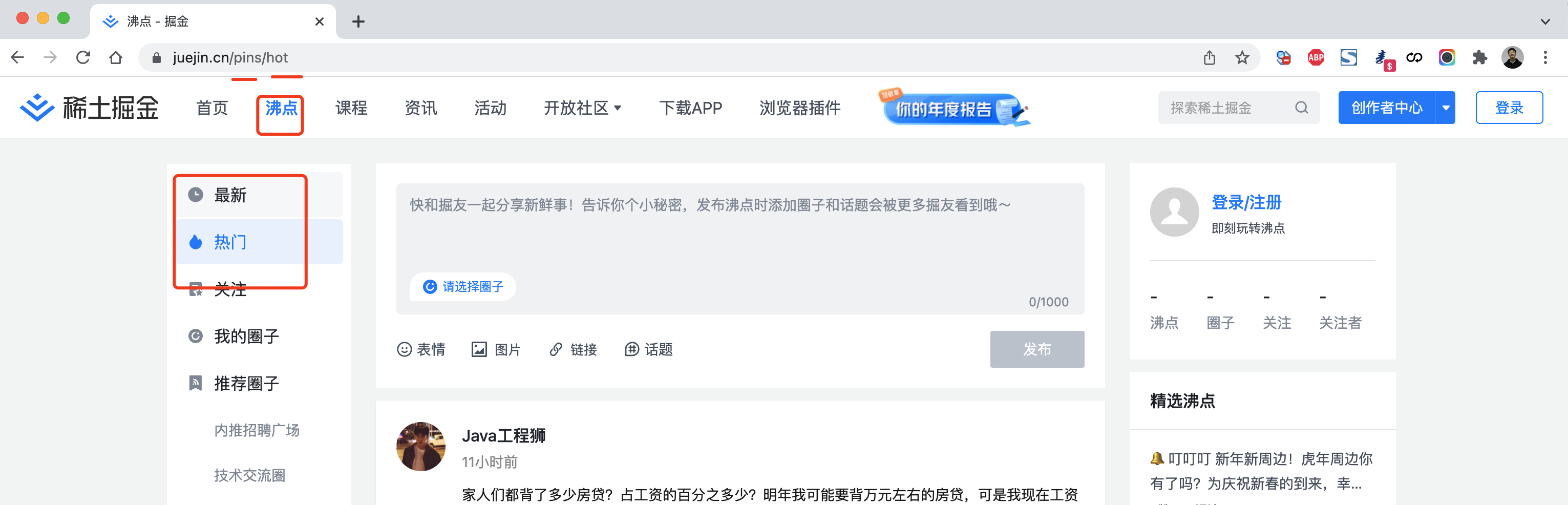
const router = new VueRouter({
  routes: [
    {
      path: '/pins/',
      component: Pins,
      children: [
        {
          // 当 /pins/hot 匹配成功,
          // Hot组件 会被渲染在 Pins 的 <router-view> 中
          path: 'hot',
          component: Hot
        },
        {
          // 当 /pins/following 匹配成功,
          // Following组件 会被渲染在 Pins 的 <router-view> 中
          path: 'following',
          component: Following
        }
      ]
    }
  ]
})
案例:路飞学城(第4版)
<!DOCTYPE html>
<html lang="en">
<head>
    <meta charset="UTF-8">
    <title>Title</title>
    <style>
        body {
            margin: 0;
        }

        .container {
            width: 1100px;
            margin: 0 auto;
        }

        .menu {
            height: 48px;
            background-color: #499ef3;
            line-height: 48px;

        }

        .menu a {
            color: white;
            text-decoration: none;
            padding: 0 10px;
        }

        .course-list {
            display: flex;
            flex-wrap: wrap;
            justify-content: flex-start;
        }

        .course-list .item {
            width: 248px;
            padding: 10px;
            border: 1px solid #dddddd;
            margin-right: 5px;
            margin-top: 10px;
        }

        .course-list .item img {
            width: 100%;
            height: 120px;
        }
    </style>

    <script src="vue.js"></script>
    <script src="vue-router.js"></script>
    <script src="axios.min.js"></script>
</head>
<body>
<div id="app">
    <div class="menu">
        <div class="container">
            <router-link to="/">路飞学城</router-link>
            <router-link to="/pins">沸点</router-link>
            <router-link to="/home">首页</router-link>
            <router-link to="/course">课程</router-link>
            <router-link to="/news">资讯</router-link>
        </div>
    </div>
    <div class="container">
        <router-view></router-view>
    </div>

</div>

<script>

    const Home = {
        data: function () {
            return {
                title: "欢迎使用路飞学城"
            }
        },
        template: `<h2>{{title}}</h2>`
    }
    const Course = {
        data: function () {
            return {
                courseList: []
            }
        },
        created: function () {
            /* 组件创建完成之后自动触发【此时组件的对象已创建,但还未将页面先关的DOM创建并显示在页面上】
                 - 可以去操作组件对象,例如:this.courseList = [11,22,33]
                 - 不可以去操作DOM,例如:document.getElementById (未创建)
             */
            axios({
                method: "get",
                url: 'https://api.luffycity.com/api/v1/course/actual/?limit=5&offset=0',
                headers: {
                    "Content-Type": "application/json"
                }
            }).then((res) => {
                this.courseList = res.data.data.result;
            })

        },
        mounted: function () {
            /* DOM对象已在页面上生成,此时就可以 */
        },
        template: `
            <div class="course-list">

                <div class="item" v-for="item in courseList">
                    <router-link :to="{name:'Detail',params:{id:item.id}}">
                        <img :src="item.cover" alt="">
                        <a>{{item.name}}</a>
                     </router-link>
                </div>

            </div>`
    }
    const News = {
        data: function () {
            return {
                dataList: []
            }
        },
        created: function () {
            /* 组件创建完成之后自动触发【此时组件的对象已创建,但还未将页面先关的DOM创建并显示在页面上】
                 - 可以去操作组件对象,例如:this.courseList = [11,22,33]
                 - 不可以去操作DOM,例如:document.getElementById (未创建)
             */
            axios({
                method: "get",
                url: 'https://api.luffycity.com/api/v1/course/actual/?limit=5&offset=10',
                headers: {
                    "Content-Type": "application/json"
                }
            }).then((res) => {
                this.dataList = res.data.data.result;
            })

        },
        template: `<ul><li v-for="item in dataList">{{item.name}}</li></ul>`
    }
    const Detail = {
        data: function () {
            return {
                title: "详细页面",
                courseId: null,
                hotCourseList: [
                    {id: 1000, title: "python全栈开发"},
                    {id: 2000, title: "异步编程"},
                ],
            }
        },
        created: function () {
            this.courseId = this.$route.params.id;
            // 此处可以根据课程ID,发送ajax请求获取课程详细信息
            this.getCourseDetail();
        },
        watch: {
            $route: function (to, from) {
                this.courseId = to.params.id;
                this.getCourseDetail();
            }
        },
        methods: {
            getCourseDetail: function () {
                // 根据this.courseId获取课程详细信息
            }
        },
        template: `
                <div>
                    <h2>课程详细页面</h2>
                    <div>当前课程ID为:{{courseId}}</div>
                    <h3>课程推荐</h3>
                    <ul>
                        <li v-for="item in hotCourseList">
                            <router-link :to="{name:'Detail', params:{id:item.id}}">{{item.title}}</router-link>
                        </li>
                    </ul>
                </div>`
    }

    const Pins = {
        data: function () {
            return {}
        },
        template: `
            <div>
                <h2>沸点专区</h2>
                <router-link :to="{name:'Hot'}">热点</router-link>
                <router-link :to="{name:'Following'}">关注</router-link>
                <router-view></router-view>
            </div>
         `
    };

    const Hot = {template: `<div><h2>Hot页面</h2></div>`};
    const Following = {template: `<div><h2>Following页面</h2></div>`};

    const router = new VueRouter({
        routes: [
            {path: '/', component: Home},
            {path: '/home', component: Home},
            {path: '/course', component: Course},
            {path: '/news', component: News},
            {path: '/detail:id', component: Detail, name: 'Detail'},
            {
                path: '/pins',
                component: Pins,
                name: 'Pins',
                children: [
                    {
                        // 当 /pins/hot 匹配成功,
                        // Hot组件 会被渲染在 Pins 的 <router-view> 中
                        path: 'hot',
                        component: Hot,
                        name:'Hot'
                    },
                    {
                        // 当 /pins/following 匹配成功,
                        // Following组件 会被渲染在 Pins 的 <router-view> 中
                        path: 'following',
                        component: Following,
                        name:'Following'
                    }
                ]
            }
        ],
        //mode: 'history'
    })

    var app = new Vue({
        el: '#app',
        data: {},
        methods: {},
        router: router
    })
</script>
</body>
</html>
案例:后台分类菜单
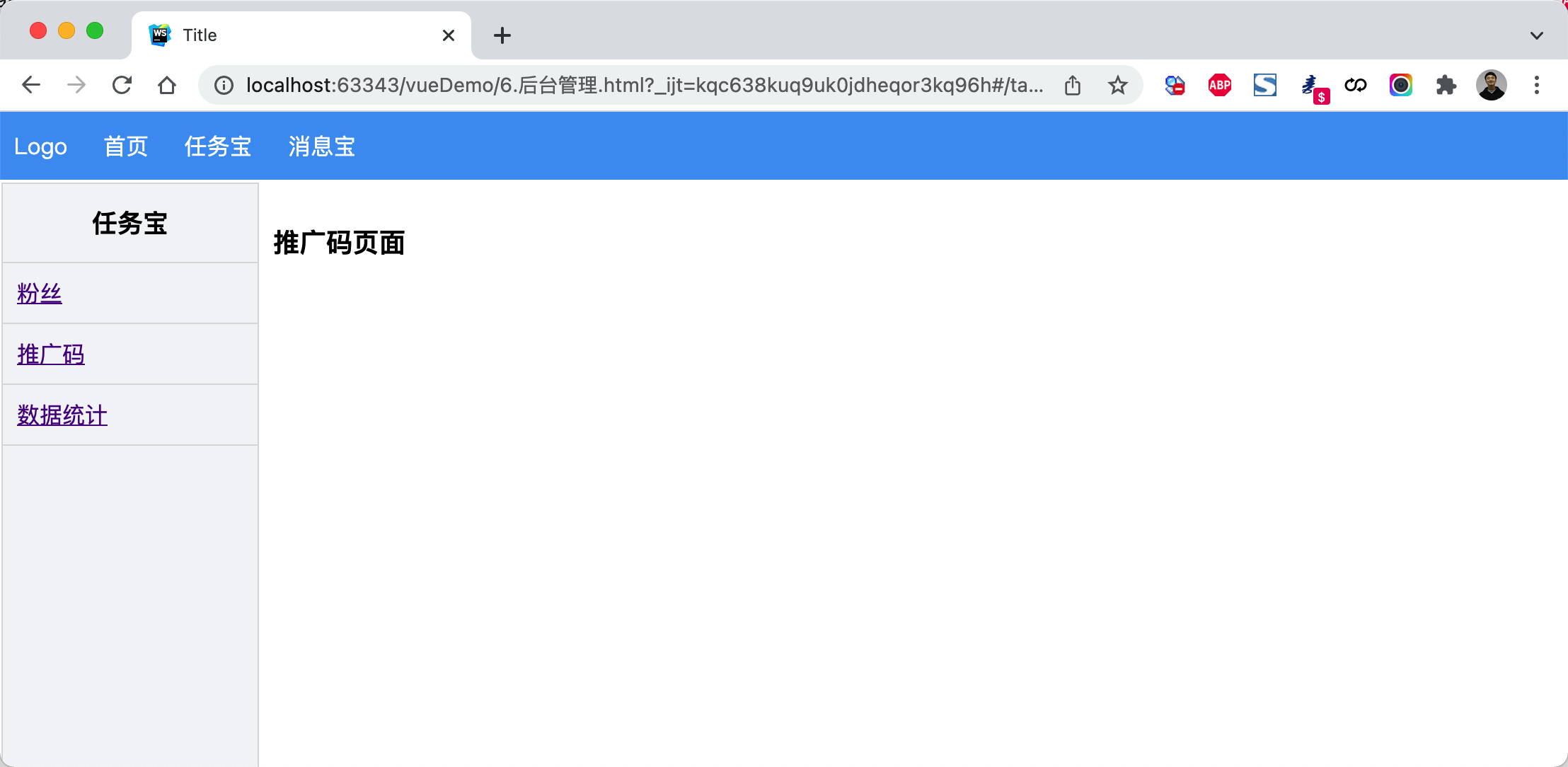
<!DOCTYPE html>
<html lang="en">
<head>
    <meta charset="UTF-8">
    <title>Title</title>
    <style>
        body {
            margin: 0;
        }

        .header {
            height: 48px;
            background-color: #499ef3;
            line-height: 48px;

        }

        .header a {
            color: white;
            text-decoration: none;
            padding: 0 10px;
        }

        .body .left-menu {
            width: 180px;
            border: 1px solid #dddddd;
            border-bottom: 0;
            position: absolute;
            left: 1px;
            top: 50px;
            bottom: 0;
            overflow: auto;
            background-color: #f3f5f7;
        }

        .body .left-menu .head {
            border-bottom: 1px solid #dddddd;
            text-align: center;
            font-size: 18px;
            font-weight: bold;
            padding: 15px;
        }

        .body .left-menu a {
            display: block;
            padding: 10px;
            border-bottom: 1px solid #dddddd;
        }

        .body .right-body {
            position: absolute;
            left: 183px;
            top: 50px;
            right: 0;
            bottom: 0;
            overflow: auto;
            padding: 10px;

        }
    </style>

    <script src="vue.js"></script>
    <script src="vue-router.js"></script>
    <script src="axios.min.js"></script>
</head>
<body>
<div id="app">
    <div class="header">
        <router-link to="/">Logo</router-link>
        <router-link to="/home">首页</router-link>
        <router-link to="/task">任务宝</router-link>
        <router-link to="/message">消息宝</router-link>
    </div>
    <div class="body">
        <router-view></router-view>
    </div>

</div>

<script>

    const Home = {
        data: function () {
            return {
                title: "欢迎使用xx系统"
            }
        },
        template: `<h2>{{title}}</h2>`
    };

    const Task = {
        data: function () {
            return {}
        },
        template: `
            <div>
                <div class="left-menu">
                    <div class="head">任务宝</div>
                    <router-link :to="{name:'Fans'}">粉丝</router-link>
                    <router-link :to="{name:'Spread'}">推广码</router-link>
                    <router-link :to="{name:'Statistics'}">数据统计</router-link>
                </div>
                <div class="right-body">
                    <router-view></router-view>
                </div>

            </div>`
    };

    const Fans = {template: `<h3>粉丝页面</h3>`};
    const Spread = {template: `<h3>推广码页面</h3>`};
    const Statistics = {template: `<h3>数据统计页面</h3>`};

    const Message = {
        data: function () {
            return {}
        },
        template: `
            <div>
                <div class="left-menu">
                    <div class="head">消息宝</div>
                    <router-link :to="{name:'Sop'}">SOP</router-link>
                    <router-link :to="{name:'Send'}">推送管理</router-link>
                </div>
                <div class="right-body">
                    <router-view></router-view>
                </div>

            </div>`
    };

    const Sop = {template: `<h3>SOP页面</h3>`};
    const Send = {template: `<h3>推送管理页面</h3>`};

    const router = new VueRouter({
        routes: [
            {path: '/', component: Home},
            {path: '/home', component: Home},
            {
                path: '/task',
                component: Task,
                name: 'Task',
                children: [
                    {
                        path: '',
                        // component: Fans,
                        // redirect:'/task/fans'
                        redirect: {name: 'Fans'}
                    },
                    {
                        path: 'fans',
                        component: Fans,
                        name: 'Fans'
                    },
                    {
                        path: 'spread',
                        component: Spread,
                        name: 'Spread'
                    },
                    {
                        path: 'statistics',
                        component: Statistics,
                        name: 'Statistics'
                    }
                ]
            },
            {
                path: '/message',
                component: Message,
                name: 'Message',
                children: [
                    {
                        path: 'sop',
                        component: Sop,
                        name: 'Sop'
                    },
                    {
                        path: 'send',
                        component: Send,
                        name: 'Send'
                    }
                ]
            }
        ]
    })

    var app = new Vue({
        el: '#app',
        data: {},
        methods: {},
        router: router
    })
</script>
</body>
</html>
4.7 编程式导航
除了使用 <router-link> 创建 a 标签来定义导航链接,我们还可以借助 router 的实例方法,通过编写代码来实现。
想要导航到不同的 URL,则使用 router.push 方法。这个方法会向 history 栈添加一个新的记录,所以,当用户点击浏览器后退按钮时,则回到之前的 URL。
- router.push
// 字符串
router.push('home')

// 对象
router.push({ path: 'home' })

// 命名的路由
router.push({ name: 'user', params: { userId: '123' }}) //

// 带查询参数,变成 /register?plan=private
router.push({ path: 'register', query: { plan: 'private' }})
- router.replace
// 字符串
router.replace('home')

// 对象
router.replace({ path: 'home' })

// 命名的路由
router.replace({ name: 'user', params: { userId: '123' }})

// 带查询参数,变成 /register?plan=private
router.replace({ path: 'register', query: { plan: 'private' }})

# 跟 router.push 很像,唯一的不同就是,它不会向 history 添加新记录,而是跟它的方法名一样 —— 替换掉当前的 history 记录。
- router.go 这个方法的参数是一个整数,意思是在 history 记录中向前或者后退多少步
// 在浏览器记录中前进一步,等同于 history.forward()
router.go(1)

// 后退一步记录,等同于 history.back()
router.go(-1)

// 前进 3 步记录
router.go(3)

// 如果 history 记录不够用,那就默默地失败呗
router.go(-100)
router.go(100)
案例:登录跳转(含顶部)
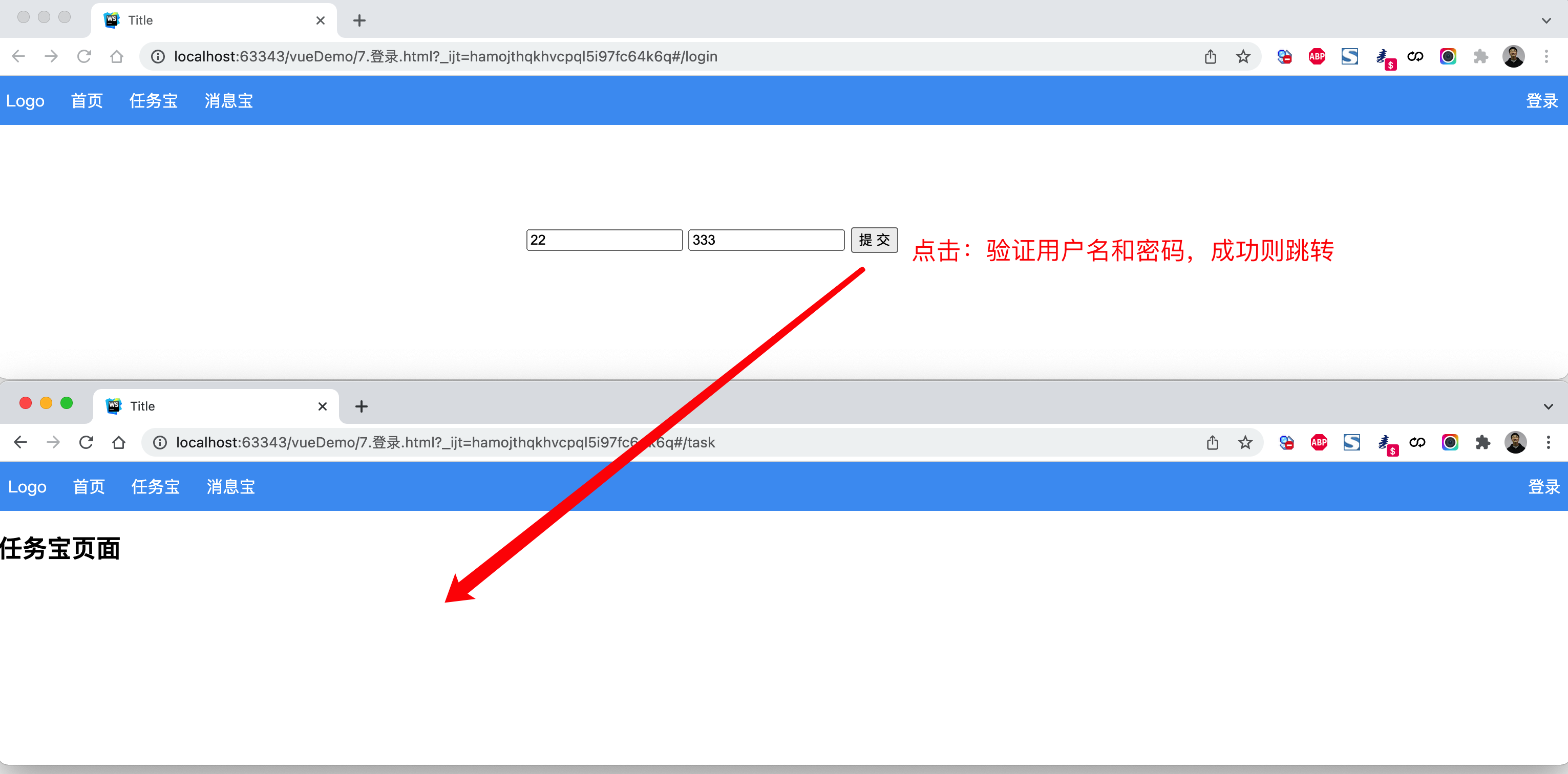
<!DOCTYPE html>
<html lang="en">
<head>
    <meta charset="UTF-8">
    <title>Title</title>
    <style>
        body {
            margin: 0;
        }

        .header {
            height: 48px;
            background-color: #499ef3;
            line-height: 48px;

        }

        .header a {
            color: white;
            text-decoration: none;
            padding: 0 10px;
        }


    </style>
    <script src="vue.js"></script>
    <script src="vue-router.js"></script>
</head>
<body>
<div id="app">
    <div class="header">
        <router-link to="/">Logo</router-link>
        <router-link to="/home">首页</router-link>
        <router-link to="/task">任务宝</router-link>
        <router-link to="/message">消息宝</router-link>

        <div style="float: right;">
            <router-link to="/login">登录</router-link>
        </div>
    </div>
    <div class="body">
        <router-view></router-view>
    </div>

</div>

<script>

    const Home = {
        data: function () {
            return {
                title: "欢迎使用xx系统"
            }
        },
        template: `<h2>{{title}}</h2>`
    };

    const Task = {
        data: function () {
            return {}
        },
        template: `
            <div>
                <h2>任务宝页面</h2>
            </div>`
    };

    const Message = {
        data: function () {
            return {}
        },
        template: `
            <div>
                <h2>消息宝页面</h2>
            </div>`
    };

    const Login = {
        data: function () {
            return {
                user: '',
                pwd: ''
            }
        },
        methods: {
            doLogin: function () {
                if (this.user.length > 0 && this.pwd.length > 0) {
                    this.$router.push({name: 'Task'});
                    // this.$router.replace({name: 'Task'});
                }
            }
        },
        template: `
            <div style="width: 500px;margin: 100px auto">
                <input type="text" placeholder="用户名" v-model="user"/>
                <input type="text" placeholder="密码" v-model="pwd" />
                <input type="button" value="提 交"  @click="doLogin" />
            </div>
         `
    };
    const router = new VueRouter({
        routes: [
            {path: '/', component: Home},
            {path: '/home', component: Home},
            {path: '/login', component: Login, name: 'Login'},
            {path: '/task', component: Task, name: 'Task'},
            {path: '/message', component: Message, name: 'Message'}
        ]
    })

    var app = new Vue({
        el: '#app',
        data: {},
        methods: {},
        router: router
    })
</script>
</body>
</html>

案例:登录跳转(不含顶部)
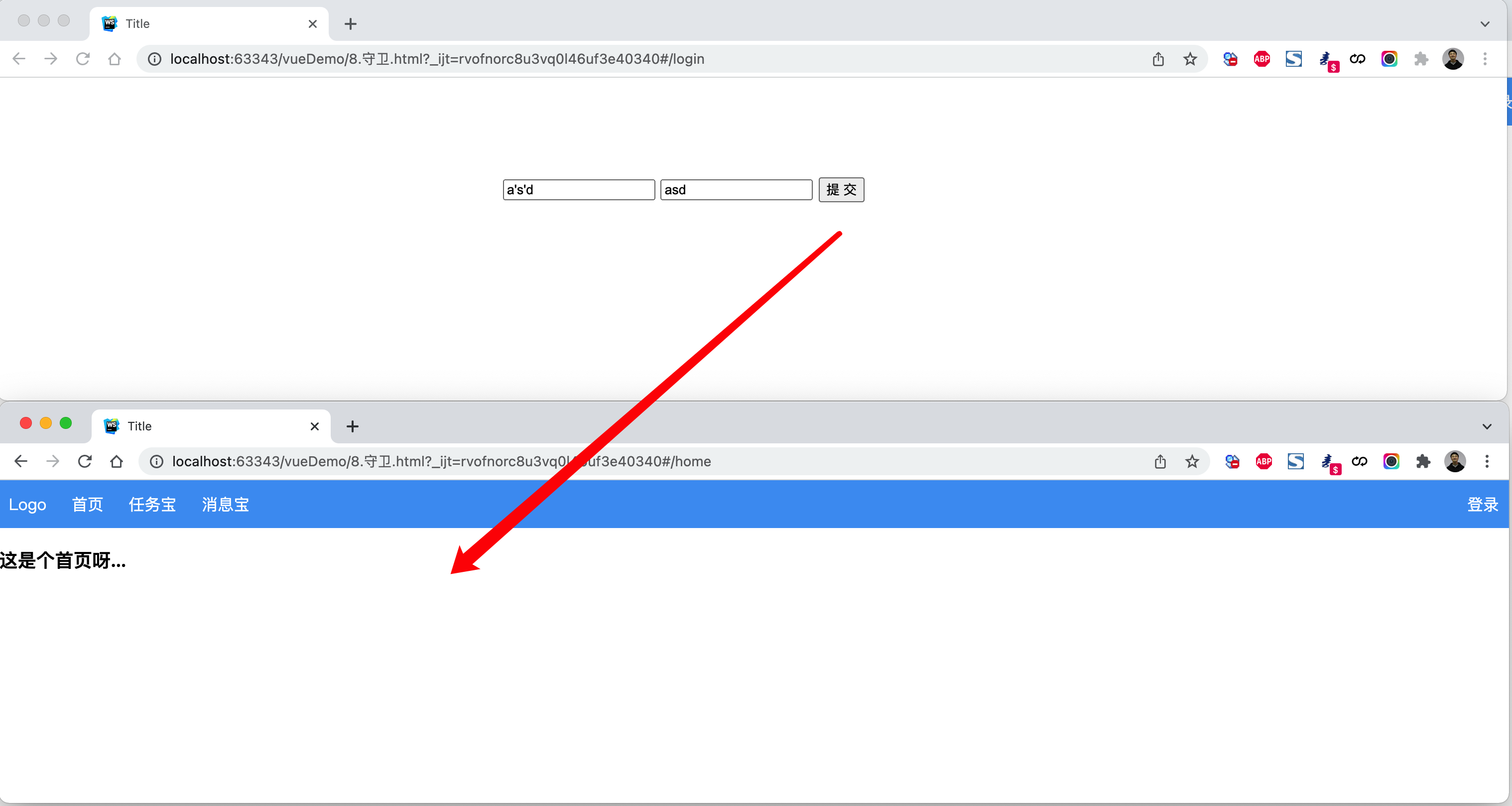
<!DOCTYPE html>
<html lang="en">
<head>
    <meta charset="UTF-8">
    <title>Title</title>
    <style>
        body {
            margin: 0;
        }

        .header {
            height: 48px;
            background-color: #499ef3;
            line-height: 48px;

        }

        .header a {
            color: white;
            text-decoration: none;
            padding: 0 10px;
        }

        .body .left-menu {
            width: 180px;
            border: 1px solid #dddddd;
            border-bottom: 0;
            position: absolute;
            left: 1px;
            top: 50px;
            bottom: 0;
            overflow: auto;
            background-color: #f3f5f7;
        }

        .body .left-menu .head {
            border-bottom: 1px solid #dddddd;
            text-align: center;
            font-size: 18px;
            font-weight: bold;
            padding: 15px;
        }

        .body .left-menu a {
            display: block;
            padding: 10px;
            border-bottom: 1px solid #dddddd;
        }

        .body .right-body {
            position: absolute;
            left: 183px;
            top: 50px;
            right: 0;
            bottom: 0;
            overflow: auto;
            padding: 10px;

        }
    </style>
    <script src="vue.js"></script>
    <script src="vue-router.js"></script>
</head>
<body>
<div id="app">
    <router-view></router-view>
</div>

<script>

    const Home = {
        data: function () {
            return {
                title: "欢迎使用xx系统"
            }
        },
        template: `
            <div>
                <div class="header">
                    <router-link to="/">Logo</router-link>
                    <router-link to="/home">首页</router-link>
                    <router-link :to="{name:'Task'}">任务宝</router-link>
                    <router-link :to="{name:'Message'}">消息宝</router-link>

                    <div style="float: right;">
                        <router-link to="/login">登录</router-link>
                    </div>
                </div>
                <div class="body">
                    <router-view></router-view>
                </div>

            </div>
        `
    };

    const Index = {template: '<h3>这是个首页呀...</h3>'}

    const Task = {
        data: function () {
            return {}
        },
        template: `
            <div>
                <div class="left-menu">
                    <div class="head">任务宝</div>
                    <router-link :to="{name:'Fans'}">粉丝</router-link>
                    <router-link :to="{name:'Spread'}">推广码</router-link>
                    <router-link :to="{name:'Statistics'}">数据统计</router-link>
                </div>
                <div class="right-body">
                    <router-view></router-view>
                </div>

            </div>`
    };

    const Fans = {template: `<h3>粉丝页面</h3>`};
    const Spread = {template: `<h3>推广码页面</h3>`};
    const Statistics = {template: `<h3>数据统计页面</h3>`};

    const Message = {
        data: function () {
            return {}
        },
        template: `
            <div>
                <div class="left-menu">
                    <div class="head">消息宝</div>
                    <router-link :to="{name:'Sop'}">SOP</router-link>
                    <router-link :to="{name:'Send'}">推送管理</router-link>
                </div>
                <div class="right-body">
                    <router-view></router-view>
                </div>

            </div>`
    };

    const Sop = {template: `<h3>SOP页面</h3>`};
    const Send = {template: `<h3>推送管理页面</h3>`};
    const Login = {
        data: function () {
            return {
                user: '',
                pwd: ''
            }
        },
        methods: {
            doLogin: function () {
                if (this.user.length > 0 && this.pwd.length > 0) {
                    this.$router.push({name: 'Index'});
                    // this.$router.replace({name: 'Task'});
                }
            }
        },
        template: `
            <div style="width: 500px;margin: 100px auto">
                <input type="text" placeholder="用户名" v-model="user"/>
                <input type="text" placeholder="密码" v-model="pwd" />
                <input type="button" value="提 交"  @click="doLogin" />
            </div>
         `
    };


    const router = new VueRouter({
        routes: [
            {
                path: '/',
                // component: Home,
                redirect: '/login'
            },
            {path: '/login', component: Login, name: 'Login'},
            {
                path: '/home',
                component: Home,
                children: [
                    {
                        path: '',
                        component: Index,
                        name: "Index"
                    },
                    {
                        path: 'task',
                        component: Task,
                        name: 'Task',
                        children: [
                            {
                                path: 'fans',
                                component: Fans,
                                name: 'Fans'
                            },
                            {
                                path: 'spread',
                                component: Spread,
                                name: 'Spread'
                            },
                            {
                                path: 'statistics',
                                component: Statistics,
                                name: 'Statistics'
                            }
                        ]
                    },
                    {
                        path: 'message',
                        component: Message,
                        name: 'Message',
                        children: [
                            {
                                path: 'sop',
                                component: Sop,
                                name: 'Sop'
                            },
                            {
                                path: 'send',
                                component: Send,
                                name: 'Send'
                            }
                        ]
                    }
                ],
            },

        ]
    })

    var app = new Vue({
        el: '#app',
        data: {},
        methods: {},
        router: router
    })
</script>
</body>
</html>

4.8 导航守卫
在基于vue-router实现访问跳转时,都会执行一个钩子。
const router = new VueRouter({ ... })

router.beforeEach((to, from, next) => {
    // to: Route: 即将要进入的目标 路由对象
    // from: Route: 当前导航正要离开的路由
    // next() 继续向后执行
    // next(false) 中断导航,保持当前所在的页面。
    // next('/')   next({path:'/'}) next({name:'Login'})  跳转到指定页面
})
注意:可以基于他实现未登录跳转登录页面。
案例:登录拦截(全局)
未登录时,访问后台管理页面,自动跳转到登录页面。
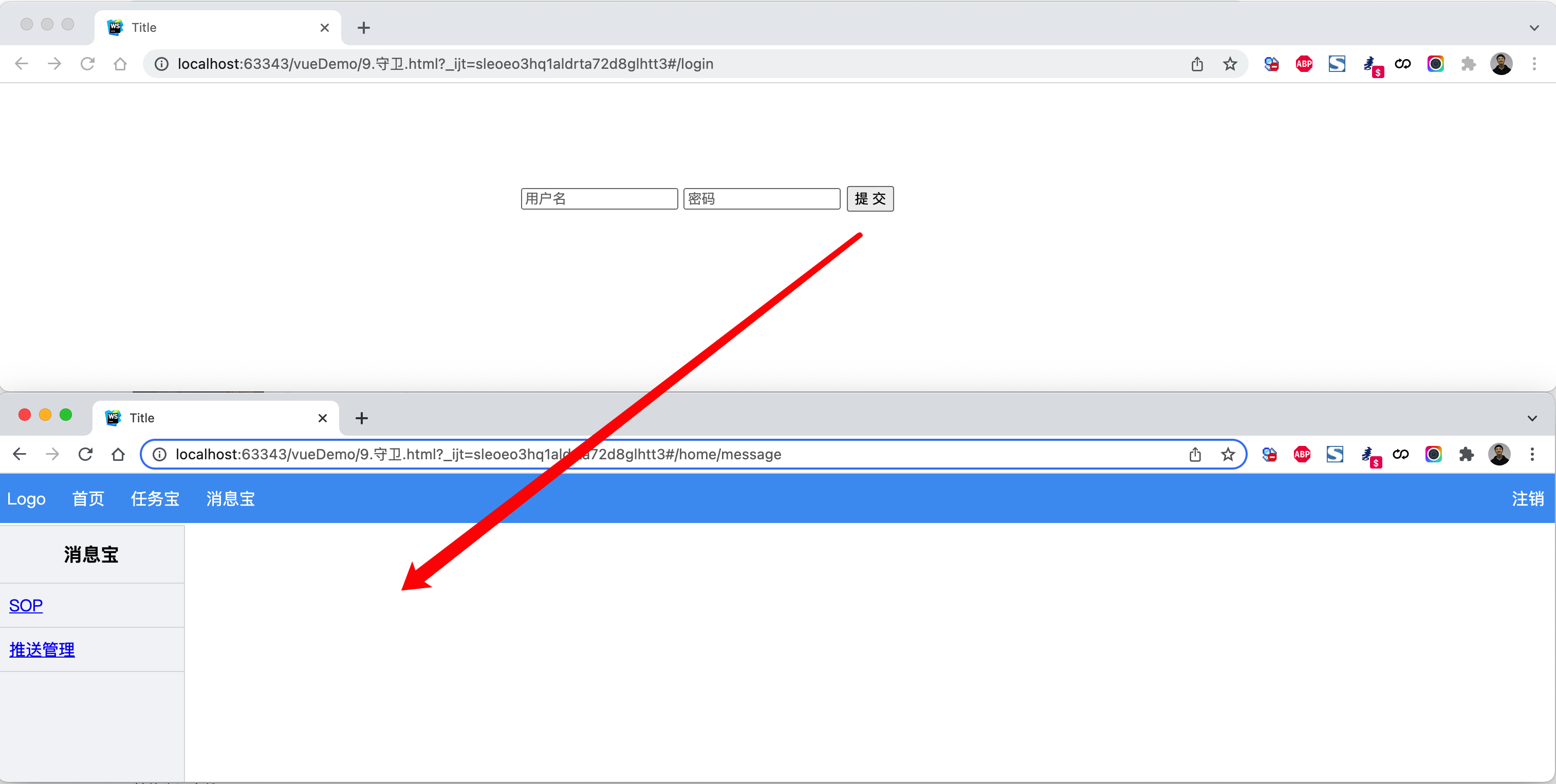
<!DOCTYPE html>
<html lang="en">
<head>
    <meta charset="UTF-8">
    <title>Title</title>
    <style>
        body {
            margin: 0;
        }

        .header {
            height: 48px;
            background-color: #499ef3;
            line-height: 48px;

        }

        .header a {
            color: white;
            text-decoration: none;
            padding: 0 10px;
        }

        .body .left-menu {
            width: 180px;
            border: 1px solid #dddddd;
            border-bottom: 0;
            position: absolute;
            left: 1px;
            top: 50px;
            bottom: 0;
            overflow: auto;
            background-color: #f3f5f7;
        }

        .body .left-menu .head {
            border-bottom: 1px solid #dddddd;
            text-align: center;
            font-size: 18px;
            font-weight: bold;
            padding: 15px;
        }

        .body .left-menu a {
            display: block;
            padding: 10px;
            border-bottom: 1px solid #dddddd;
        }

        .body .right-body {
            position: absolute;
            left: 183px;
            top: 50px;
            right: 0;
            bottom: 0;
            overflow: auto;
            padding: 10px;

        }
    </style>
    <script src="vue.js"></script>
    <script src="vue-router.js"></script>
</head>
<body>
<div id="app">
    <router-view></router-view>
</div>

<script>

    const Home = {
        data: function () {
            return {
                title: "欢迎使用xx系统"
            }
        },
        methods: {
            doLogout: function () {
                sessionStorage.clear();
                this.$router.push({name: "Login"});
            }
        },
        template: `
            <div>
                <div class="header">
                    <router-link to="/">Logo</router-link>
                    <router-link to="/home">首页</router-link>
                    <router-link :to="{name:'Task'}">任务宝</router-link>
                    <router-link :to="{name:'Message'}">消息宝</router-link>

                    <div style="float: right;">
                        <a @click="doLogout">注销</a>
                    </div>
                </div>
                <div class="body">
                    <router-view></router-view>
                </div>

            </div>
        `
    };

    const Index = {template: '<h3>这是个首页呀...</h3>'}

    const Task = {
        data: function () {
            return {}
        },
        template: `
            <div>
                <div class="left-menu">
                    <div class="head">任务宝</div>
                    <router-link :to="{name:'Fans'}">粉丝</router-link>
                    <router-link :to="{name:'Spread'}">推广码</router-link>
                    <router-link :to="{name:'Statistics'}">数据统计</router-link>
                </div>
                <div class="right-body">
                    <router-view></router-view>
                </div>

            </div>`
    };

    const Fans = {template: `<h3>粉丝页面</h3>`};
    const Spread = {template: `<h3>推广码页面</h3>`};
    const Statistics = {template: `<h3>数据统计页面</h3>`};

    const Message = {
        data: function () {
            return {}
        },
        template: `
            <div>
                <div class="left-menu">
                    <div class="head">消息宝</div>
                    <router-link :to="{name:'Sop'}">SOP</router-link>
                    <router-link :to="{name:'Send'}">推送管理</router-link>
                </div>
                <div class="right-body">
                    <router-view></router-view>
                </div>

            </div>`
    };

    const Sop = {template: `<h3>SOP页面</h3>`};
    const Send = {template: `<h3>推送管理页面</h3>`};
    const Login = {
        data: function () {
            return {
                user: '',
                pwd: ''
            }
        },
        methods: {
            doLogin: function () {
                if (this.user.length > 0 && this.pwd.length > 0) {
                    sessionStorage.setItem("isLogin", true);
                    this.$router.push({name: 'Index'});
                }
            }
        },
        template: `
            <div style="width: 500px;margin: 100px auto">
                <input type="text" placeholder="用户名" v-model="user"/>
                <input type="text" placeholder="密码" v-model="pwd" />
                <input type="button" value="提 交"  @click="doLogin" />
            </div>
         `
    };
    const router = new VueRouter({
        routes: [
            {
                path: '/',
                component: Home,
                redirect: '/home'
            },
            {
                path: '/home',
                component: Home,
                name: "Home",
                children: [
                    {
                        path: '',
                        component: Index,
                        name: "Index"
                    },
                    {
                        path: 'task',
                        component: Task,
                        name: 'Task',
                        children: [
                            {
                                path: 'fans',
                                component: Fans,
                                name: 'Fans'
                            },
                            {
                                path: 'spread',
                                component: Spread,
                                name: 'Spread'
                            },
                            {
                                path: 'statistics',
                                component: Statistics,
                                name: 'Statistics'
                            }
                        ]
                    },
                    {
                        path: 'message',
                        component: Message,
                        name: 'Message',
                        children: [
                            {
                                path: 'sop',
                                component: Sop,
                                name: 'Sop'
                            },
                            {
                                path: 'send',
                                component: Send,
                                name: 'Send'
                            }
                        ]
                    }
                ],
            },
            {path: '/login', component: Login, name: 'Login'},
        ]
    })

    router.beforeEach((to, from, next) => {
        // 如果已登录,则可以继续访问目标地址
        if (sessionStorage.getItem('isLogin')) {
            next();
            return;
        }
        // 未登录,访问登录页面
        if (to.name === "Login") {
            next();
            return;
        }
        // 未登录,跳转登录页面
        // next(false); 保持当前所在页面,不跳转
        next({name: 'Login'});
    })

    var app = new Vue({
        el: '#app',
        data: {},
        methods: {},
        router: router
    })
</script>
</body>
</html>
案例:登录拦截(路由)
<!DOCTYPE html>
<html lang="en">
<head>
    <meta charset="UTF-8">
    <title>Title</title>
    <style>
        body {
            margin: 0;
        }

        .header {
            height: 48px;
            background-color: #499ef3;
            line-height: 48px;

        }

        .header a {
            color: white;
            text-decoration: none;
            padding: 0 10px;
        }

        .body .left-menu {
            width: 180px;
            border: 1px solid #dddddd;
            border-bottom: 0;
            position: absolute;
            left: 1px;
            top: 50px;
            bottom: 0;
            overflow: auto;
            background-color: #f3f5f7;
        }

        .body .left-menu .head {
            border-bottom: 1px solid #dddddd;
            text-align: center;
            font-size: 18px;
            font-weight: bold;
            padding: 15px;
        }

        .body .left-menu a {
            display: block;
            padding: 10px;
            border-bottom: 1px solid #dddddd;
        }

        .body .right-body {
            position: absolute;
            left: 183px;
            top: 50px;
            right: 0;
            bottom: 0;
            overflow: auto;
            padding: 10px;

        }
    </style>
    <script src="vue.js"></script>
    <script src="vue-router.js"></script>
</head>
<body>
<div id="app">
    <router-view></router-view>
</div>

<script>

    const Home = {
        data: function () {
            return {
                title: "欢迎使用xx系统"
            }
        },
        methods: {
            doLogout: function () {
                sessionStorage.clear();
                this.$router.push({name: "Login"});
            }
        },
        template: `
            <div>
                <div class="header">
                    <router-link to="/">Logo</router-link>
                    <router-link to="/home">首页</router-link>
                    <router-link :to="{name:'Task'}">任务宝</router-link>
                    <router-link :to="{name:'Message'}">消息宝</router-link>

                    <div style="float: right;">
                        <a @click="doLogout">注销</a>
                    </div>
                </div>
                <div class="body">
                    <router-view></router-view>
                </div>

            </div>
        `
    };

    const Index = {template: '<h3>这是个首页呀...</h3>'}

    const Task = {
        data: function () {
            return {}
        },
        template: `
            <div>
                <div class="left-menu">
                    <div class="head">任务宝</div>
                    <router-link :to="{name:'Fans'}">粉丝</router-link>
                    <router-link :to="{name:'Spread'}">推广码</router-link>
                    <router-link :to="{name:'Statistics'}">数据统计</router-link>
                </div>
                <div class="right-body">
                    <router-view></router-view>
                </div>

            </div>`
    };

    const Fans = {template: `<h3>粉丝页面</h3>`};
    const Spread = {template: `<h3>推广码页面</h3>`};
    const Statistics = {template: `<h3>数据统计页面</h3>`};

    const Message = {
        data: function () {
            return {}
        },
        template: `
            <div>
                <div class="left-menu">
                    <div class="head">消息宝</div>
                    <router-link :to="{name:'Sop'}">SOP</router-link>
                    <router-link :to="{name:'Send'}">推送管理</router-link>
                </div>
                <div class="right-body">
                    <router-view></router-view>
                </div>

            </div>`
    };

    const Sop = {template: `<h3>SOP页面</h3>`};
    const Send = {template: `<h3>推送管理页面</h3>`};
    const Login = {
        data: function () {
            return {
                user: '',
                pwd: ''
            }
        },
        methods: {
            doLogin: function () {
                if (this.user.length > 0 && this.pwd.length > 0) {
                    sessionStorage.setItem("isLogin", true);
                    this.$router.push({name: 'Index'});
                }
            }
        },
        template: `
            <div style="width: 500px;margin: 100px auto">
                <input type="text" placeholder="用户名" v-model="user"/>
                <input type="text" placeholder="密码" v-model="pwd" />
                <input type="button" value="提 交"  @click="doLogin" />
            </div>
         `
    };
    const router = new VueRouter({
        routes: [
            {
                path: '/',
                component: Home,
                redirect: '/home'
            },
            {
                path: '/home',
                component: Home,
                name: "Home",
                children: [
                    {
                        path: '',
                        component: Index,
                        name: "Index"
                    },
                    {
                        path: 'task',
                        component: Task,
                        name: 'Task',
                        children: [
                            {
                                path: 'fans',
                                component: Fans,
                                name: 'Fans'
                            },
                            {
                                path: 'spread',
                                component: Spread,
                                name: 'Spread'
                            },
                            {
                                path: 'statistics',
                                component: Statistics,
                                name: 'Statistics'
                            }
                        ]
                    },
                    {
                        path: 'message',
                        component: Message,
                        name: 'Message',
                        children: [
                            {
                                path: 'sop',
                                component: Sop,
                                name: 'Sop'
                            },
                            {
                                path: 'send',
                                component: Send,
                                name: 'Send'
                            }
                        ]
                    }
                ],
                beforeEnter: (to, from, next) => {
                    if (sessionStorage.getItem('isLogin')) {
                        next();
                        return;
                    }
                    // 未登录,跳转登录页面
                    // next(false); 保持当前所在页面,不跳转
                    next({name: 'Login'});
                }
            },
            {path: '/login', component: Login, name: 'Login'},
        ]
    })

    var app = new Vue({
        el: '#app',
        data: {},
        methods: {},
        router: router
    })
</script>
</body>
</html>
补充:
-
cookie
-
localStorage
- sessionStorage